F1 (help) Key for the iCrowd

We help to get fixed or to get application
call +8801713031130

From 12PM - 12AM Bangladesh Time
Shop @ Cell Bazaar

Inside

Core Builder's Place for iPhone / iPod & IT Hacks & Help

Subscribe in a reader enter email :

Showing posts with label 3GS. Show all posts

HDR Photo on Jialbroken 3G and 3GS! The Missing information just discovered by @CoreBuilder

Wow Finlay! HDR Photo on Jialbroken 3G and 3GS is working (Tested on 3GS)

The HDR  cam Hack by @cdevwill
"

  • iPhone 3G: /System/Library/CoreServices/SpringBoard.app/ – copy N82AP.plist on your desktop
  • iPhone 3Gs: /System/Library/CoreServices/SpringBoard.app/ – copy N88AP.plist on your desktop
Now you will need to edit that plist by adding a key named “hdr-image-capture” with a boolean value of “true” to the “capabilities” section of this property list.
"
Not working on most of the Jailbroken 3G & 3GS. and MIMI pull the hack from the cydia too (Not working? Cant tell you as I did not tried)

I found Why and how it can be done.

Interested to get it done on your iPhone? Make sure you made the donation :P and had read the  Remote Jailbreak & Support
                                    or
want the information to publish on your blog? let me know I like to write commercially :D

Why Donation when I got free earlier?
Was it Free?
Many of the guys like Jason Hawen { Phone: +447823339434 email: Jashpfc@sky.com Twitter: @Jashpfc FaceBook: http://www.facebook.com/people/Jason-Hawen/1322803608} & his friends payment had with him and was collecting for my i4 but disappear on time.
More guys  I can say name of them ...from UK, Ireland, Israel, Brazil & other places you may find them on my facebook/Twitter/Blog comment,

who ask for help and promise to donate... later.. as I had no PayPal but never did actually :D

Now I have a paypal :D So donate
to get me for iPhone4 & inspire my good work

OH forget to tell you this is not my hack I just found it working

Want Free?
I have 290 Friends on twitter & I will publish it on my blog when i will reach to 500+

Please Share this post every way possible to stop online cheating and spread the words....


Rearrange your iPhone/iPod touch Apps right in iTunes

Now you can rearrange your iPhone apps and even the entire app page directly in iTunes. Just plug in your iPhone or iPod touch and select it in the Source window. Now click on the Applications tab and drag your Apps around in the order you want. You can also rearrange the pages of apps themselves by dragging them in the right side bar.

How to fix AppStore login on iPhone / iPod / iPad

I think most of you had suffered after changing the account on you iDevice (iPhone/iPod /iPad) old account pop up while updating or downloading any app.
I was very disappointed  and restore my Device and set up as new device. Today a Srilankan friend  experiencing the same so I dig out the issue and find some interesting thing, actually iTunes stores last authorized account and while sync the iDevice it push the login information to the device may be the one you don't want.

How to fix it ?
Simple
ON PC iTunes


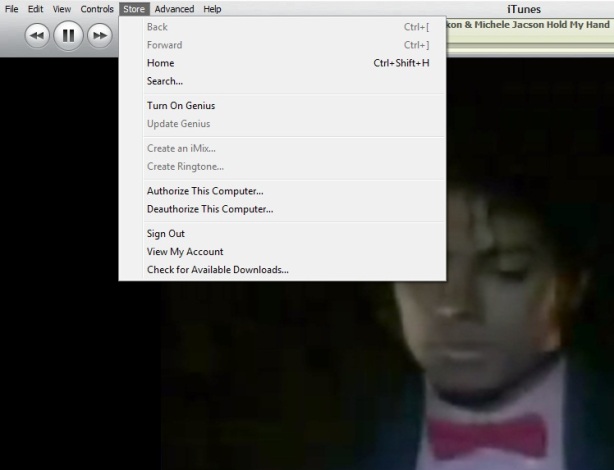
1. Login with the old Account from Menu > Store  > Sign  in
2. Then Menu > Store  > Deauthorize This Computer
3. Then Menu > Store  > Sign out
4. Menu > Store  > Sign in with your new account
5.Then Menu > Store  > Authorize This Computer

On iDevice
1. Go to Setting > Store >
2. Tap on Sign out
3. Go to Setting > General > Reset
4. Reset Local warning, Home screen Layout and Keyboard Dictionary
5. Reboot the iDevice

Last step
1. Connect the iDevice to PC and Sync with the iTunes

Done

Keyboard Shortcut of iTunes


Some of my friend ask me time to time how to use iTunes smartly via keyboard there is the full list of keyboard controls (for Windows). This list covers them all – from [Enter] to play a song, to [Ctrl+Alt+Down], which mutes the volume…
Let me highlight a few in particular: “Snap window to screen size”, “Reshuffle the current playlist” and “Toggle artwork”.
General:
Play the selected song [Enter]
Plays to the next album in a list [Shift][Ctrl][Alt][Right]
Plays the previous album in a list [Shift][Ctrl][Alt][Left]
Create a new Smart Playlist [Shift][+]
Reshuffle the current playlist [Shift][Shuffle Button]
Delete the selected playlist immediately [Ctrl][Delete]
Delete the selected playlist and all the songs listed in it [Shift][Delete]
Check or uncheck all the songs in a list [Ctrl][Click checkbox]
Expand or collapse all the subfolders and lists [Ctrl][Click triangle]
Snap window to screen size [Shift][Double click the title bar]
Refresh the Radio or Party Shuffle list [F5]
Next Music Store Page [Ctrl][]]
Previous Music Store Page [Ctrl][[]
Mini Player [Ctrl][M]
Stream audio from a URL [Ctrl][U]
File Menu:
New Playlist [Ctrl][N]
New Smart Playlist [Ctrl][Alt][N]
New Playlist with selected songs [Ctrl][Shift][N]
Add File [Ctrl][O]
Close Window [Ctrl][W] or [Alt][F4]
Import… [Ctrl][Shift][O]
Get Info [Ctrl][I]
Show File [Ctrl][R]
Show File that is currently playing [Ctrl][L]
Print [Ctrl][P]
Edit Menu:
Undo [Ctrl][Z]
Cut [Ctrl][X]
Copy [Ctrl][C]
Paste [Ctrl][V]
Select All [Ctrl][A]
Unselect All [Ctrl][Shift][A]
Preferences [Ctrl][,]
Controls Menu:
Play / Pause [Spacebar]
Next song [Right]
Previous song [Left]
Next Chapter [Ctrl][Shift][Right]
Previous Chapter [Ctrl][Shift][Left]
Increase volume [Ctrl][Up]
Decrease volume [Ctrl][Down]
Mute [Ctrl][Alt][Down]
Eject Disc [Ctrl][E]
View Menu:
Toggle Browser [Ctrl][B]
Toggle Song Artwork [Ctrl][G]
Toggle MiniStore [Ctrl][Shift][M]
Toggle Visualizer [Ctrl][T]
List View [Ctrl][Alt][3]
Album View [Ctrl][Alt][4]
CoverFlow View [Ctrl][Alt][5]
Video/Viz: Half Size [Ctrl][0]
Video/Viz: Actual Size [Ctrl][1]
Video/Viz: Double Size [Ctrl][2]
Video/Viz: Fit to Screen [Ctrl][3]
Video/Viz: Full Screen [Ctrl][F]
View Options [Ctrl][J] or [Right click on a column heading]

iTunes 9.2 and all abouts


Apple has released iTunes 9.2 for Mac and Windows, which will be required for installing the upcoming iOS 4 update, and syncing iPhone 4. Previously released in beta for the Mac at WWDC 2010, new features include:
iTunes 9.2 comes with several new features and improvements, including:
  • Sync with iPhone 4 to enjoy your favorite music, movies, TV shows, books and more on-the-go
  • Sync and read books with iPhone or iPod touch with iOS 4 and iBooks 1.1
  • Organize and sync PDF documents as books. Read PDFs with iBooks 1.1 on iPad and any iPhone or iPod touch with iOS 4
  • Organize your apps on your iOS 4 home screens into folders using iTunes
  • Faster back-ups while syncing an iPhone or iPod touch with iOS 4

  • Album artwork improvements make artwork appear more quickly when exploring your library

  • For information on the security content of this update, please visit: http://support.apple.com/kb/HT1222
Hit up Apple’s Software Update to grab it, and let us know how it works for you.
Jail Breakers :
iPad Jail breakers Code Red
Spirit User Code Red
PwnageTool & redsn0w users Code Green :-)


Dream video Camera for iPhone on AppStore with effects. broadcust live when recording to the web and take snap while taking video

Qik Video Camera  Version: 4.68 for iPhone 2G 3G & 3GS is with cool effects. Now enhance with the ability to show what you are recording LIVE to the web!

The Video Camera for any iPhone, with amazing touch effects, zoom, pause and other controls. The world's first video camera that lets you apply special effects as you record and show that Live to the web. You can even take a picture of your favorite moment while recording the video.

• The best combined resolution and FPS performance in the app store
• Show what you are recording as you record it - Live to the web at qik.com/<your account> where your friends and family can watch you live as you record. Every live video is also automatically stored for your friends to view it later. Please note that the Live quality may be compromised depending on the available network.
• Viewers watching the live video on the web can text chat back which shows up on the phone right above the Effects wheel.
• 10 amazing real-time effects that you can now apply as you record that can even show up live on the web. For example - you can show your kid's soccer game live in black & white:
- Black&White, Mirror, Avatar, Sepia, Twirl, X-ray: Yup, it is like having Apple's Photo Booth effects right on your iPhone
- Red Only: In this case the entire picture is black-and-white except the red
- Lens: focus on specific areas just with a touch
- PhotoMix: This cool effect lets you start with a picture and then erase parts of the picture to reveal the video
- Frosted glass: Start with a frosted glass screen and then wipe the screen to reveal the clear video
• Fastest and the most reliable sharing to Facebook, Twitter, Youtube or Qik
• Wish you could freeze some of those precious moments? Now you can with the new Capture Photo feature! Photo shows for 3secs and then is moved to the photo gallery
• The only video camera app where video and audio are always in sync
• Share links via SMS and Email or attach your video to Email
• Patent pending, exclusive live upload technology -- no restarts on the inevitable network disconnects, no wires, no hassle
• Archive, view, and manage your videos on qik.com -- no memory worries
• SPECIAL FOR 3GS USERS: upload videos taken with the native video recorder to Facebook, Twitter, SMS and Qik

Other features include:
• Smooth zoom and brightness control, audio gain control
• Export videos to phone's gallery (auto-export option in settings)
• Download videos via local Wi-Fi
• Standby mode - save your battery
• Audio feedback for Record, Stop and Pause buttons - lets you film yourself
• Landscape recording

Tips for better recording:
• Better lighting = better video quality
• Your iPhone's microphone is located at the bottom - make sure it's not covered by your hand when recording
• You can download your videos through a browser on Wi-Fi:
- Enable Wi-Fi access to your videos in Qik Gallery view - get the address shown in popup window
- Enter that into your local web browser to see your videos!
• Use volume buttons to control level of audio feedback
• Effects controls:
- Spin the effects wheel to choose an effect
- Use tab on the left to hide control panel and watch effects at full
- Currently selected effect has its thumbnail zoomed in - hit black cross to turn off effect and go back to Normal
- For PhotoMix effect, a new image is suggested to be selected only at the first start of application or after black cross is pressed

For 3GS users: this app provides effects, zoom and auto-focus, but the video quality of native video camera on iPhone 3GS is still higher than with this application. You can use this app to upload native videos, though.

Getting crazy ? See in appstore

iPhone Android / iDroid is Comming for iPhone 3G & 3GS Also for iPod 1st Gen & 2Gen


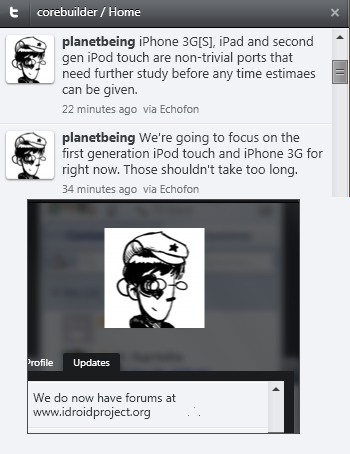
Just few minute back planetbeing announce the update for 3G iPhone & iPod 1st Gen will come in a short time (expecting current week) & iPhone 3Gs & iPod 2nd Gen will take time as they are non-trivial ports and need further study and research.

Also inform the twitter community there is a wiki for iDroid is live with the details of research.

Experiencing a bad Battery life on iPhone / iPod ? Battery Boost Pro might help

Increase your battery life with Battery Boost Pro!

- Increase Game play time
- Increase Video playback
- Increase Audio playback
- Increase Talk time
- Increase Net browsing time

Battery Boost Pro features a comprehensive collection of tips and tricks to improve
your battery life.

Get more out of you iPhone/iPod Touch today!
What's new in Version 1.1
- Added additional tips
- Improved content view

Visit the AppStore

BuzzMe – quick and simple iPhone-to-iPhone messaging for FREE!

 BuzzMe – quick and simple iPhone-to-iPhone messaging for FREE!

Tell your friends to "BuzzMe!" Available for both iPhone and iPod Touch.

Here's the iPhone messenger application you've been waiting for- BuzzMe!

BuzzMe! is an iPhone-to-iPhone messaging application with push notification that allows you to text your friends anywhere in the world for FREE.
Forget about IM Systems where you have to log in and out. Stop paying a fortune for texting!

BuzzMe! is a simple way to text your friends for FREE with an iPhone or iPod Touch, and you don't even need and ID. Just invite your friends to BuzzMe! and you're ready to go! Even if your friends live in a different country: BuzzMe! messages will reach all iPhones and iPod Touches around the word- fast and FREE!

BuzzMe! – it's that simple!


Short description:

- text messaging for free
- works with push notifications
- works with iPhone and iPod touch
- messages are received instantly anywhere in the world
- BuzzMe! software is required to be able to send/receive messages
- you will only get messages from your invited friends
- no unrequested or advertising messages
- messages can be sent to multiple contacts at a time
- different ring tones

What's new in Version 2.0
- send/receive photos
- send/receive audio messages
- custom balloon colors
- customize friend's nickname and icon
- more ringtones
- optional landscape view
- more languages
- bug fixes

Dev Team releases Jailbreaking tool 3.1.5

Dev Team releases Jailbreaking tool 3.1.5 The Dev Team has just released an update to PwnageTool. The newest version is 3.1.5 and it will work on Apple’s latest firmware update 3.1.3 however, for the moment this PwnageTool (3.1.5)  is only available for the Mac OS X.
PwnageTool 3.1.5 will allow you to create custom firmware so you will still be able to Jailbreak your iPhones while enjoying the newest 3.1.3 update.
If you plan on using the newest PwnageTool to jailbreak your 3.1.3 updated iPhone, I reccomend make sure to visit the Dev Team official site for more details before trying it out.


Note: Till today neither of the Jail breaking is supporting blacksn0w 

Jailbreaks iPhone OS 3.1.3 : blackra1n & ultrasn0w Can Still Unlock

Well folks, that didn't take long at all. We now have the ability to jailbreak and unlock the iPhone on the new OS 3.1.3 only days after it's release. We have two options for different basebands, 04.26.08 and 05.11.07.

Sn0wbreeze 3.1.3 can jailbreak iPhone 2G, 3G and iPhone 3GS (old bootrom only) on iPhone OS 3.1.3. Baseband 04.26.08 can be unlocked using Ultrasn0w. If your baseband is 05.11.07, GeoHot's blacksn0w will work just the same as it did before. (That was released last year But No unlock for the latest Baseband 05.12.01)

For those of you that have never used any of these programs, please don't try can call iKing (+8801713031130) if assistance needed. 

Note: We have tested this method on 2G 3G but 3Gs not at hand at this moment.
Be smart. Don't do this unless you absolutely have to, or if you want to test and inform others of your success/failure stores
Again, THIS IS FOR OLD BOOTROMS OF THE 3GS. If you have a newer 3GS, just stay away.

Hidden Features Of iPhone Firmware 3.1.3

As you already know Apple release iPhone firmware 3.1.3 today, but the changelog they offer is not satisfying or worthwhile at all. Pretty much they didn’t make you update in the first place. Anyway, we still manage to jailbreak it, and above all that it seems that there are some hidden features that Apple didn’t advertise.

The update also reportedly resolves an issue where third-party applications would not launch in some instances. It also addresses a bug that could cause applications to crash when using the Japanese Kana keyboard.

iPhone OS 3.1.3 also includes a number of security updates related to CoreAudio, ImageIO, Recovery Mode and WebKit. Full details are available in the support document on Apple’s Web site.

[via AppleInsider]

HOW TO: Put The iPhone In DFU Mode And Jailbreak, Even If Your Home Or Power Button Is Broken

As you know, to get into DFU you must press the two buttons simultaneously for 10 seconds, but some times one of the two buttons will break. An alternative to jailbreak without having to go into the DFU mode is to use Blackra1n. However, if the iPhone freezes and you need to restore the firmware to do it again, this guide will come back again very useful.

What you need:

  • original Apple firmware
  • BetterZip on Mac or WinZip on Windows (or something similar, your choice)

How to do it:

1. Create a copy of the original apple firmware and change the file extension from .ipsw to .zip

2. Unpack the .zip file to view its content. Navigate to Firmware > all_flash

3. Inside you will get two folders ( all_flash.m68ap.production and all_flash.n82ap.production ) and both of them will contain various files. The ones you are interested in are:

  • LLB.m ** ap.RELEASE.img3
  • applelogo.xxx.img3

NOTE: asterisks stands for 68 or 82 – depending on the folder. “xxx” is a different number for each device.

4. Delete the LLB.m ** ap.RELEASE.img3 file in both folders and rename the applelogo.xxx.img3 file to LLB.m ** ap.RELEASE.img3

5. Save everything and rename the file back from .zip to .ipsw

6. Connect your iPhone or iPod Touch to your computer, open iTunes and click the “Restore” button while holding down the Alt key if you’re using Mac (Shift key if you’re on Windovs).Now browsed for the modified .ipsw and restore your device with it.When iTune is done restoring your device with the custom firmware, your iPhone/iTouch will load directly into the DFU mode and now you can restore with a custom jailbreake firmware.

So basically what you are doing here is, making LLB  (which is not there) invalidate iBoot which causes it to go into a DFU loop. (thx iH8sn0w for your input)

OFFICIAL PLAYBOY application!!! on AppStore?

The only OFFICIAL PLAYBOY application!

Get exclusive content and a glimpse of January/February double issue and get to vote on the Playmate of the year 2009! of Playboy wherever and whenever you want!

Get your hands on all the good stuff electronically, including the cover, the Playmate's intro text, data sheet and a behind the scenes video, plus preview pictures and the following ICONIC MONTHLY FEATURES:

ICONIC MONTHLY FEATURES
Playboy Interview — Candid long-form conversation with the world's most insightful minds
Playboy Advisor — Advice about everything from sex to stereos and cars to cuisine
20 Questions — A selection from the quick-hitting Q&A session with today's top celebrities
Party Jokes — Classic gags that are sure to make you the center of attention
Celebrities Hangin' With Hef — Famous folks partying and posing with the man himself
Fashion — Pictures of today's hottest looks with tips on how to make them work for you

EXCLUSIVE CONTENT
Playmate Video — The new Centerfold comes to life in a sexy preview clip that's unavailable anywhere else!

Free Wallpapers — Add some Playboy personality to your iPhone with free Rabbit Head wallpaper and downloadable photographs of the Playmate, designed and available exclusively for this app!

If you want to be dialed into what's new from the world's top entertainment and lifestyle magazine for men (and what man wouldn't?) Playboy is the app you need!

Monthly editions are available for purchase through the “Archive” section within the application, including previous months.

*This app does not contain any fully nude content.
What's new in Version 1.0.22
More explicit images and articles for the Jan Feb 2010 issue.

WOW feeling hot in the cold days :D

5.0 Megapixel Camera for iPhone

Turn your iPhone into a powerful camera with fantastic 5.0 MPX resolution and many more features!


After months of developing our unique algorithm it’s finally here! You will not face the laughs of your friends with better camera phones anymore.

No matter what generation of iPhone you have, with 5.0 MPX Camera app you will be able to take pictures in extra high resolution of 2 560 × 1 920 (compared to 1 600 × 1 200 with standard camera). Your photos will be smoother, more detailed and overall better looking when posted on Facebook, Twitter, Flickr, Picasa or any online photo sharing community.

Don’t wait for the uncertain announcement of the next-gen iPhone with better camera. You can have it right now! Take the chance to upgrade your built-in camera in the easiest possible way, for the lowest possible price, and don’t miss the most precious moments in your life that deserve to be taken by camera with the best resolution you can have.

FEATURES:

5.0 MPX Mode
------------
Take your pictures in fantastic 5.0 MPX resolution, which is 2 560 × 1 920 pixels. More than twice the number of pixels taken by the standard built-in iPhone camera. 5.0 MPX resolution is available both in Quick Shot and in Countdown camera modes.

Standard Mode
-------------
In some cases you might want to use your native camera resolution. It is available in all camera modes. Therefore you can definitely leave your standard camera app behind and use the 5.0 MPX Camera in every situation, whether you are taking simple photo-notes or for those extraordinary moments in your life.

Countdown Mode
--------------
There are many precious moments in which you want to be the part of the picture, not just the one behind it. For times like these, use the Countdown Mode, set the shutter delay and take your place amongst your friends. This timer mode is provided with sound signalization, starting three seconds before shutter activation.

Time-Lapse Mode
---------------
Place your iPhone in stable position, choose the Time-Lapse mode and set time gaps between the shots. 5.0 MPX Camera will take the picture after given time automatically, even through a couple of hours. With the set of taken pictures you can easily create your own stop-motion movie. Or blend them together and simulate those amazing long-shutter pictures!

Instant Review
--------------
You don’t have to leave the app and go to Camera Roll to see your last picture anymore. Simply choose the Review tab and you can check the taken photo right in the 5.0 MPX Camera app.

Big Button Shutter
------------------
It is so easy to capture photos without having to try to tap the tiny camera button. Simply tap anywhere in the screen to take picture. You will not miss any of the candid shots and you will be able to take the pictures of yourself without setting the right finger position.

On-the-go Saving
----------------
You can take several standard pictures and they will be saved in the background. You don’t have to wait for next shot until the previous one is saved. The number of photos being saved is stated above the tabs. And you can even take some quick shots and set the timer or time-lapse right after that – saving queue will manage all of them easily.

NOTICE:

Please note that due to physical limitations of the iPhone screen, you might not be able to see the difference between standard and 5.0 MPX photos on your iPhone. Images displayed on your iPhone are not in full resolution. The difference can be seen after syncing your photos to your computer, viewing on the internet in full resolution or in printed photos made from your pictures taken by the 5.0 MPX Camera.

LANGUANGES:
English

REQUIREMENTS:
Compatible with iPhone. Requires iPhone OS 3.1 or later.

WHAT'S NEW IN THIS VERSION:
- Bug fixes


Todo+Cal+Sync

Todo+Cal+Sync

Todo+Cal+Sync is an advanced todo and calendar management application specifically designed for the iPhone. Just swipe left+right to switch between todo, month, day and list views.
It offers a simple visual interface to quickly access and organize multiple calendars, large lists of ideas, projects and things to do, while offering the full power of both hierarchically structured or free form categories/tags.
Complex tasks can be split up into subtasks (and further sub-sub tasks if needed) while monitoring overall completion status in the main todo entry.

Rich use of color allows grouping and highlighting todos and calendar entries in a way immediately recognizable at the first glance. Advanced tag-based navigation provides quick focusing to a topic of interest and related todo items or calendar events with a few taps. Todo lists can be sorted by due date, priority or tag. The calendar provides month, day and list views, which colored display of data from multiple calendars. With a few taps calendar categories can be hidden or shown in any calendar view.

The integrated SyncML client and server allows synchronizing tasks, calendar (and also the address book) with any SyncML compliant server, service or mobile phone. This includes various enterprise collaboration systems and on-line personal information management services like GooSync, GroupWiseSync, mobical, Scheduleworld, O-Sync, and many more. Many of today's smartphones and featurephones support SyncML and Wi-Fi and therefore can be directly synchronized with Todo+Cal without exposing any data to external internet services.

Before buying this program with the wrong expectations, please be aware that it supports the open SyncML standard, but does not directly sync with internet based or desktop calendaring software that do not support SyncML (like iCal, Outlook). For some popular calendars third party solutions exist that add SyncML access (like GooSync does for Google Calendar, or WinFonie for many Windows based calendar software).

However, please be aware that these solutions are third party offerings for which we are in no way responsible, and cannot provide support or guarantee particular features you might expect to be supported. Please also note that such solutions usually have a price/fee attached. We are constantly testing Todo+Cal with many of these solutions, but these are provided by independent companies who can change their feature set, policies and conditions according to their own terms.

The power of SyncML as an open synchronisation standard lies in the independence from a particular service. On the other hand this includes the possibility of services claiming SyncML compatibility which do not really comply with the standard. We put great efforts into making our software work with as many different services as possible even then - within the limits of SyncML standard compliance.
So please check with the provider of the software or service you want to use our application with first whether they support it.

Note that due to current iPhone SDK limitations, reminders alerts/alarms can only be activated by a workaround publishing the reminders to an external WebDAV server. Please see "Todo+Cal+Sync Support" page (link below) for setup instructions.


screenshotscreenshot

NEW in 2.0: Built-in SyncML server allows direct phone-to-phone sync over Wi-Fi - not only with iPhones but any other SyncML and Wi-Fi enabled mobile phone. See support link for documentation.

NEW: Audible reminders now possible via calendar export to WebDAV server - allows subscribing to the exported reminders from built-in iPhone calendar to activate them (see support link for details).

Please visit the Todo+Cal web page (see support link below) for more information and documentation for download.
New in this version • Improved automatic scrolling to correct time in day view
• Fixed weekly recurrences occurring on multiple days not starting on the first day (some occurences were not shown)
• Updated localisations for French and Norwegian
• Power user feature: Client and server side filtering for highly advanced sync scenarios
• Power user feature: Client logs can now be locally retrieved via built-in server (for those interested in SyncML tech details)
Languages English, French, German
Requirements Compatible with iPhone and iPod touch.
Requires iPhone OS 3.0 or later.

netTV

FAQ
Question: Why it keeps buffering when I play a channel?
Answer: Buffering is done when the app runs out of data. Frequent buffering happens due to low bandwidth between you and the channel server. It's either you have a low bandwidth connection (i.e. 3G network) or the channel server is being overloaded by too many connections. Please note that netTV does not maintain any server, it uses channel servers already available on the web.

---------------
netTV is now available over Cellular Network. To enable, go to Settings->netTV.

Watch more than 200 live TV channels from all over the world.
No hardware needed!

You can
- watch over 200 channels from all over the world in full screen.
- browse channels by categories and countries.
- make you own favorite list. (Click on the star icon located on the right of each channel to add into your Favorite list)

Please note that some channels are only available for iPhone 3GS due to cpu constraints.

Please be aware that channels may not have same quality and some may go dead as netTV uses channel servers available on the web.

Disclaimer: Chestnut Soft doesn't maintain any channel server. Only uses the channel servers already available on the Web. Channels offered may vary and may be withdrawn without prior notice. No refund will be given when the content changes or is withdrawn.

New in this version
- Faster channel update
- Spanish language support
- Bug fixes

Languages
English, Spanish, Turkish

Requirements
Compatible with iPhone and iPod touch.

Requires iPhone OS 3.0 or later.

iPhone OS 4.0 Firmware licked information


Guys at BGR got hold of some Rocking news :) Here is his information

That’s right, y’all. We’re back at it, and this time we’ve received some exclusive iPhone OS 4.0 details from one of our trusty Apple connects.
Here are some iPhone OS 4.0 features, according to our guy:
  • There will be multi-touch gestures OS-wide. (Would make sense for that as the rumored OS for the iTablet is close if not the same as the iPhone)
  • “A few new ways” to run applications in the background — multitasking.
  • Many graphical and UI changes to make navigating through the OS easier and more efficient. We haven’t had this broken down, but we can only hope for improved notifications, a refreshed home screen, etc.
  • The update will supposedly be available for only the iPhone 3G and 3GS, but will “put them ahead in the smartphone market because it will make them more like full-fledged computers” more than any other phone to date. Everyone is “really excited.”
  • The last piece of information is the most vague, but apparently there will be some brand new syncing ability for the contacts and calendar applications.
That’s all we have for now! Who can’t wait for next Wednesday?
Thanks, Lindsey & BGR!


*****BGR also confirmed that, Apple Tablet will be called as iTablet not iSlate

To know more & update
Read our blog Every day Bookmark or Make it your home page http://corebuilder.blogspot.com/
&
follow us http://twitter.com/corebuilder

Powerful Camera with 10x Zoom & more


Zoom in/out with your iPhone Camera! One of iPhone's most requested feature.


With Camera Zoom, you can now zoom in and out in real-time when taking pictures, by just simply moving the slider.

Anti-shake stabilization helps eliminate those blurry photos.


A timer lets you setup timed group photos.

Tap to Focus now works for iPhone 3Gs.


Faster shot taking with iPhone OS 3.1. Now ready to snap the next shot quickly.

Review your last photos quickly with the review button.

PS: You can take several standard pictures and they will be saved in the background. You don’t have to wait for next shot until the previous one is saved. The number of photos being saved is stated above the tabs. And you can even take some quick shots and set the timer or time-lapse right after that – saving queue will manage all of them easily.

FEATURES:

√ Anti-shake (optional)

√ 10 seconds timer (optional)

√ Up to 10x digital zoom

√ Tap to focus and auto-focus for 3GS

√ Auto-adjusts photo to best quality

√ Camera roll preview

√ Tap preview image to email 

√ Moving the slider to zoom in/out
√ Hide/Show the slider (optional)
√ 320x480 Standard Size(To save you memory)

With the best features you want, Start using this camera app today and you will quickly be replacing the default camera application.

Languages English
Requirements Compatible with iPhone.
Requires iPhone OS 3.0 or later

iPhone OS 4.0 is close to be released... in END of Jan 2010?


A new report suggests that iPhone OS 4.0 could be close to release, months before it would normally be expected. Apple has heretofore only released new firmware with new phone models. However, CNET reports that a "prominent" app developer says he's got the new SDK and has updated his app already. In the past, Apple has provided developer previews in March for new OS versions that are then released in June or July.

Rick Broida, who writes iPhone Atlas for CNET, noted today that he had gotten an email from a dev claiming that he's got a hold of iPhone OS 4.0:
Quote:
iPhone OS 4.0 is imminent. At least, that's the only conclusion I can draw from an e-mail I just received from a prominent app developer.

The message includes the following snippet: "Just wanted to give you a heads up that we've submitted an updated app for the new iPhone OS 4.0 software."
Rumers have swirled ahead of the expected Apple tablet announcement later this month. An event - which is still unscheduled and unconfirmed - is supposedly going to happen at the Yerba Buena Center for the Arts, with the date variously being set as January 26 or January 27. The French site Mac4Ever said that the tablet announcement would be accompanied by an announcement of an iPhone 4.0 beta, which is purported to include a "simulator" mode that would allow apps to be run on larger screens. Some developers were said to have been given beta SDKs ahead of the announcement so that they could prepare demos to be shown at the event.

The website iPodNN had noted speculation on Wednesday that the iPhone OS update was being held back until the tablet was announced because the build contained too many references to the still-unannounced device.


This may not come as a huge surprise given the all-but-certain announcement later this month of the hyper-rumored Apple tablet, which will most likely operate like an oversizeiPod Touch--and require an updated version of the operating system. For those seeking further evidence, Boy Genius Report "discovered" OS 4.0 last month in some server logs.


But could this point to something more? A new iPhone model, perhaps? With all the recent buzzing about tablets, the rumor mill has been mostly mum on that topic. But the the timing is right: It was three years ago this month that Apple announced the first iPhone, and it's been more than six months since the introduction of the 3GS.

In other words, a new iPhone is definitely due. And let's face it: The iPhone OS could do with a refit. On my wish list: multitasking, a to-do list that syncs with Outlook, and a better way to organize apps. At the very least, we may see contact icons on the Home screen.


Jailbreak & unlock might be hard on the new iPhone as apple is taking too long to release the new OS 4.0 we believe they are more focusing on the security issue and like to alert not to update the new OS to be unlocked till some solution been developed...