
Geo hot will rock again with a new exploit called pwned4life

Inside
Showing posts with label iPod. Show all posts
Showing posts with label iPod. Show all posts


Rearrange your iPhone/iPod touch Apps right in iTunes
Now you can rearrange your iPhone apps and even the entire app page directly in iTunes. Just plug in your iPhone or iPod touch and select it in the Source window. Now click on the Applications tab and drag your Apps around in the order you want. You can also rearrange the pages of apps themselves by dragging them in the right side bar.


How to fix AppStore login on iPhone / iPod / iPad
I think most of you had suffered after changing the account on you iDevice (iPhone/iPod /iPad) old account pop up while updating or downloading any app.
I was very disappointed and restore my Device and set up as new device. Today a Srilankan friend experiencing the same so I dig out the issue and find some interesting thing, actually iTunes stores last authorized account and while sync the iDevice it push the login information to the device may be the one you don't want.
How to fix it ?
Simple
ON PC iTunes

1. Login with the old Account from Menu > Store > Sign in
2. Then Menu > Store > Deauthorize This Computer
3. Then Menu > Store > Sign out
4. Menu > Store > Sign in with your new account
5.Then Menu > Store > Authorize This Computer
On iDevice
1. Go to Setting > Store >
2. Tap on Sign out
3. Go to Setting > General > Reset
4. Reset Local warning, Home screen Layout and Keyboard Dictionary
5. Reboot the iDevice
Last step
1. Connect the iDevice to PC and Sync with the iTunes
Done
I was very disappointed and restore my Device and set up as new device. Today a Srilankan friend experiencing the same so I dig out the issue and find some interesting thing, actually iTunes stores last authorized account and while sync the iDevice it push the login information to the device may be the one you don't want.
How to fix it ?
Simple
ON PC iTunes
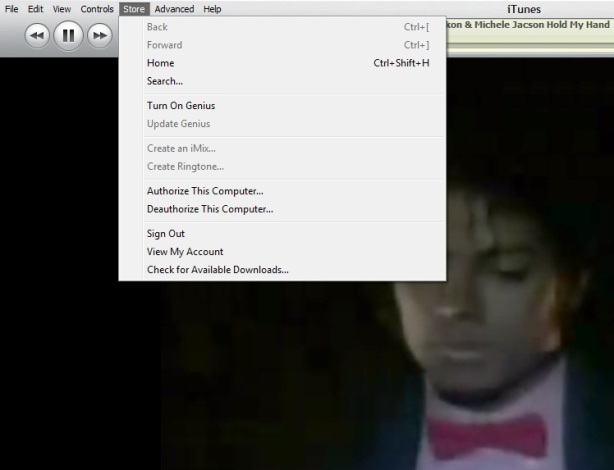
1. Login with the old Account from Menu > Store > Sign in
2. Then Menu > Store > Deauthorize This Computer
3. Then Menu > Store > Sign out
4. Menu > Store > Sign in with your new account
5.Then Menu > Store > Authorize This Computer
On iDevice
1. Go to Setting > Store >
2. Tap on Sign out
3. Go to Setting > General > Reset
4. Reset Local warning, Home screen Layout and Keyboard Dictionary
5. Reboot the iDevice
Last step
1. Connect the iDevice to PC and Sync with the iTunes
Done
Keyboard Shortcut of iTunes

Some of my friend ask me time to time how to use iTunes smartly via keyboard there is the full list of keyboard controls (for Windows). This list covers them all – from [Enter] to play a song, to [Ctrl+Alt+Down], which mutes the volume…
Let me highlight a few in particular: “Snap window to screen size”, “Reshuffle the current playlist” and “Toggle artwork”.
General:
Play the selected song [Enter]
Plays to the next album in a list [Shift][Ctrl][Alt][Right]
Plays the previous album in a list [Shift][Ctrl][Alt][Left]
Create a new Smart Playlist [Shift][+]
Reshuffle the current playlist [Shift][Shuffle Button]
Delete the selected playlist immediately [Ctrl][Delete]
Delete the selected playlist and all the songs listed in it [Shift][Delete]
Check or uncheck all the songs in a list [Ctrl][Click checkbox]
Expand or collapse all the subfolders and lists [Ctrl][Click triangle]
Snap window to screen size [Shift][Double click the title bar]
Refresh the Radio or Party Shuffle list [F5]
Next Music Store Page [Ctrl][]]
Previous Music Store Page [Ctrl][[]
Mini Player [Ctrl][M]
Stream audio from a URL [Ctrl][U]
File Menu:
New Playlist [Ctrl][N]
New Smart Playlist [Ctrl][Alt][N]
New Playlist with selected songs [Ctrl][Shift][N]
Add File [Ctrl][O]
Close Window [Ctrl][W] or [Alt][F4]
Import… [Ctrl][Shift][O]
Get Info [Ctrl][I]
Show File [Ctrl][R]
Show File that is currently playing [Ctrl][L]
Print [Ctrl][P]
Edit Menu:
Undo [Ctrl][Z]
Cut [Ctrl][X]
Copy [Ctrl][C]
Paste [Ctrl][V]
Select All [Ctrl][A]
Unselect All [Ctrl][Shift][A]
Preferences [Ctrl][,]
Controls Menu:
Play / Pause [Spacebar]
Next song [Right]
Previous song [Left]
Next Chapter [Ctrl][Shift][Right]
Previous Chapter [Ctrl][Shift][Left]
Increase volume [Ctrl][Up]
Decrease volume [Ctrl][Down]
Mute [Ctrl][Alt][Down]
Eject Disc [Ctrl][E]
View Menu:
Toggle Browser [Ctrl][B]
Toggle Song Artwork [Ctrl][G]
Toggle MiniStore [Ctrl][Shift][M]
Toggle Visualizer [Ctrl][T]
List View [Ctrl][Alt][3]
Album View [Ctrl][Alt][4]
CoverFlow View [Ctrl][Alt][5]
Video/Viz: Half Size [Ctrl][0]
Video/Viz: Actual Size [Ctrl][1]
Video/Viz: Double Size [Ctrl][2]
Video/Viz: Fit to Screen [Ctrl][3]
Video/Viz: Full Screen [Ctrl][F]
View Options [Ctrl][J] or [Right click on a column heading]
iTunes 9.2 and all abouts

Apple has released iTunes 9.2 for Mac and Windows, which will be required for installing the upcoming iOS 4 update, and syncing iPhone 4. Previously released in beta for the Mac at WWDC 2010, new features include:
iTunes 9.2 comes with several new features and improvements, including:
- Sync with iPhone 4 to enjoy your favorite music, movies, TV shows, books and more on-the-go
- Sync and read books with iPhone or iPod touch with iOS 4 and iBooks 1.1
- Organize and sync PDF documents as books. Read PDFs with iBooks 1.1 on iPad and any iPhone or iPod touch with iOS 4
- Organize your apps on your iOS 4 home screens into folders using iTunes
- Faster back-ups while syncing an iPhone or iPod touch with iOS 4
-
Album artwork improvements make artwork appear more quickly when exploring your library
-
For information on the security content of this update, please visit: http://support.apple.com/kb/HT1222
Jail Breakers :
iPad Jail breakers Code Red
Spirit User Code Red
PwnageTool & redsn0w users Code Green :-)

Wi-Fi Sync for iPhone: Syncing with no USB cable for $10 or Free?

It 'just been released in Cydia Store application Wi-Fi Sync, as already announced, allows you to synchronize your device with iTunes just using a WiFi connection and no longer need the USB cable. It 'just been released in Cydia Application Store Wi-Fi Sync, as Announced Already, allows you to synchronize your device with iTunes just using a WiFi connection and No longer need the USB cable. Operation is very simple and we see along the characteristics: Operation is very simple and we see along the characteristics:
Once installed Wi-Fi Sync, just launch it and your device will appear in the list of devices connected in the left column of iTunes. Once installed the Wi-Fi Sync, just launch it and your device will Appear in the list of devices connected in the left column of iTunes. Of course requirement is that you are connected to the same WiFi network both computers from the iPhone or iPod Touch! Of course requirement is That You Are Connected To The Same Both WLAN network computers from the iPhone or iPod Touch!
So you can make a full synchronization of photos, emails, contacts, music, applications and all without the need of the USB cable but uses only a WiFi connection! I know you can perform a full synchronization of photos, emails, contacts, music, and all applications without the need of the USB cable But only uses a WiFi connection!
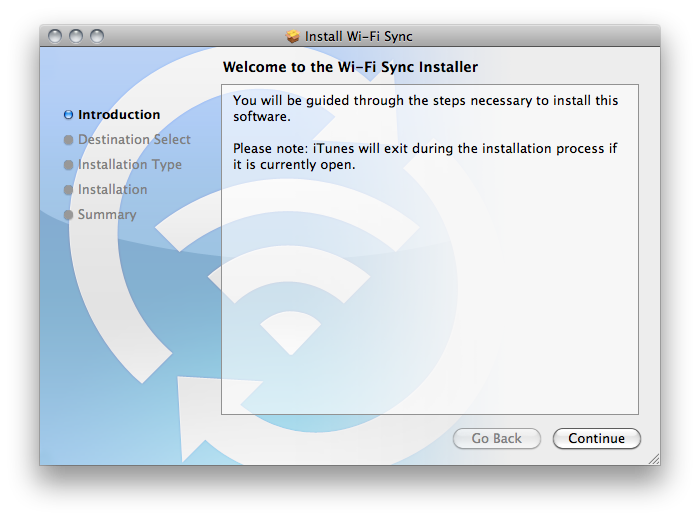
Wi-Fi when Sync is only compatible with computers running Mac OS X 10.5 and 10.6 but the developer assures that an update compatible with the Windows operating system will arrive shortly. Wi-Fi Sync is currently only compatible with computers running Mac OS X 10.5 and 10.6 But The developer assures That an update compatible with the Windows operating system Will Arrive Shortly.
To operate you must have also installed the free software for Mac which you can download official link by clicking here - DOWNLOAD
Wi-Fi Sync does not currently support iPad. Wi-Fi sync does not currently support iPad.
Frankly I expected better from what must have been a revolutionary application and instead, at least at the moment (although I do not think will improve a lot), it is only compatible with Mac and moreover require a client installed on your computer. Frankly I expected better from what must have Been a revolutionary application and INSTEAD, at least at the moment (although I do not think Will Improve a lot), it is only compatible with Mac and to require Moreover client installed on your computer. I believe that it is much easier to plug the USB cable and start a better sync ... especially free! I Believe That It Is Much Easier To connect the USB cable and start to better sync ... Especially free! The cost of this application it is not even very low, indeed! The cost of this application it is not even very low, indeed!
Here's a video of the Wi-Fi Sync in action: Here's a video of the Wi-Fi Sync in action:
Go to the manufacturer's site -> CLICK
Find Wi-Fi Sync on Cydia Store at a price of $ 9.99 (but we crazy?).
PS who have a mac and wanna try follow me on twitter will not let u down :D
iPhone Android / iDroid is Comming for iPhone 3G & 3GS Also for iPod 1st Gen & 2Gen
If you remember last week we gave you the news of the success of porting the Android & also how to install Android on 2G iPhone

Just few minute back planetbeing announce the update for 3G iPhone & iPod 1st Gen will come in a short time (expecting current week) & iPhone 3Gs & iPod 2nd Gen will take time as they are non-trivial ports and need further study and research.
Also inform the twitter community there is a wiki for iDroid is live with the details of research.
How to make your own iPad micro SIM
The iPad is almost in the every where, but the micro-SIM is not.
Despite the 3G version of the iPad being sold unlocked, it requires a whole new type of SIM card, or does it? That's right, we've been trimming away the mystery of the new micro-SIM.
At first glance, the electronic contact area is no different to that of a conventional SIM, you know, the type that's small enough to fit into a tiny phone never mind the hulking iPad.
As it turns out traditional SIMs measure 15 x 25mm and have that angled corner. The new micro-SIM is officially 12 x 15mm. That's effectively the size of just the normal SIM contact area.
Apple was just wanting to be clever or it just wanted everyone to be forced to buy new SIMs, either way it's a touch annoying, but with our mighty scissors we can cut them down to size and so can you. SIMples.
How to do it:
Future Publishing Limited provides the information for this project in good faith and makes no representations as to its completeness or accuracy. Individuals carrying out the instructions in this project do so at their own risk.
1. Here's a traditional SIM and its measurements, the only working area is the metal contacts.

2. This is the same SIM with the micro-SIM specifications overlaid. You can use this to trim yours down to size.

3. Here we are cutting our SIM down to size...

4. ...and now it's ready to activate in our shiny new iPad.

However, AT&T's version of the micro-SIM appears to be around 13.5 x 16.5mm - enough to give the original contact area 1.1m clearance along the bottom and left edge and 1.7mm along the top and right area - so it may be worth holding off on the scissors until we get our hands on an iPad and check the correct dimensions.
There are even tools that cut a micro sim from a sim.
See the picture closely the at&t SIMs

The chip looks identical.

Collected from techradar & macrumor
Despite the 3G version of the iPad being sold unlocked, it requires a whole new type of SIM card, or does it? That's right, we've been trimming away the mystery of the new micro-SIM.
At first glance, the electronic contact area is no different to that of a conventional SIM, you know, the type that's small enough to fit into a tiny phone never mind the hulking iPad.
As it turns out traditional SIMs measure 15 x 25mm and have that angled corner. The new micro-SIM is officially 12 x 15mm. That's effectively the size of just the normal SIM contact area.
Apple was just wanting to be clever or it just wanted everyone to be forced to buy new SIMs, either way it's a touch annoying, but with our mighty scissors we can cut them down to size and so can you. SIMples.
How to do it:
Future Publishing Limited provides the information for this project in good faith and makes no representations as to its completeness or accuracy. Individuals carrying out the instructions in this project do so at their own risk.
1. Here's a traditional SIM and its measurements, the only working area is the metal contacts.
2. This is the same SIM with the micro-SIM specifications overlaid. You can use this to trim yours down to size.
3. Here we are cutting our SIM down to size...
4. ...and now it's ready to activate in our shiny new iPad.
However, AT&T's version of the micro-SIM appears to be around 13.5 x 16.5mm - enough to give the original contact area 1.1m clearance along the bottom and left edge and 1.7mm along the top and right area - so it may be worth holding off on the scissors until we get our hands on an iPad and check the correct dimensions.
There are even tools that cut a micro sim from a sim.
See the picture closely the at&t SIMs
The chip looks identical.
Collected from techradar & macrumor
How To Use iTunes to use Multiple iPhone or iPod
Not many iTunes users know that it is possible to use multiple iTunes libraries on the same computer system. There is virtually no information about running multiple iTunes libraries once iTunes has been started. Before we explain how to setup multiple iTunes libraries we should analyze why someone would want to work with several iTunes libraries instead of just one.
The main reason to use multiple iTunes libraries would be to divide specific data into different libraries. This can be dividing losless and lossy music, libraries for specific occasions, specific music genres or types like bootlegs or live music only.
You might want multiple libraries so that you could, for example, have a library of holiday music that wouldn't appear in your Party Shuffle mix the rest of the year. Or you could use separate libraries to keep your music on your computer and your movies on an external hard disk.
It is actually very easy to create a second iTunes library. All that needs to be done is to press the Shift key (Alt on Macs) before launching iTunes. A small popup window will be displayed asking the user to choose or create a library.

Steps To create or use a different iTunes library: 


Selecting the create a library option will create a new iTunes library that acts independently of all other iTunes libraries. It should also be noted that iTunes will always open the library that has been used the last time iTunes was executed. Switching libraries would again require pressing the Shift key during launch.
The main reason to use multiple iTunes libraries would be to divide specific data into different libraries. This can be dividing losless and lossy music, libraries for specific occasions, specific music genres or types like bootlegs or live music only.
You might want multiple libraries so that you could, for example, have a library of holiday music that wouldn't appear in your Party Shuffle mix the rest of the year. Or you could use separate libraries to keep your music on your computer and your movies on an external hard disk.
It is actually very easy to create a second iTunes library. All that needs to be done is to press the Shift key (Alt on Macs) before launching iTunes. A small popup window will be displayed asking the user to choose or create a library.

Steps To create or use a different iTunes library:
If iTunes is open, quit it.
Hold down the Shift key while you open iTunes (from the Start menu, choose All Programs > iTunes > iTunes).
In the dialog that appears, do one of the following:
■
To create a new library, click Create Library.
■
To choose a different library, click Choose Library.
You can name your iTunes library (the folder containing all of your iTunes content and the iTunes Library.itl file) whatever you like and store it anywhere.
Selecting the create a library option will create a new iTunes library that acts independently of all other iTunes libraries. It should also be noted that iTunes will always open the library that has been used the last time iTunes was executed. Switching libraries would again require pressing the Shift key during launch.
BarMax CA The $1000 application Get hacked and being distributed


BarMax: California Edition. Harvard lawyers teamed with top iPhone developers to produce BarMax, the only complete bar exam prep solution (Essay, MBE, Performance Test, and Flash Cards) available for purchase in the iPhone App Store. Plus it is the only course with 1,371 REAL previous MBE questions, and over 100 REAL previous essay exams.
"Although I've only had the BarMax application for a few weeks, I am already a huge fan. I've had zero problems with the application and it has been very helpful to listen to the lectures." -Craig G, actual BarMax student.
Contact us at info@getbarmax.com for more information, and try BarMax Lite in the App Store for a FREE Trial Version of BarMax to evaluate the course materials. BarMax MPRE is also available to download for free.
Take 50 pounds of books and condense them into the palm of your hand. With BarMax, you squeeze thousands of pages of bar exam course material and over 1,500 real multiple choice and essay practice questions into your iPhone or iPod Touch. In addition, once you purchase the app, we send you a complete Welcome Packet with hundreds of pages of supplemental material, on-screen outlines, practice exams, and suggested as well as optional hard copy printouts.
BarMax's Advisory Board oversees content; Advisory Board Members include:
- Paul Pelosi, Jr. Esq. NASA. JD/MBA Georgetown University.
- Seo Salimi, Esq. Latham & Watkins. JD, University of Southern California.
- Christopher Blazejewski, Esq. Sherin and Lodgen LLP. JD, Harvard University.
- Tej Srimushnam, Esq. Morrison & Foerster. JD, University of Pennsylvania.
- Michael Allen, Esq. President, Lateral Link. JD, Harvard University.
BarMax is a complete solution and the most thorough yet flexible way to study for the bar exam. Listen to audio lectures right on your iPhone wherever you are. Practice MBE questions or review flashcards on the go. With BarMax, your life will no longer revolve around your bar exam prep course. Instead, your bar exam prep will revolve around you.
Don't worry if you don't own an iPhone--we can ship you an iPod Touch as part of your package that will run the app. You will also receive a welcome packet that includes all the materials in Word format so you can print them up and follow along.
If you want to study with your laptop and paper in addition to the iPhone, we have you covered. "On request, BarMax will also send users electronic copies of paperwork." --American Bar Association (ABA) Journal
We offer all of this for one fourth of the price of current packages on the market. We are using the revolutionary technology behind the iPhone to enable bar prep at a much better price, and to teach students in a much better way.
BarMax includes:
- Outlines & audio lectures for all 12 subjects
- Email support (live contact with Harvard-educated lawyers)
- Skeleton outlines for note taking
- 1,371 real practice MBE questions from previous exams categorized by subject
- Over 800 flashcards categorized by subject
- 102 real practice CA essay questions with sample answers
- 18 real practice CA performance tests with sample answers
Plus more…
- Welcome packet with all the materials in MS Word format and hard copy printout option
- Lifetime access to the app and course materials once you purchase
- Great tips and tricks on how to perform on exam day and structure your studying
- Full calendar to make tackling exam prep a breeze—just follow the calendar and you will be prepared
- Review includes: Constitutional Law, Contracts, Crimes, Evidence, Real Property, Torts, Remedies, Professional Responsibility, Civil Procedure, Business Associations (Corporations, Agency & Partnership), Trusts & Wills, and Community Property
Apple now get focoused on the Battery issu for iPod & iPhone
Today, Apple posted two pages — one dedicated to the iPod and one to the iPhone — to help users get the most from their battery. Because of its different features, the iPhone has its own set of tips that include minimizing use of location services; turning off push notifications; auto-check fewer email accounts; use Airplane Mode in low- or no-coverage areas; adjust brightness; and turning off 3G. Basically, if you read and apply our tips you are good to go, but it is always nice to see that after 3 years full of complaints, Apple posts some official tips.
Ubuntu 10.04 ... now with iPhone/iPod touch support

Whenever mention about Ubuntu (or for that matter any other Linux distro), I’m invariably asked whether the OS offers support for Apple’s iPod. The answer has always been “no” … until now.
It seems that the Alpha 3 release of Ubuntu 10.04 “Lucid Lynx” offers out-of-the-box support for the iPhone and iPod touch devices.

Integration seems seamless. The Nautilus file manager accesses the tracks, playlists and apps, while RhythmBox can integrate with the contents much like iTunes can (although it cannot play back any DRMed files you might have …). This has been tested using the latest hardware, and the latest firmware.
In my opinion Ubuntu is fast becoming the most user-friendly and versatile of the Linux distros, and offering iPhone/iPod touch support only makes it even more user-friendly.
This should help open up Linux to a whole new audience.
Experiencing a bad Battery life on iPhone / iPod ? Battery Boost Pro might help

- Increase Game play time
- Increase Video playback
- Increase Audio playback
- Increase Talk time
- Increase Net browsing time
Battery Boost Pro features a comprehensive collection of tips and tricks to improve
your battery life.
Get more out of you iPhone/iPod Touch today!
What's new in Version 1.1
BuzzMe – quick and simple iPhone-to-iPhone messaging for FREE!
BuzzMe – quick and simple iPhone-to-iPhone messaging for FREE!
Tell your friends to "BuzzMe!" Available for both iPhone and iPod Touch.
Here's the iPhone messenger application you've been waiting for- BuzzMe!
BuzzMe! is an iPhone-to-iPhone messaging application with push notification that allows you to text your friends anywhere in the world for FREE.
Forget about IM Systems where you have to log in and out. Stop paying a fortune for texting!
BuzzMe! is a simple way to text your friends for FREE with an iPhone or iPod Touch, and you don't even need and ID. Just invite your friends to BuzzMe! and you're ready to go! Even if your friends live in a different country: BuzzMe! messages will reach all iPhones and iPod Touches around the word- fast and FREE!
BuzzMe! – it's that simple!
Short description:
- text messaging for free
- works with push notifications
- works with iPhone and iPod touch
- messages are received instantly anywhere in the world
- BuzzMe! software is required to be able to send/receive messages
- you will only get messages from your invited friends
- no unrequested or advertising messages
- messages can be sent to multiple contacts at a time
- different ring tones
What's new in Version 2.0
- send/receive photos
- send/receive audio messages
- custom balloon colors
- customize friend's nickname and icon
- more ringtones
- optional landscape view
- more languages
- bug fixes
Tell your friends to "BuzzMe!" Available for both iPhone and iPod Touch.
Here's the iPhone messenger application you've been waiting for- BuzzMe!
BuzzMe! is an iPhone-to-iPhone messaging application with push notification that allows you to text your friends anywhere in the world for FREE.
Forget about IM Systems where you have to log in and out. Stop paying a fortune for texting!
BuzzMe! is a simple way to text your friends for FREE with an iPhone or iPod Touch, and you don't even need and ID. Just invite your friends to BuzzMe! and you're ready to go! Even if your friends live in a different country: BuzzMe! messages will reach all iPhones and iPod Touches around the word- fast and FREE!
BuzzMe! – it's that simple!
Short description:
- text messaging for free
- works with push notifications
- works with iPhone and iPod touch
- messages are received instantly anywhere in the world
- BuzzMe! software is required to be able to send/receive messages
- you will only get messages from your invited friends
- no unrequested or advertising messages
- messages can be sent to multiple contacts at a time
- different ring tones
What's new in Version 2.0
- send/receive photos
- send/receive audio messages
- custom balloon colors
- customize friend's nickname and icon
- more ringtones
- optional landscape view
- more languages
- bug fixes
Quickoffice Mobile Office Suite 3.0 with some New Featurs Ready for it?
ACCESS. VIEW. EDIT. SHARE.
Quickoffice Connect™ Mobile Suite is the FIRST and ONLY full-featured Microsoft® Office productivity suite for iPhone® or iPod® touch with integrated access to multiple cloud services.
Quickoffice Connect™ service allow for easy access to MobileMe, Dropbox, Google® Docs, and Box.net.
Our solution provides continuous and convenient access to your same content across multiple devices, such as from office workstations to home computers, laptops, iPhone or iPod touch using your existing user account.
Provides easy mobile access to content with an intuitive interface to cloud services.
Access remote content and share edited files via email or return your content to remote cloud storage accounts.
Users will enjoy all the same award-winning functionality as before with Quickoffice Mobile Office Suite and now easily access newly supported cloud services using your existing user account.
With Quickoffice Connect™ Mobile Suite you can:
• Create, Open & Edit Microsoft® Office Files (DOC, DOCX, XLS and XLSX)
• Email, View & Access Attachments with Popular File Formats (PPT, PDF, iWork, HTML, PNG, JPG, GIF, SVG, TIF, MP3, etc.)
• Remotely Access Files via Cloud Storage Services (Box.net, Dropbox, Google Docs and MobileMe)
• Share Files via Email or Cloud Service Providers
• Manage and Transfer Files via WiFi
Localized in French, German, Italian, Spanish, Japanese, Simplified & Traditional Chinese
FREE Updates (coming in 2010): Create & Edit PowerPoint files
Reasons to buy Quickoffice vs. any other solution:
• Fast and responsive app performance
• No desktop application to install – simple file transfer from any browser
• Easy access to multiple remote storage providers and sharing of files
• Robust, rich features for power users such as two-finger zoom and fast scrolling
• No need to purchase MS Exchange® to access or email files
• Very easy to use, intuitive user interface
• 100% data integrity – guaranteed Microsoft® compatibility
• Responsive Customer Care Specialists
• Simply works better!
Quickoffice Connect™ Mobile Suite offers 7 applications in 1 powerful mobile solution:
• Create, Open & Edit Word documents
• Create, Open & Edit Excel spreadsheets
• Transfer desktop files via WiFi
• Remotely Access files from multiple cloud service providers
• Email & Access files directly via iPhone
• Mount your device as a drive via WiFi
• Advanced Notepad Editor
Quickword® - Advanced Word Document Processing
• Create, Open & Edit Microsoft Word documents
• Extensive text formatting; bold, italics, underline, font sizes, styles
• Wrap text at any zoom level eliminates repetitive left/right scrolling
• Adjust indentation level of bulleted/numbered lists, paragraphs
• Set paragraph alignment
• File support: Edit (97-2008) DOC, DOCX, TXT
Quicksheet® - Advanced Excel Spreadsheet Editor
• Create, Open & Edit Microsoft Excel spreadsheets
• Professional-grade calculation engine
• Supports advanced Excel features
• Edit font type & size
• Extensive formatting: bold, italic, cell background, font color, symbols
• File support: (97-2008) XLS, XLSX
Also includes full Quickoffice Connect™ functionality and services for remote access, email, WiFi, and file management.
Visit Quickoffice.com/iPhone for full technical details.
Quickoffice Connect™ Mobile Suite is the FIRST and ONLY full-featured Microsoft® Office productivity suite for iPhone® or iPod® touch with integrated access to multiple cloud services.
Quickoffice Connect™ service allow for easy access to MobileMe, Dropbox, Google® Docs, and Box.net.
Our solution provides continuous and convenient access to your same content across multiple devices, such as from office workstations to home computers, laptops, iPhone or iPod touch using your existing user account.
Provides easy mobile access to content with an intuitive interface to cloud services.
Access remote content and share edited files via email or return your content to remote cloud storage accounts.
Users will enjoy all the same award-winning functionality as before with Quickoffice Mobile Office Suite and now easily access newly supported cloud services using your existing user account.
With Quickoffice Connect™ Mobile Suite you can:
• Create, Open & Edit Microsoft® Office Files (DOC, DOCX, XLS and XLSX)
• Email, View & Access Attachments with Popular File Formats (PPT, PDF, iWork, HTML, PNG, JPG, GIF, SVG, TIF, MP3, etc.)
• Remotely Access Files via Cloud Storage Services (Box.net, Dropbox, Google Docs and MobileMe)
• Share Files via Email or Cloud Service Providers
• Manage and Transfer Files via WiFi
Localized in French, German, Italian, Spanish, Japanese, Simplified & Traditional Chinese
FREE Updates (coming in 2010): Create & Edit PowerPoint files
Reasons to buy Quickoffice vs. any other solution:
• Fast and responsive app performance
• No desktop application to install – simple file transfer from any browser
• Easy access to multiple remote storage providers and sharing of files
• Robust, rich features for power users such as two-finger zoom and fast scrolling
• No need to purchase MS Exchange® to access or email files
• Very easy to use, intuitive user interface
• 100% data integrity – guaranteed Microsoft® compatibility
• Responsive Customer Care Specialists
• Simply works better!
Quickoffice Connect™ Mobile Suite offers 7 applications in 1 powerful mobile solution:
• Create, Open & Edit Word documents
• Create, Open & Edit Excel spreadsheets
• Transfer desktop files via WiFi
• Remotely Access files from multiple cloud service providers
• Email & Access files directly via iPhone
• Mount your device as a drive via WiFi
• Advanced Notepad Editor
Quickword® - Advanced Word Document Processing
• Create, Open & Edit Microsoft Word documents
• Extensive text formatting; bold, italics, underline, font sizes, styles
• Wrap text at any zoom level eliminates repetitive left/right scrolling
• Adjust indentation level of bulleted/numbered lists, paragraphs
• Set paragraph alignment
• File support: Edit (97-2008) DOC, DOCX, TXT
Quicksheet® - Advanced Excel Spreadsheet Editor
• Create, Open & Edit Microsoft Excel spreadsheets
• Professional-grade calculation engine
• Supports advanced Excel features
• Edit font type & size
• Extensive formatting: bold, italic, cell background, font color, symbols
• File support: (97-2008) XLS, XLSX
Also includes full Quickoffice Connect™ functionality and services for remote access, email, WiFi, and file management.
Visit Quickoffice.com/iPhone for full technical details.
What's new in Version 3.0.0
Access your Google Docs, Box.net, Dropbox, & MobileMe accounts!
General enhancements.
General enhancements.
Dev Team releases Jailbreaking tool 3.1.5
 The Dev Team has just released an update to PwnageTool. The newest version is 3.1.5 and it will work on Apple’s latest firmware update 3.1.3 however, for the moment this PwnageTool (3.1.5) is only available for the Mac OS X.
PwnageTool 3.1.5 will allow you to create custom firmware so you will still be able to Jailbreak your iPhones while enjoying the newest 3.1.3 update.
If you plan on using the newest PwnageTool to jailbreak your 3.1.3 updated iPhone, I reccomend make sure to visit the Dev Team official site for more details before trying it out.
Note: Till today neither of the Jail breaking is supporting blacksn0w
Recover Password-Protected iPhone and iPod Backups
Elcomsoft iPhone Password Breaker

Recover Password-Protected iPhone and iPod Backups
Elcomsoft iPhone Password Breaker enables forensic access to password-protected backups for iPhone 2G, 3G, 3GS, and iPod Touch 1st, 2nd, and 3rd Gen devices. Featuring the company’s patent-pending GPU acceleration technology, Elcomsoft iPhone Password Breaker is the first GPU-accelerated iPhone/iPod password recovery tool on the market. The new tool recovers the original plain-text password that protects encrypted backups containing address books, call logs, SMS archives, calendars, camera snapshots, voice mail and email account settings, applications, Web browsing history and cache.Features and Benefits
- Gain access to information stored in password-protected iPhone and iPod Touch backups
- Recover the original plain-text password
- Save time with cost-efficient GPU acceleration when one or several ATI* or NVIDIA video cards are installed
- Perform advanced dictionary attacks with highly customizable permutations
- Perform offline attacks without Apple iTunes installed
- Recover passwords to backups for original and ‘jailbroken’ iPhone 2G, 3G, 3GS, and iPod Touch 1st, 2nd, and 3rd Gen devices
GPU Acceleration
ElcomSoft offers a highly efficient, cost-effective solution to lengthy attacks by dramatically increasing the speed of password recovery when one or more supported video cards are present. The company’s patent-pending GPU acceleration reduces the time required to recover iPhone/iPod backup passwords by orders of magnitude. The latest generation of ElcomSoft GPU acceleration technology supports unlimited numbers of ATI or NVIDIA boards such as NVIDIA GeForce 8, 9, and 200 series and ATI RADEON 4800 and 5000 series. ElcomSoft GPU acceleration provides true supercomputer performance at consumer prices.Advanced Attacks
Elcomsoft iPhone Password Breaker supports an advanced dictionary attack with customizable permutations. According to multiple security researches, the majority of users choose meaningful, dictionary-based passwords that are easier for them to remember. Elcomsoft iPhone Password Breaker is able to recover such passwords and their variations quickly and efficiently no matter which language they are. Elcomsoft iPhone Password Breaker supports a variety of permutations of dictionary words, trying hundreds of variants for each dictionary word to ensure the best possible chance to recover the password.Offline Backups
Elcomsoft iPhone Password Breaker does not use Apple iTunes, and does not need to have it installed. All password recovery operations are performed offline.Compatibility
Elcomsoft iPhone Password Breaker supports Windows XP, Windows Server 2003, Windows Server 2008, Windows Vista or Windows 7 with x32 and x64 architectures. Password-protected backups to iPhone 2G, 3G, 3GS, and iPod Touch 1st, 2nd, and 3rd Gen devices are supported.*Sorry, support for ATI cards is temporary unavailable due to problems with latest versions of ATI Catalyst drivers. The work is in progress and very close to completion, though - please be patient.
 Download free version
Turns your iPhone or iPod touch into a keyboard and trackpad for your PC & Free

Touch Mouse [iTunes link] is a free iPhone / iPod Touch application from Logitech that turns your iDevice into a wireless keyboard and trackpad for your Windows or Macintosh computer. It's not a remote control application, so you don't get a view of the computer's screen; you simply get an alternative way to control the mouse pointer and keyboard. Touch Mouse works by relying on a small server software component that you install on your desktop computer that listens for connections from the iPhone app.
This is very useful when you have a computer set up as a PVR. Most of the time, you can do what you need to do with a remote control, but occasionally you'll need to navigate the file system or close a pesky dialog box (no, I don't want to upgrade my antivirus, thanks), and for that Touch Mouse can be very useful.
My one small concern about Touch Mouse is that there is no authentication going on; it appears that any computer that is running the Touch Mouse server software on the same wireless network shows up in the Touch Mouse app. That won't be a problem for me since I'm using it at home on my home network, but it could be a problem in other environments.
MyWeather Mobile With Push


View on iTunes
Category: WeatherMyWeather Mobile is a feature rich weather application with severe weather push notifications, animated looping radar and satellite, NWS alert map, 36-hour temperature, precipitation and wind speed/direction graphs (USA only), 7-day forecasts, over 10,000 U.S. cities and now thousands of international cities. You can also rotate the phone horizontally to view FULL-SCREEN radar animation and 36 hour trend graphs (USA only).
What's new in Version 2.0
• Push Notifications for Severe Weather Alerts
• Alert Map with all active National Weather Service watches, warnings and advisories
• Auto Refresh Button –manually or automatically every 10 minutes.
• New MyWeather product icon
• Fixed Radar map Auto-Center
• Fixed “i” button - easier to open
• Data Display – Numerous improvements have been made to our data display.
• Updated International cities – We updated our city list for Argentina and Israeli cities
• Alert Map with all active National Weather Service watches, warnings and advisories
• Auto Refresh Button –manually or automatically every 10 minutes.
• New MyWeather product icon
• Fixed Radar map Auto-Center
• Fixed “i” button - easier to open
• Data Display – Numerous improvements have been made to our data display.
• Updated International cities – We updated our city list for Argentina and Israeli cities
MyWeather Mobile - iTunes Top 100 Paid Applications of 2008 NOW WITH PUSH ALERTS!
FEATURES
* Push Severe Weather Alerts – Users can now receive 50 NWS weather alerts pushed to your iPhone or iPod/iTouch (for USA only)! Please see our YouTube video at http://www.youtube.co/watch?v=qI_tBs49D98
* Alert Map – Users can see all active National Weather Service alerts for watches, warnings and advisories.
* Pins on Alert Map– Touch the red push-pin to view the NWS alert for that location.
* Auto Refresh Button – Users can now either manually refresh the data or let the app do it for them automatically every 10 minutes.
* New MyWeather Icon – MyWeather has updated our product icon!
* Fixed Radar map Auto-Center – The Radar and Satellite maps will now auto-center to your highlighted city when in the vertical position.
* Fixed “i” button – We updated the “i” button so it is easier to touch and open.
* Data Display – Numerous improvements have been made to our data display to reflect our commitment to accuracy and user feedback.
FEATURES
* Push Severe Weather Alerts – Users can now receive 50 NWS weather alerts pushed to your iPhone or iPod/iTouch (for USA only)! Please see our YouTube video at http://www.youtube.co/watch?v=qI_tBs49D98
* Alert Map – Users can see all active National Weather Service alerts for watches, warnings and advisories.
* Pins on Alert Map– Touch the red push-pin to view the NWS alert for that location.
* Auto Refresh Button – Users can now either manually refresh the data or let the app do it for them automatically every 10 minutes.
* New MyWeather Icon – MyWeather has updated our product icon!
* Fixed Radar map Auto-Center – The Radar and Satellite maps will now auto-center to your highlighted city when in the vertical position.
* Fixed “i” button – We updated the “i” button so it is easier to touch and open.
* Data Display – Numerous improvements have been made to our data display to reflect our commitment to accuracy and user feedback.
Apple iPhone, iPod touch Security Patch 3.1.3: What's Fixed
Apple on Tuesday released an updated version of its iPhone OS software for the iPhone and iPod touch. The new version 3.1.3 patches several security holes, provides a few bug fixes and minor enhancements, and is available via iTunes download.
The five security fixes are related to CoreAudio, ImageIO, Recovery Mode and WebKit.
The CoreAudio patch prevents "maliciously crafted" MP4 audio files from wreaking havoc, such as terminating programs or running rogue code. The ImageIO fix blocks malicious TIFF images from performing similar voodoo when users view them.
The Recovery Mode update prevents someone with physical access to a locked iPhone or iPod touch from bypassing the passcode and accessing your data. It corrects a memory corruption glitch in the handling of a USB control message that allowed the security breach.
WebKit gets two patches. One corrects an HTML 5-related problem that may cause mail to load remote audio and video files when remote image-loading is turned off. The second blocks WebKit from accessing a malicious FTP server.
The minor upgrades in iPhone OS version 3.1.3 correct a bug that causes apps to crash when using a Japanese Kana keyboard, and improve the accuracy of battery-level reporting on the iPhone 3GS.
The iPhone OS patch comes hot on the heels of Monday's iTunes 9.0.3 update, which remedies the problem of iTunes forgetting user passwords, and fixes glitches with iPod syncing. It also improves iTunes' stability and performance.
The five security fixes are related to CoreAudio, ImageIO, Recovery Mode and WebKit.
The CoreAudio patch prevents "maliciously crafted" MP4 audio files from wreaking havoc, such as terminating programs or running rogue code. The ImageIO fix blocks malicious TIFF images from performing similar voodoo when users view them.
The Recovery Mode update prevents someone with physical access to a locked iPhone or iPod touch from bypassing the passcode and accessing your data. It corrects a memory corruption glitch in the handling of a USB control message that allowed the security breach.
WebKit gets two patches. One corrects an HTML 5-related problem that may cause mail to load remote audio and video files when remote image-loading is turned off. The second blocks WebKit from accessing a malicious FTP server.
The minor upgrades in iPhone OS version 3.1.3 correct a bug that causes apps to crash when using a Japanese Kana keyboard, and improve the accuracy of battery-level reporting on the iPhone 3GS.
The iPhone OS patch comes hot on the heels of Monday's iTunes 9.0.3 update, which remedies the problem of iTunes forgetting user passwords, and fixes glitches with iPod syncing. It also improves iTunes' stability and performance.
Subscribe to:
Posts (Atom)