F1 (help) Key for the iCrowd

We help to get fixed or to get application
call +8801713031130

From 12PM - 12AM Bangladesh Time
Shop @ Cell Bazaar

Inside

Core Builder's Place for iPhone / iPod & IT Hacks & Help

Subscribe in a reader enter email :

Showing posts with label iPhone. Show all posts

HDR Photo on Jialbroken 3G and 3GS! The Missing information just discovered by @CoreBuilder

Wow Finlay! HDR Photo on Jialbroken 3G and 3GS is working (Tested on 3GS)

The HDR  cam Hack by @cdevwill
"

  • iPhone 3G: /System/Library/CoreServices/SpringBoard.app/ – copy N82AP.plist on your desktop
  • iPhone 3Gs: /System/Library/CoreServices/SpringBoard.app/ – copy N88AP.plist on your desktop
Now you will need to edit that plist by adding a key named “hdr-image-capture” with a boolean value of “true” to the “capabilities” section of this property list.
"
Not working on most of the Jailbroken 3G & 3GS. and MIMI pull the hack from the cydia too (Not working? Cant tell you as I did not tried)

I found Why and how it can be done.

Interested to get it done on your iPhone? Make sure you made the donation :P and had read the  Remote Jailbreak & Support
                                    or
want the information to publish on your blog? let me know I like to write commercially :D

Why Donation when I got free earlier?
Was it Free?
Many of the guys like Jason Hawen { Phone: +447823339434 email: Jashpfc@sky.com Twitter: @Jashpfc FaceBook: http://www.facebook.com/people/Jason-Hawen/1322803608} & his friends payment had with him and was collecting for my i4 but disappear on time.
More guys  I can say name of them ...from UK, Ireland, Israel, Brazil & other places you may find them on my facebook/Twitter/Blog comment,

who ask for help and promise to donate... later.. as I had no PayPal but never did actually :D

Now I have a paypal :D So donate
to get me for iPhone4 & inspire my good work

OH forget to tell you this is not my hack I just found it working

Want Free?
I have 290 Friends on twitter & I will publish it on my blog when i will reach to 500+

Please Share this post every way possible to stop online cheating and spread the words....


Geo hot will rock again

Geo hot will rock again with a new exploit called pwned4life

Rearrange your iPhone/iPod touch Apps right in iTunes

Now you can rearrange your iPhone apps and even the entire app page directly in iTunes. Just plug in your iPhone or iPod touch and select it in the Source window. Now click on the Applications tab and drag your Apps around in the order you want. You can also rearrange the pages of apps themselves by dragging them in the right side bar.

How to fix AppStore login on iPhone / iPod / iPad

I think most of you had suffered after changing the account on you iDevice (iPhone/iPod /iPad) old account pop up while updating or downloading any app.
I was very disappointed  and restore my Device and set up as new device. Today a Srilankan friend  experiencing the same so I dig out the issue and find some interesting thing, actually iTunes stores last authorized account and while sync the iDevice it push the login information to the device may be the one you don't want.

How to fix it ?
Simple
ON PC iTunes


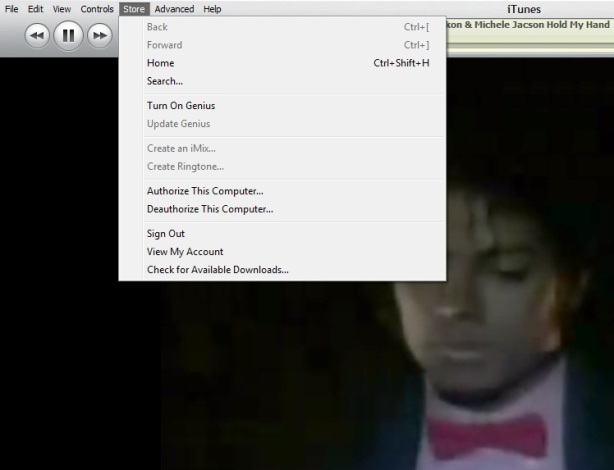
1. Login with the old Account from Menu > Store  > Sign  in
2. Then Menu > Store  > Deauthorize This Computer
3. Then Menu > Store  > Sign out
4. Menu > Store  > Sign in with your new account
5.Then Menu > Store  > Authorize This Computer

On iDevice
1. Go to Setting > Store >
2. Tap on Sign out
3. Go to Setting > General > Reset
4. Reset Local warning, Home screen Layout and Keyboard Dictionary
5. Reboot the iDevice

Last step
1. Connect the iDevice to PC and Sync with the iTunes

Done

Keyboard Shortcut of iTunes


Some of my friend ask me time to time how to use iTunes smartly via keyboard there is the full list of keyboard controls (for Windows). This list covers them all – from [Enter] to play a song, to [Ctrl+Alt+Down], which mutes the volume…
Let me highlight a few in particular: “Snap window to screen size”, “Reshuffle the current playlist” and “Toggle artwork”.
General:
Play the selected song [Enter]
Plays to the next album in a list [Shift][Ctrl][Alt][Right]
Plays the previous album in a list [Shift][Ctrl][Alt][Left]
Create a new Smart Playlist [Shift][+]
Reshuffle the current playlist [Shift][Shuffle Button]
Delete the selected playlist immediately [Ctrl][Delete]
Delete the selected playlist and all the songs listed in it [Shift][Delete]
Check or uncheck all the songs in a list [Ctrl][Click checkbox]
Expand or collapse all the subfolders and lists [Ctrl][Click triangle]
Snap window to screen size [Shift][Double click the title bar]
Refresh the Radio or Party Shuffle list [F5]
Next Music Store Page [Ctrl][]]
Previous Music Store Page [Ctrl][[]
Mini Player [Ctrl][M]
Stream audio from a URL [Ctrl][U]
File Menu:
New Playlist [Ctrl][N]
New Smart Playlist [Ctrl][Alt][N]
New Playlist with selected songs [Ctrl][Shift][N]
Add File [Ctrl][O]
Close Window [Ctrl][W] or [Alt][F4]
Import… [Ctrl][Shift][O]
Get Info [Ctrl][I]
Show File [Ctrl][R]
Show File that is currently playing [Ctrl][L]
Print [Ctrl][P]
Edit Menu:
Undo [Ctrl][Z]
Cut [Ctrl][X]
Copy [Ctrl][C]
Paste [Ctrl][V]
Select All [Ctrl][A]
Unselect All [Ctrl][Shift][A]
Preferences [Ctrl][,]
Controls Menu:
Play / Pause [Spacebar]
Next song [Right]
Previous song [Left]
Next Chapter [Ctrl][Shift][Right]
Previous Chapter [Ctrl][Shift][Left]
Increase volume [Ctrl][Up]
Decrease volume [Ctrl][Down]
Mute [Ctrl][Alt][Down]
Eject Disc [Ctrl][E]
View Menu:
Toggle Browser [Ctrl][B]
Toggle Song Artwork [Ctrl][G]
Toggle MiniStore [Ctrl][Shift][M]
Toggle Visualizer [Ctrl][T]
List View [Ctrl][Alt][3]
Album View [Ctrl][Alt][4]
CoverFlow View [Ctrl][Alt][5]
Video/Viz: Half Size [Ctrl][0]
Video/Viz: Actual Size [Ctrl][1]
Video/Viz: Double Size [Ctrl][2]
Video/Viz: Fit to Screen [Ctrl][3]
Video/Viz: Full Screen [Ctrl][F]
View Options [Ctrl][J] or [Right click on a column heading]

iTunes 9.2 and all abouts


Apple has released iTunes 9.2 for Mac and Windows, which will be required for installing the upcoming iOS 4 update, and syncing iPhone 4. Previously released in beta for the Mac at WWDC 2010, new features include:
iTunes 9.2 comes with several new features and improvements, including:
  • Sync with iPhone 4 to enjoy your favorite music, movies, TV shows, books and more on-the-go
  • Sync and read books with iPhone or iPod touch with iOS 4 and iBooks 1.1
  • Organize and sync PDF documents as books. Read PDFs with iBooks 1.1 on iPad and any iPhone or iPod touch with iOS 4
  • Organize your apps on your iOS 4 home screens into folders using iTunes
  • Faster back-ups while syncing an iPhone or iPod touch with iOS 4

  • Album artwork improvements make artwork appear more quickly when exploring your library

  • For information on the security content of this update, please visit: http://support.apple.com/kb/HT1222
Hit up Apple’s Software Update to grab it, and let us know how it works for you.
Jail Breakers :
iPad Jail breakers Code Red
Spirit User Code Red
PwnageTool & redsn0w users Code Green :-)


Dream video Camera for iPhone on AppStore with effects. broadcust live when recording to the web and take snap while taking video

Qik Video Camera  Version: 4.68 for iPhone 2G 3G & 3GS is with cool effects. Now enhance with the ability to show what you are recording LIVE to the web!

The Video Camera for any iPhone, with amazing touch effects, zoom, pause and other controls. The world's first video camera that lets you apply special effects as you record and show that Live to the web. You can even take a picture of your favorite moment while recording the video.

• The best combined resolution and FPS performance in the app store
• Show what you are recording as you record it - Live to the web at qik.com/<your account> where your friends and family can watch you live as you record. Every live video is also automatically stored for your friends to view it later. Please note that the Live quality may be compromised depending on the available network.
• Viewers watching the live video on the web can text chat back which shows up on the phone right above the Effects wheel.
• 10 amazing real-time effects that you can now apply as you record that can even show up live on the web. For example - you can show your kid's soccer game live in black & white:
- Black&White, Mirror, Avatar, Sepia, Twirl, X-ray: Yup, it is like having Apple's Photo Booth effects right on your iPhone
- Red Only: In this case the entire picture is black-and-white except the red
- Lens: focus on specific areas just with a touch
- PhotoMix: This cool effect lets you start with a picture and then erase parts of the picture to reveal the video
- Frosted glass: Start with a frosted glass screen and then wipe the screen to reveal the clear video
• Fastest and the most reliable sharing to Facebook, Twitter, Youtube or Qik
• Wish you could freeze some of those precious moments? Now you can with the new Capture Photo feature! Photo shows for 3secs and then is moved to the photo gallery
• The only video camera app where video and audio are always in sync
• Share links via SMS and Email or attach your video to Email
• Patent pending, exclusive live upload technology -- no restarts on the inevitable network disconnects, no wires, no hassle
• Archive, view, and manage your videos on qik.com -- no memory worries
• SPECIAL FOR 3GS USERS: upload videos taken with the native video recorder to Facebook, Twitter, SMS and Qik

Other features include:
• Smooth zoom and brightness control, audio gain control
• Export videos to phone's gallery (auto-export option in settings)
• Download videos via local Wi-Fi
• Standby mode - save your battery
• Audio feedback for Record, Stop and Pause buttons - lets you film yourself
• Landscape recording

Tips for better recording:
• Better lighting = better video quality
• Your iPhone's microphone is located at the bottom - make sure it's not covered by your hand when recording
• You can download your videos through a browser on Wi-Fi:
- Enable Wi-Fi access to your videos in Qik Gallery view - get the address shown in popup window
- Enter that into your local web browser to see your videos!
• Use volume buttons to control level of audio feedback
• Effects controls:
- Spin the effects wheel to choose an effect
- Use tab on the left to hide control panel and watch effects at full
- Currently selected effect has its thumbnail zoomed in - hit black cross to turn off effect and go back to Normal
- For PhotoMix effect, a new image is suggested to be selected only at the first start of application or after black cross is pressed

For 3GS users: this app provides effects, zoom and auto-focus, but the video quality of native video camera on iPhone 3GS is still higher than with this application. You can use this app to upload native videos, though.

Getting crazy ? See in appstore

May Day! May Day! IPHONE DEV TEAM under attack! 2 Officer down

It's a May Day! for all the iPhone Dev Team is under cyber attack! www.redsn0w.com  & www.ultrasn0w.com has been hijacked by same hacker and he put site icon as Monalisa's icona and put "hello world" on the index page of the both of the web page. Here i like to mention that apple use the same picture as wall paper in bundle.... is apple getting dirty ?

The main site of the iPhone Dev Team (http://blog.iphone-dev.org) is still up  ... Wish  the sites will be fixed soon 

Thanks to @aditadx for bringing to attention

Wi-Fi Sync for iPhone: Syncing with no USB cable for $10 or Free?


It 'just been released in Cydia Store application Wi-Fi Sync, as already announced, allows you to synchronize your device with iTunes just using a WiFi connection and no longer need the USB cable. It 'just been released in Cydia Application Store Wi-Fi Sync, as Announced Already, allows you to synchronize your device with iTunes just using a WiFi connection and No longer need the USB cable. Operation is very simple and we see along the characteristics: Operation is very simple and we see along the characteristics:


Once installed Wi-Fi Sync, just launch it and your device will appear in the list of devices connected in the left column of iTunes. Once installed the Wi-Fi Sync, just launch it and your device will Appear in the list of devices connected in the left column of iTunes. Of course requirement is that you are connected to the same WiFi network both computers from the iPhone or iPod Touch! Of course requirement is That You Are Connected To The Same Both WLAN network computers from the iPhone or iPod Touch!

So you can make a full synchronization of photos, emails, contacts, music, applications and all without the need of the USB cable but uses only a WiFi connection! I know you can perform a full synchronization of photos, emails, contacts, music, and all applications without the need of the USB cable But only uses a WiFi connection!


Wi-Fi when Sync is only compatible with computers running Mac OS X 10.5 and 10.6 but the developer assures that an update compatible with the Windows operating system will arrive shortly. Wi-Fi Sync is currently only compatible with computers running Mac OS X 10.5 and 10.6 But The developer assures That an update compatible with the Windows operating system Will Arrive Shortly.

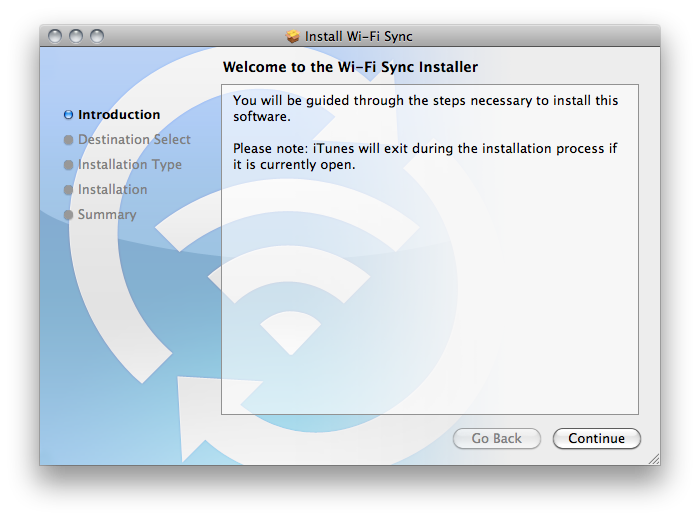
To operate you must have also installed the free software for Mac which you can download official link by clicking here - DOWNLOAD

Wi-Fi Sync does not currently support iPad. Wi-Fi sync does not currently support iPad.

Frankly I expected better from what must have been a revolutionary application and instead, at least at the moment (although I do not think will improve a lot), it is only compatible with Mac and moreover require a client installed on your computer. Frankly I expected better from what must have Been a revolutionary application and INSTEAD, at least at the moment (although I do not think Will Improve a lot), it is only compatible with Mac and to require Moreover client installed on your computer. I believe that it is much easier to plug the USB cable and start a better sync ... especially free! I Believe That It Is Much Easier To connect the USB cable and start to better sync ... Especially free! The cost of this application it is not even very low, indeed! The cost of this application it is not even very low, indeed!

Here's a video of the Wi-Fi Sync in action: Here's a video of the Wi-Fi Sync in action:


Go to the manufacturer's site -> CLICK
Find Wi-Fi Sync on Cydia Store at a price of $ 9.99 (but we crazy?).

PS who have a mac and wanna try follow me on twitter will not let u down :D

A Masterpiece Collection for the reader of iPad/iPhone/iPod

Masterpiece Collection is a book collection iPad/iPhone/iPod touch highly praised by the reader & the reviewer cause it has chosen the books very wisely
"A luxurious reading experience." - MacWorld
Beautifully typeset using techniques used for quality printed books, this collection includes unabridged versions of some of the world's most loved novels, plays and short stories. Pages can be 'turned', their edges following your finger, mimicking real books.

• 3D animation lets you ‘turn’ pages, mimicking real books.
• Each title displayed on a custom-designed book spine
• Lovingly typeset using techniques for quality printed books
• Choice of three text sizes (via your iPhone’s Settings App)

This app is powered by Gizreader, created by and for lovers of books. See a video demo on the GizReader website. (www.gizreader.com)

The depth of each richly designed spine tells you whether a book is short, long or in-between.

Skim down the pile of books. Tap to choose. A highlight reminds you which title you were last reading.

Lose yourself almost instantly in the story. GizReader is quick. Its type is crisp and clear, beautifully set for reading pleasure. Each book’s formatting is checked and polished, compared where necessary against multiple sources.

Pages turn realistically, their edges following your finger, with a satisfying flip sound. (Unless you turn the sound off.) Alternatively, you can tap or swipe to turn pages instantly.

When you return to a book, GizReader remembers your place, even if you have resized the text. (Choose from three text sizes in your iPhone’s Settings App.) You can also see from the progress bar where you are in the story.

The app includes unabridged versions of some of the world’s most loved masterpieces. The collection grows over time, via free updates.

The titles are:

Novels:
• The Adventures of Huckleberry Finn by Mark Twain
• The Adventures of Tom Sawyer by Mark Twain
• Around the World in 80 Days by Jules Verne
• The Call of the Wild by Jack London
• The Count of Monte Cristo by Alexandre Dumas
• David Copperfield by Charles Dickens
• Emma by Jane Austen
• Frankenstein by Mary Shelley
• Gulliver’s Travels by Jonathan Swift
• The Hound of the Baskervilles by Arthur Conan Doyle
• The Invisible Man by H. G. Wells
• Jane Eyre by Charlotte Brontë
• King Solomon's Mines by H. Rider Haggar
• Little Women by Louisa May Alcott
• The Lost World by Arthur Conan Doyle
• The Man in the Iron Mask by Alexandre Dumas
• The Mysterious Affair at Styles by Agatha Christie
• North and South by Elizabeth Gaskell
• Oliver Twist by Charles Dickens
• Pride and Prejudice by Jane Austen
• The Prisoner of Zenda by Anthony Hope
• The Red Badge of Courage by Stephen Crane
• The Return of Tarzan by Edgar Rice Burroughs
• Sense and Sensibility by Jane Austen
• The Strange Case of Dr. Jekyll and Mr. Hyde by Robert Louis Stevenson
• A Tale of Two Cities by Charles Dickens
• Tarzan of the Apes by Edgar Rice Burroughs
• The Time Machine by H.G. Wells
• Treasure Island by Robert Louis Stevenson
• Wuthering Heights by Emily Bronte

Plays:
• The Importance of Being Earnest by Oscar Wilde
• Romeo and Juliet by William Shakespeare

Short story collections (each contains a series of short stories):
• The Adventures of Sherlock Holmes by Arthur Conan Doyle
• The Memoirs of Sherlock Holmes by Sir Arthur Conan Doyle
• The Return of Sherlock Holmes by Sir Arthur Conan Doyle
• The Curious Case of Benjamin Button, and Other Stories by F. Scott Fitzgerald
• The Garden Party and Other Stories by Katherine Mansfield
• The Jungle Book by Rudyard Kipling

New in Version 1.0.10 added a new book:
• The Return of Sherlock Holmes by Sir Arthur Conan Doyle
Check on APPSTORE

Have you ever worried about your iPhone/iPod Touch Battery?

We all have. Now you don't have to worry about that anymore. iBattery Manager Pro - Ultimate Battery App is the most advance battery application inside App store with some of great features like Battery Management, Battery Maintenance, calibration Supercharge( helps your battery to get more charge increasing upto 5 % better battery life) and many more as they claimed. Your search for best ALL-IN-1 Battery Management & Maintenance app ends here.

Get in to the detailed features:- 

SuperCharge (Exclusive)
Your Device is not full charge even if it says 100%.. iBattery Manager overcomes this limitation and help your device charge upto its full potential. Thus overall increasing battery charge by upto 5%

Battery Management(Exclusive)
Helps you manage your iPhone/iPod touch battery in most efficient way. If you want to listen music for 2 hours. Press the music button, slide it to 2 hours, now you can see how much battery will be left after you listen music for 2 hours. Great use when you are generally out.

Battery Timings
Tells you current battery percentage and remaining time of talk 2G, talk3G, standby, video, audio, internet 3g, internet wifi, game, game 3D.

Health/Maintenance
It increase battery life of your device by helping you Full Charge Cycle once in a month. Records your last full charge cycle and reminds you, next scheduled Full Charge Cycle date. So you needn't remember about it. Recommended by Apple at www.apple.com/battries

Dock mode(Exclusive)
If you have an iPhone dock, put your iPhone there while charging, selected the dock mode, now you can see nice LCD display of current time, current battery and remaining time to charge from a far distance, no need to go near your iPhone/iPod Touch to see your current battery charging status. (does not require Dock to work this feature)

Calibration
Battery health calibration to determine the capacity of battery. ( automatic & manual )

Alert on Full Charge
You will be notified with alert sound when your battery get full charged. There are 6 different alert sound to choose from. It also supports alert repetition so that you never miss the alert.

Remaining time to Recharge
Tells you remaining time to recharge when connected to power cable/usb cable.

Tips & Tricks:- Apply these latest Tips & Tricks to maximize your battery life

and more....

iBattery Manager supports the following device model
- iPhone 2G
- iPhone 3G
- iPhone 3GS
- iPod 1st Gen
- iPod 2nd Gen
- iPod 3rd Gen


They had recently update to Version 2.0
Version 2.0 comes with the following new features
--------------------------------------------------
+ Complete rewrite of code
+ Battery life for Game(normal) and Game 3D is included
+ Added Battery Maintenance
+ Added dock mode
+ Added Calibration of battery (Manual and Automatic) feature
+ Added 6 different sounds to choose from for alert on full recharge
+ Added alert sound repetition interval so that you never miss the alert sound
+ Added alert sound repetition ON/OFF setting
+ Added FAQ
+ Added Bug report and Feature request inside the app
+ Added Share with mail and write a review
+ Added About page

Can check screen shot & buy from AppStore for $0.99

Spirit is out for BUT with lots of bug an your dead iphone will not bring to life


Nothing to write about it massy release with so many limitation locked devices cant be jailbreak ed so why it is useful LOL and people gave donation for this?
If you give a try http://spiritjb.com/

Darkroom: A Great iPhone Experience shooting in the dark

Does your iPhone photos come up blurry at times? Is it from insufficient lighting or accidental motion from pressing the shutter button? Whatever the reasons, Darkroom can help you achieve better photos.

Darkroom's steady mode feature takes a photo automatically once there's no movement. You'll only need to focus on the subject and keep your hands steady. Perfect for subjects in low light or self portraits.

You are now able to share your photos online. Instead of keeping the photos to yourself in your Camera Roll, upload it your online Stepcase photo album and immediately share those moments with friends and family.

Features:
- One click photo taking
- Optimized steady mode algorithm
- Preview in Camera Roll
- Auto save
- Online album
- Clean interface with larger viewing window

Upgrade to Darkroom Pro and get two more steady modes for greater control as well as other useful features such as Self timer and full screen shutter.

----
This camera application is designed for iPhone only. Check @ iTunes AppStore it's FREE

Steve Jobs shares his thoughts on Flash and Ask to read it

Steve Jobs has posted an open letter on Apple’s website regarding Adobe’s Flash. Below is an exclusive summary of the six key points as to why Flash is not supported on iPhone OS.
  • Apple says Flash isn’t “open”
    Apple notes that Adobe’s Flash products are 100% proprietary meaning that they are only available from Adobe, and Adobe has sole authority as to their future enhancement, pricing, etc.
  • Adobe claims iPhone OS cannot access the “full web”
    Apple disagrees. Apple states that almost all this video is also available in a more modern format, H.264, which is viewable on iPhone, iPod touch, and iPad. In addition, Apple supports HTML5, CSS, and JavaScript. And don’t forget the shiny YouTube application.
  • Reliability, Security, Performance
    Symantec recently highlighted Flash for having one of the worst security records in 2009. Flash is the number one reason why Macs crash. Flash does not run well on mobile devices.
  • Battery life
    Flash requires that videos be encoded through software rather than hardware which gives you about half the battery life.
  • Touch
    Flash has many features that do not work well with multi-touch such as rollovers. Developers would need to rewrite their Flash websites. Instead, Apple suggests switching to more modern technologies like HTML5, CSS, and JavaScript.
  • “The most important reason”
    Apple isn’t too fond of having third party development tools. Especially if it’s cross-platform.
The full-length letter can be found across the jump.

Full-Length Letter on APPLE:

The Next iPhone confirmed on June 7

Apple put up details about its Worldwide Developers Conference (WWDC) on its site. Given the recent iPhone 4G leak and Apple’s usual timing when it comes to iPhone announcements, it’s very likely that Apple will officially announce the next version of iPhone at the conference, which is being held from June 7-11 in San Francisco.
Since the leaked prototype that ended up in the hands of tech blog Gizmodo is obviously very real, we don’t expect too many surprises. We expect the iPhone 4G (as it will likely be called) to feature a front camera, an upgraded back camera, improved display, microSIM support and metal details on the case.

And Steve Jobs Tweeted the announcement of the new iPhone on June 7

Turbo2Sn0w Reboot issue on Windows: Cause and HowTo FIX

As we inform you that Turbo2Sn0w ends up with ASL.dll error and will shutdown / reboot your PC in 600 second.

What it do actually ?

It copy a batch file name iTunes.bat on the start-up folder with the error msg and shutdown command


TO DO 2 FIX the issue

Remove the batch file name iTunes.bat from  the startup folder and make a reboot

Turbo2Sn0w Another fake jailbreak will shoutdown / reboot your PC in10 min

Did nothing but a command screen dll show and ends up with ASL.dll error and will shutdown / reboot your PC in 600 second

Thunderst0rm been release April Fool after 25 days

Thunderst0rm been release & nothing worth it. Just a cheating ...

NO DFU or Recovery mood
Not even restart device

100% Fake and i fully agree with iH8Snow

iPhone Android / iDroid is Comming for iPhone 3G & 3GS Also for iPod 1st Gen & 2Gen


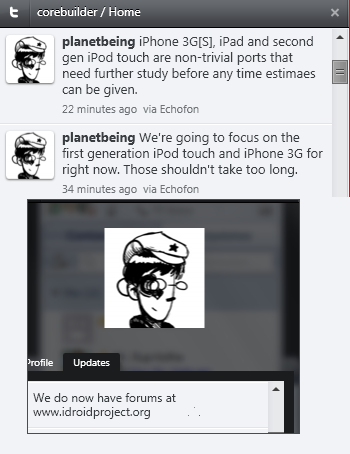
Just few minute back planetbeing announce the update for 3G iPhone & iPod 1st Gen will come in a short time (expecting current week) & iPhone 3Gs & iPod 2nd Gen will take time as they are non-trivial ports and need further study and research.

Also inform the twitter community there is a wiki for iDroid is live with the details of research.

Install iDroid (an Android distribution) on iPhone 2G

Good news theiphonewiki has publish the guideline to install Android on iPhone 2G the iPhone owner may like to try how it works on iPhone as Apple will soon stop the update for the iPhone 2G.


We already publish the news of success of installing Android on iPhone earlier now time to celebrate the achievement.

We don't wanna  pretend very clever or act we know all so like to give the installation guide line from the original source

What you need to have?
  • A compatible jailbroken device (currently only the 2G iPhone is supported)
  • A Linux PC (this guide is tailored for Ubuntu 9.10 or later). Only Live CDs and native Linux installations can be used (No virtual machines)
    • If possible, use a 32-bit version of Linux. You may have difficulty using the pre-built utilities on 64-bit systems.
  • Backups of any important data on the device. This is alpha-quality software, so you may encounter a problem that requires a full Restore to fix. 
OH! last thing due to license cant tell you the source of the installer firmware files Google it I bet you will get those..

These are:
Filename md5 hash
sd8686.bin 57c08a7aa0d6e3efb9db5d96e0f80a8d
sd8686_helper.bin 6edc7f5032463c294eb1b738482f734d
zephyr_aspeed.bin bad4dedccde0a5bef1a9468d918aa75a
zephyr_main.bin 3c6f0f5f567a2a228aa290f2c49b583a


Keep in mind that UBUNTU 10.04 LTS is coming in 5 day!! you are the one to chose wait for the next release or enjoy it now!

Be careful do the experiment if u need any assistance feel free to ask i also like to take part in the experiment but dont have a 2G iPhone :(