


Inside
Showing posts with label AppStore. Show all posts
Showing posts with label AppStore. Show all posts
Rearrange your iPhone/iPod touch Apps right in iTunes
Now you can rearrange your iPhone apps and even the entire app page directly in iTunes. Just plug in your iPhone or iPod touch and select it in the Source window. Now click on the Applications tab and drag your Apps around in the order you want. You can also rearrange the pages of apps themselves by dragging them in the right side bar.


How to fix AppStore login on iPhone / iPod / iPad
I think most of you had suffered after changing the account on you iDevice (iPhone/iPod /iPad) old account pop up while updating or downloading any app.
I was very disappointed and restore my Device and set up as new device. Today a Srilankan friend experiencing the same so I dig out the issue and find some interesting thing, actually iTunes stores last authorized account and while sync the iDevice it push the login information to the device may be the one you don't want.
How to fix it ?
Simple
ON PC iTunes

1. Login with the old Account from Menu > Store > Sign in
2. Then Menu > Store > Deauthorize This Computer
3. Then Menu > Store > Sign out
4. Menu > Store > Sign in with your new account
5.Then Menu > Store > Authorize This Computer
On iDevice
1. Go to Setting > Store >
2. Tap on Sign out
3. Go to Setting > General > Reset
4. Reset Local warning, Home screen Layout and Keyboard Dictionary
5. Reboot the iDevice
Last step
1. Connect the iDevice to PC and Sync with the iTunes
Done
I was very disappointed and restore my Device and set up as new device. Today a Srilankan friend experiencing the same so I dig out the issue and find some interesting thing, actually iTunes stores last authorized account and while sync the iDevice it push the login information to the device may be the one you don't want.
How to fix it ?
Simple
ON PC iTunes
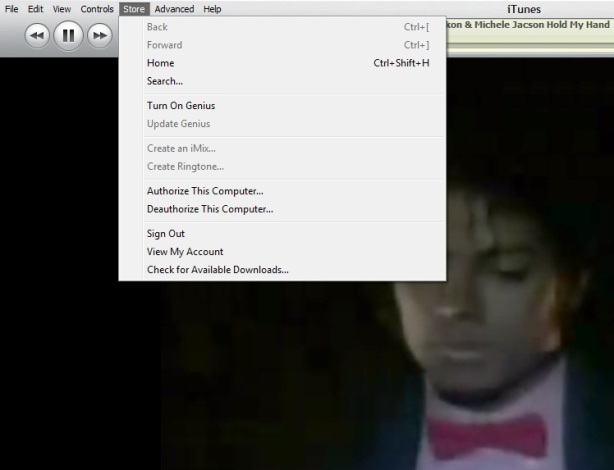
1. Login with the old Account from Menu > Store > Sign in
2. Then Menu > Store > Deauthorize This Computer
3. Then Menu > Store > Sign out
4. Menu > Store > Sign in with your new account
5.Then Menu > Store > Authorize This Computer
On iDevice
1. Go to Setting > Store >
2. Tap on Sign out
3. Go to Setting > General > Reset
4. Reset Local warning, Home screen Layout and Keyboard Dictionary
5. Reboot the iDevice
Last step
1. Connect the iDevice to PC and Sync with the iTunes
Done
Keyboard Shortcut of iTunes

Some of my friend ask me time to time how to use iTunes smartly via keyboard there is the full list of keyboard controls (for Windows). This list covers them all – from [Enter] to play a song, to [Ctrl+Alt+Down], which mutes the volume…
Let me highlight a few in particular: “Snap window to screen size”, “Reshuffle the current playlist” and “Toggle artwork”.
General:
Play the selected song [Enter]
Plays to the next album in a list [Shift][Ctrl][Alt][Right]
Plays the previous album in a list [Shift][Ctrl][Alt][Left]
Create a new Smart Playlist [Shift][+]
Reshuffle the current playlist [Shift][Shuffle Button]
Delete the selected playlist immediately [Ctrl][Delete]
Delete the selected playlist and all the songs listed in it [Shift][Delete]
Check or uncheck all the songs in a list [Ctrl][Click checkbox]
Expand or collapse all the subfolders and lists [Ctrl][Click triangle]
Snap window to screen size [Shift][Double click the title bar]
Refresh the Radio or Party Shuffle list [F5]
Next Music Store Page [Ctrl][]]
Previous Music Store Page [Ctrl][[]
Mini Player [Ctrl][M]
Stream audio from a URL [Ctrl][U]
File Menu:
New Playlist [Ctrl][N]
New Smart Playlist [Ctrl][Alt][N]
New Playlist with selected songs [Ctrl][Shift][N]
Add File [Ctrl][O]
Close Window [Ctrl][W] or [Alt][F4]
Import… [Ctrl][Shift][O]
Get Info [Ctrl][I]
Show File [Ctrl][R]
Show File that is currently playing [Ctrl][L]
Print [Ctrl][P]
Edit Menu:
Undo [Ctrl][Z]
Cut [Ctrl][X]
Copy [Ctrl][C]
Paste [Ctrl][V]
Select All [Ctrl][A]
Unselect All [Ctrl][Shift][A]
Preferences [Ctrl][,]
Controls Menu:
Play / Pause [Spacebar]
Next song [Right]
Previous song [Left]
Next Chapter [Ctrl][Shift][Right]
Previous Chapter [Ctrl][Shift][Left]
Increase volume [Ctrl][Up]
Decrease volume [Ctrl][Down]
Mute [Ctrl][Alt][Down]
Eject Disc [Ctrl][E]
View Menu:
Toggle Browser [Ctrl][B]
Toggle Song Artwork [Ctrl][G]
Toggle MiniStore [Ctrl][Shift][M]
Toggle Visualizer [Ctrl][T]
List View [Ctrl][Alt][3]
Album View [Ctrl][Alt][4]
CoverFlow View [Ctrl][Alt][5]
Video/Viz: Half Size [Ctrl][0]
Video/Viz: Actual Size [Ctrl][1]
Video/Viz: Double Size [Ctrl][2]
Video/Viz: Fit to Screen [Ctrl][3]
Video/Viz: Full Screen [Ctrl][F]
View Options [Ctrl][J] or [Right click on a column heading]
iFireLight for iPad What is it & giveaway

Who never think of getting a flash light on mobile? YES!! True that every one want to keep it for an emergency iPod/ iPhone user have so many option to chose but for the iPad? Not many.
iFireLight for the iPad brings a little bit of safety and comfort to your digital life style. You always have your new digital friend with you, and it is the perfect size screen for lighting up a room when you need it. Easily change the screen color for setting the mood. Even make the screen flash for getting noticed when you need to be noticed.
Just want to sit around a cozy fire any place any time? iFireLight has you covered there too. At the flick of a switch, transform your iPad into a romantic and comfortable center piece. Guaranteed not to catch the curtains on fire.
Stuck in the dark or on the side of the road? Your friendly iPad is there to save the day. Set the desired
screen color, and turn on either the light to see or flashing light for a becon to be seen.
* this app has the ability for a rapidly flashing light, that may be adverse to some people. Be careful and use responsibly.


Note: this app is working with iPad only not with any iPod or iPhone
Who are interested to get the awesome iPad app may hit the download link
The Grand Giveaway
Great news is we got some promo code for this nice app and we like to share with our readers who have a iPad and promo codes are valid for USA store only.
1. Follow @corebuilder & @vonswankoFSM on twitter
2. Make a comment on the post mentioning your twitter id
3. Make a twit “@corebuilder & @vonswankoFSM I’m a iPad owner want the chance for #iFireLight #giveaway for #iPad”
4. We will DM you the promo code
5. Then show us some love by giving some ranking and your valued comments
Dream video Camera for iPhone on AppStore with effects. broadcust live when recording to the web and take snap while taking video

Qik Video Camera Version: 4.68 for iPhone 2G 3G & 3GS is with cool effects. Now enhance with the ability to show what you are recording LIVE to the web!
The Video Camera for any iPhone, with amazing touch effects, zoom, pause and other controls. The world's first video camera that lets you apply special effects as you record and show that Live to the web. You can even take a picture of your favorite moment while recording the video.
• The best combined resolution and FPS performance in the app store
• Show what you are recording as you record it - Live to the web at qik.com/<your account> where your friends and family can watch you live as you record. Every live video is also automatically stored for your friends to view it later. Please note that the Live quality may be compromised depending on the available network.
• Viewers watching the live video on the web can text chat back which shows up on the phone right above the Effects wheel.
• 10 amazing real-time effects that you can now apply as you record that can even show up live on the web. For example - you can show your kid's soccer game live in black & white:
- Black&White, Mirror, Avatar, Sepia, Twirl, X-ray: Yup, it is like having Apple's Photo Booth effects right on your iPhone
- Red Only: In this case the entire picture is black-and-white except the red
- Lens: focus on specific areas just with a touch
- PhotoMix: This cool effect lets you start with a picture and then erase parts of the picture to reveal the video
- Frosted glass: Start with a frosted glass screen and then wipe the screen to reveal the clear video
• Fastest and the most reliable sharing to Facebook, Twitter, Youtube or Qik
• Wish you could freeze some of those precious moments? Now you can with the new Capture Photo feature! Photo shows for 3secs and then is moved to the photo gallery
• The only video camera app where video and audio are always in sync
• Share links via SMS and Email or attach your video to Email
• Patent pending, exclusive live upload technology -- no restarts on the inevitable network disconnects, no wires, no hassle
• Archive, view, and manage your videos on qik.com -- no memory worries
• SPECIAL FOR 3GS USERS: upload videos taken with the native video recorder to Facebook, Twitter, SMS and Qik
Other features include:
• Smooth zoom and brightness control, audio gain control
• Export videos to phone's gallery (auto-export option in settings)
• Download videos via local Wi-Fi
• Standby mode - save your battery
• Audio feedback for Record, Stop and Pause buttons - lets you film yourself
• Landscape recording
Tips for better recording:
• Better lighting = better video quality
• Your iPhone's microphone is located at the bottom - make sure it's not covered by your hand when recording
• You can download your videos through a browser on Wi-Fi:
- Enable Wi-Fi access to your videos in Qik Gallery view - get the address shown in popup window
- Enter that into your local web browser to see your videos!
• Use volume buttons to control level of audio feedback
• Effects controls:
- Spin the effects wheel to choose an effect
- Use tab on the left to hide control panel and watch effects at full
- Currently selected effect has its thumbnail zoomed in - hit black cross to turn off effect and go back to Normal
- For PhotoMix effect, a new image is suggested to be selected only at the first start of application or after black cross is pressed
For 3GS users: this app provides effects, zoom and auto-focus, but the video quality of native video camera on iPhone 3GS is still higher than with this application. You can use this app to upload native videos, though.
• The best combined resolution and FPS performance in the app store
• Show what you are recording as you record it - Live to the web at qik.com/<your account> where your friends and family can watch you live as you record. Every live video is also automatically stored for your friends to view it later. Please note that the Live quality may be compromised depending on the available network.
• Viewers watching the live video on the web can text chat back which shows up on the phone right above the Effects wheel.
• 10 amazing real-time effects that you can now apply as you record that can even show up live on the web. For example - you can show your kid's soccer game live in black & white:
- Black&White, Mirror, Avatar, Sepia, Twirl, X-ray: Yup, it is like having Apple's Photo Booth effects right on your iPhone
- Red Only: In this case the entire picture is black-and-white except the red
- Lens: focus on specific areas just with a touch
- PhotoMix: This cool effect lets you start with a picture and then erase parts of the picture to reveal the video
- Frosted glass: Start with a frosted glass screen and then wipe the screen to reveal the clear video
• Fastest and the most reliable sharing to Facebook, Twitter, Youtube or Qik
• Wish you could freeze some of those precious moments? Now you can with the new Capture Photo feature! Photo shows for 3secs and then is moved to the photo gallery
• The only video camera app where video and audio are always in sync
• Share links via SMS and Email or attach your video to Email
• Patent pending, exclusive live upload technology -- no restarts on the inevitable network disconnects, no wires, no hassle
• Archive, view, and manage your videos on qik.com -- no memory worries
• SPECIAL FOR 3GS USERS: upload videos taken with the native video recorder to Facebook, Twitter, SMS and Qik
Other features include:
• Smooth zoom and brightness control, audio gain control
• Export videos to phone's gallery (auto-export option in settings)
• Download videos via local Wi-Fi
• Standby mode - save your battery
• Audio feedback for Record, Stop and Pause buttons - lets you film yourself
• Landscape recording
Tips for better recording:
• Better lighting = better video quality
• Your iPhone's microphone is located at the bottom - make sure it's not covered by your hand when recording
• You can download your videos through a browser on Wi-Fi:
- Enable Wi-Fi access to your videos in Qik Gallery view - get the address shown in popup window
- Enter that into your local web browser to see your videos!
• Use volume buttons to control level of audio feedback
• Effects controls:
- Spin the effects wheel to choose an effect
- Use tab on the left to hide control panel and watch effects at full
- Currently selected effect has its thumbnail zoomed in - hit black cross to turn off effect and go back to Normal
- For PhotoMix effect, a new image is suggested to be selected only at the first start of application or after black cross is pressed
For 3GS users: this app provides effects, zoom and auto-focus, but the video quality of native video camera on iPhone 3GS is still higher than with this application. You can use this app to upload native videos, though.
Darkroom: A Great iPhone Experience shooting in the dark

Darkroom's steady mode feature takes a photo automatically once there's no movement. You'll only need to focus on the subject and keep your hands steady. Perfect for subjects in low light or self portraits.
You are now able to share your photos online. Instead of keeping the photos to yourself in your Camera Roll, upload it your online Stepcase photo album and immediately share those moments with friends and family.
Features:
- One click photo taking
- Optimized steady mode algorithm
- Preview in Camera Roll
- Auto save
- Online album
- Clean interface with larger viewing window
Upgrade to Darkroom Pro and get two more steady modes for greater control as well as other useful features such as Self timer and full screen shutter.
----
This camera application is designed for iPhone only. Check @ iTunes AppStore it's FREE
APPtilities | 65+ in 1 this iPhone App Giving amost everything what else u need?
Are you looking for the BEST deal in the App Store? Look no further APP BEAST is packed with 60+ apps for the price of 1! WOW !! But Do you need all these ?
TAKE @ Look


APP BEAST comes with a beautifully designed interface which is COMPLETELY customizable by you! You can personalize the looks of the app in seconds!
★ APP BEAST INCLUDES 60+ Apps★
✔ iPod Alarm clock (Customize background and LCD Color!)
✔ Contact Safe
✔ Image Safe
✔ Voice Memo
✔ RSS Reader
✔ Fullscreen Camera (with tons of tools!)
✔ System Information (Memory)
✔ Battery Info
✔ Bubble Level
✔ Parking finder
✔ Image Filters (brightness, contrast, color tints, Black & White, and More)
✔ Security Alarm
✔ Fullscreen Private Web Browser
✔ Flashlight (Customize Colors)
✔ World Holidays & Your Events
✔ Cocktails Recipes
✔ Referee Calls
✔ Neon Paint
✔ Password Generator (Multiple types of protection settings)
✔ Periodic Table of Elements
✔ Metal Detector
✔ BAC Calculator (Blood Alcohol Content)
✔ BMI Calculator (Body Mass Index)
✔ BMR Calculator (Basal Metabolic Rate)
✔ Required Calories Generator by Activity level
✔ THR Calculator (Target Heart Rate)
✔ Max Rep Calculator
✔ Tip Calculator
✔ Currency Converter
✔ Calculator
✔ Random Number Generator
✔ Tally Counter
✔ Web Search (Google, Yahoo!, MSN, Ask)
✔ Task Timers
✔ Emoji Enabler
✔ Traffic Information
✔ Crazy Laws
✔ Language Translator (over 50 Languages)
✔ Dictionary
✔ Thesaurus
✔ Walk N Text
✔ Fake Call
✔ Fake SMS (Texting)
✔ Fake Missed Calls
✔ Fake Lock-Screen Alerts
✔ Fake MMS
✔ Contact Exporter (Export contacts to CSV File)
✔ Group Email
✔ Facebook tools
✔ Twitter Tools
✔ Notes
✔ Fortune Teller
✔ Famous Quotes (over 20,000!)
✔ Metronome
✔ Plum Bob
✔ Altimeter
✔ Massage
✔ Light Rave
✔ Contact Shortcuts (create shortcuts for SMS, CALLS, EMAILS)
✔ Web Apps(Create shortcuts on home-screen for easy access later)
✔ Theme Settings (Set themes for customized look across the app!)
What they Offer more?
★GET A CHANCE TO WIN A FREE Prize worth $499 by purchasing!!!★
★ APP BEAST Promo Info★
-Purchase APP BEAST and send an email to appbeast@gmail.com with the subject as: APP BEAST Promo
-Buyer must send a copy of a valid iTunes Receipt from purchasing APP BEAST to be entered into the contest along with their name!
-All entries must be sent by May 31, 2010!
-Winner will be Selected by the App Beast Random Number Generator based on the order we receive the Emails
-Winner will be announced on a YouTube video and contacted (BY the email address they sent) on June 1, 2010!
-THE APP BEAST PROMO is in no way endorsed or sponsored by Apple® or iTunes®.
Check it out
TAKE @ Look


APP BEAST comes with a beautifully designed interface which is COMPLETELY customizable by you! You can personalize the looks of the app in seconds!
★ APP BEAST INCLUDES 60+ Apps★
✔ iPod Alarm clock (Customize background and LCD Color!)
✔ Contact Safe
✔ Image Safe
✔ Voice Memo
✔ RSS Reader
✔ Fullscreen Camera (with tons of tools!)
✔ System Information (Memory)
✔ Battery Info
✔ Bubble Level
✔ Parking finder
✔ Image Filters (brightness, contrast, color tints, Black & White, and More)
✔ Security Alarm
✔ Fullscreen Private Web Browser
✔ Flashlight (Customize Colors)
✔ World Holidays & Your Events
✔ Cocktails Recipes
✔ Referee Calls
✔ Neon Paint
✔ Password Generator (Multiple types of protection settings)
✔ Periodic Table of Elements
✔ Metal Detector
✔ BAC Calculator (Blood Alcohol Content)
✔ BMI Calculator (Body Mass Index)
✔ BMR Calculator (Basal Metabolic Rate)
✔ Required Calories Generator by Activity level
✔ THR Calculator (Target Heart Rate)
✔ Max Rep Calculator
✔ Tip Calculator
✔ Currency Converter
✔ Calculator
✔ Random Number Generator
✔ Tally Counter
✔ Web Search (Google, Yahoo!, MSN, Ask)
✔ Task Timers
✔ Emoji Enabler
✔ Traffic Information
✔ Crazy Laws
✔ Language Translator (over 50 Languages)
✔ Dictionary
✔ Thesaurus
✔ Walk N Text
✔ Fake Call
✔ Fake SMS (Texting)
✔ Fake Missed Calls
✔ Fake Lock-Screen Alerts
✔ Fake MMS
✔ Contact Exporter (Export contacts to CSV File)
✔ Group Email
✔ Facebook tools
✔ Twitter Tools
✔ Notes
✔ Fortune Teller
✔ Famous Quotes (over 20,000!)
✔ Metronome
✔ Plum Bob
✔ Altimeter
✔ Massage
✔ Light Rave
✔ Contact Shortcuts (create shortcuts for SMS, CALLS, EMAILS)
✔ Web Apps(Create shortcuts on home-screen for easy access later)
✔ Theme Settings (Set themes for customized look across the app!)
What they Offer more?
★GET A CHANCE TO WIN A FREE Prize worth $499 by purchasing!!!★
★ APP BEAST Promo Info★
-Purchase APP BEAST and send an email to appbeast@gmail.com with the subject as: APP BEAST Promo
-Buyer must send a copy of a valid iTunes Receipt from purchasing APP BEAST to be entered into the contest along with their name!
-All entries must be sent by May 31, 2010!
-Winner will be Selected by the App Beast Random Number Generator based on the order we receive the Emails
-Winner will be announced on a YouTube video and contacted (BY the email address they sent) on June 1, 2010!
-THE APP BEAST PROMO is in no way endorsed or sponsored by Apple® or iTunes®.
Check it out

Facebook Ultimate w/♡☺♬ take your facebook experience to the next level!

Facebook Ultimate is a dual-account, fun-packed, full-featured facebook client that will revolutionize the way you look at your social media. Check out some Ultimate videos at:
http://www.ultiapp.com/ultimate101.mov
http://www.ultiapp.com/ultimatepv.mov
http://www.ultiapp.com/ultimatepd.mov
http://www.ultiapp.com/ultimate.mov
New in 1.5: Slideshow! View your or your friend's pictures in style with this new slideshow mode. (http://www.ultiapp.com/ultimatepv.mov)
Features:
- Dual facebook account
- Powerful rules engine
- Define your own spam rules
- Picture decoration (watch the video above)
- Slideshow (watch the video above)
- Google-like search
- Notification page with content preview
- Mark posts/notifications as read/unread
- Global/Multi-album picture view
- Copy and paste
- Multi-color and b/w ☺ emoticons
- Landscape keyboard
- Text flipping
- Fast photo upload
- Save pictures to your iPhone
- Out-of-the-box games/applications detector
- Context sensitive help
- And other facebook features
Let ultimate take your facebook experience to the next level!
Long missing features to send contact information from iPhone via SMS now possible

Long missing features to send contact information from iPhone now possible by SMSCard. The app allows You to select contact from Your address book. It makes it possible to send exactly the phone numbers that You want, e.g. You can choose whether You would like to send contact's work number, home number or both by simply checking the required square. Then naturally You press the button „SMS send“. After this You are redirected to an SMS window where You simply have to select recipient phone number and double click on SMS text area and paste the contact. On pressing button „SEND“ your generated contact information will be sent to recipient.
Check this out iTunes Download
BarMax CA The $1000 application Get hacked and being distributed


BarMax: California Edition. Harvard lawyers teamed with top iPhone developers to produce BarMax, the only complete bar exam prep solution (Essay, MBE, Performance Test, and Flash Cards) available for purchase in the iPhone App Store. Plus it is the only course with 1,371 REAL previous MBE questions, and over 100 REAL previous essay exams.
"Although I've only had the BarMax application for a few weeks, I am already a huge fan. I've had zero problems with the application and it has been very helpful to listen to the lectures." -Craig G, actual BarMax student.
Contact us at info@getbarmax.com for more information, and try BarMax Lite in the App Store for a FREE Trial Version of BarMax to evaluate the course materials. BarMax MPRE is also available to download for free.
Take 50 pounds of books and condense them into the palm of your hand. With BarMax, you squeeze thousands of pages of bar exam course material and over 1,500 real multiple choice and essay practice questions into your iPhone or iPod Touch. In addition, once you purchase the app, we send you a complete Welcome Packet with hundreds of pages of supplemental material, on-screen outlines, practice exams, and suggested as well as optional hard copy printouts.
BarMax's Advisory Board oversees content; Advisory Board Members include:
- Paul Pelosi, Jr. Esq. NASA. JD/MBA Georgetown University.
- Seo Salimi, Esq. Latham & Watkins. JD, University of Southern California.
- Christopher Blazejewski, Esq. Sherin and Lodgen LLP. JD, Harvard University.
- Tej Srimushnam, Esq. Morrison & Foerster. JD, University of Pennsylvania.
- Michael Allen, Esq. President, Lateral Link. JD, Harvard University.
BarMax is a complete solution and the most thorough yet flexible way to study for the bar exam. Listen to audio lectures right on your iPhone wherever you are. Practice MBE questions or review flashcards on the go. With BarMax, your life will no longer revolve around your bar exam prep course. Instead, your bar exam prep will revolve around you.
Don't worry if you don't own an iPhone--we can ship you an iPod Touch as part of your package that will run the app. You will also receive a welcome packet that includes all the materials in Word format so you can print them up and follow along.
If you want to study with your laptop and paper in addition to the iPhone, we have you covered. "On request, BarMax will also send users electronic copies of paperwork." --American Bar Association (ABA) Journal
We offer all of this for one fourth of the price of current packages on the market. We are using the revolutionary technology behind the iPhone to enable bar prep at a much better price, and to teach students in a much better way.
BarMax includes:
- Outlines & audio lectures for all 12 subjects
- Email support (live contact with Harvard-educated lawyers)
- Skeleton outlines for note taking
- 1,371 real practice MBE questions from previous exams categorized by subject
- Over 800 flashcards categorized by subject
- 102 real practice CA essay questions with sample answers
- 18 real practice CA performance tests with sample answers
Plus more…
- Welcome packet with all the materials in MS Word format and hard copy printout option
- Lifetime access to the app and course materials once you purchase
- Great tips and tricks on how to perform on exam day and structure your studying
- Full calendar to make tackling exam prep a breeze—just follow the calendar and you will be prepared
- Review includes: Constitutional Law, Contracts, Crimes, Evidence, Real Property, Torts, Remedies, Professional Responsibility, Civil Procedure, Business Associations (Corporations, Agency & Partnership), Trusts & Wills, and Community Property
Find out who is no longer your friend on Facebook

Unfriended !!!
It's happened to all of us. You are on Facebook and you happen to notice that your number of friends is less than what it used to be. Why doesn't Facebook tell me who unfriended me? Is it trying to spare my feelings? Unfriended can't tell you why, but it can tell you who. Don't spend hours going over your friend list to determine who doesn't love you anymore.
Who WOULDN'T want to be friends with me?!? My posts are ever so witty. My photos are always tasteful. I keep my Farmville and Bejeweled posts to a minimum. Who could feel so strongly about me that they they no longer want to be my friend?
Well there are lots of reasons. Maybe you recently broke up with someone and that person doesn't want you cyber-stalking them. Maybe the person decided that no matter how many friends you have in common, they really don't know you. Maybe that person can't stand your constant updates about when you are tired, sleepy, at work or what you had to eat that day. It's hard to say.
Even though the people on Facebook may not be anymore, Unfriended will always be your friend.
 View In iTunes $0.99
Who WOULDN'T want to be friends with me?!? My posts are ever so witty. My photos are always tasteful. I keep my Farmville and Bejeweled posts to a minimum. Who could feel so strongly about me that they they no longer want to be my friend?
Well there are lots of reasons. Maybe you recently broke up with someone and that person doesn't want you cyber-stalking them. Maybe the person decided that no matter how many friends you have in common, they really don't know you. Maybe that person can't stand your constant updates about when you are tired, sleepy, at work or what you had to eat that day. It's hard to say.
Even though the people on Facebook may not be anymore, Unfriended will always be your friend.
- Category: Social Networking
- Released: Jan 28, 2010
- Version: 1.0
- 0.2 MB
- Languages: English
- Seller: Initech, LLC
- © Initech LLC
Quickoffice Mobile Office Suite 3.0 with some New Featurs Ready for it?
ACCESS. VIEW. EDIT. SHARE.
Quickoffice Connect™ Mobile Suite is the FIRST and ONLY full-featured Microsoft® Office productivity suite for iPhone® or iPod® touch with integrated access to multiple cloud services.
Quickoffice Connect™ service allow for easy access to MobileMe, Dropbox, Google® Docs, and Box.net.
Our solution provides continuous and convenient access to your same content across multiple devices, such as from office workstations to home computers, laptops, iPhone or iPod touch using your existing user account.
Provides easy mobile access to content with an intuitive interface to cloud services.
Access remote content and share edited files via email or return your content to remote cloud storage accounts.
Users will enjoy all the same award-winning functionality as before with Quickoffice Mobile Office Suite and now easily access newly supported cloud services using your existing user account.
With Quickoffice Connect™ Mobile Suite you can:
• Create, Open & Edit Microsoft® Office Files (DOC, DOCX, XLS and XLSX)
• Email, View & Access Attachments with Popular File Formats (PPT, PDF, iWork, HTML, PNG, JPG, GIF, SVG, TIF, MP3, etc.)
• Remotely Access Files via Cloud Storage Services (Box.net, Dropbox, Google Docs and MobileMe)
• Share Files via Email or Cloud Service Providers
• Manage and Transfer Files via WiFi
Localized in French, German, Italian, Spanish, Japanese, Simplified & Traditional Chinese
FREE Updates (coming in 2010): Create & Edit PowerPoint files
Reasons to buy Quickoffice vs. any other solution:
• Fast and responsive app performance
• No desktop application to install – simple file transfer from any browser
• Easy access to multiple remote storage providers and sharing of files
• Robust, rich features for power users such as two-finger zoom and fast scrolling
• No need to purchase MS Exchange® to access or email files
• Very easy to use, intuitive user interface
• 100% data integrity – guaranteed Microsoft® compatibility
• Responsive Customer Care Specialists
• Simply works better!
Quickoffice Connect™ Mobile Suite offers 7 applications in 1 powerful mobile solution:
• Create, Open & Edit Word documents
• Create, Open & Edit Excel spreadsheets
• Transfer desktop files via WiFi
• Remotely Access files from multiple cloud service providers
• Email & Access files directly via iPhone
• Mount your device as a drive via WiFi
• Advanced Notepad Editor
Quickword® - Advanced Word Document Processing
• Create, Open & Edit Microsoft Word documents
• Extensive text formatting; bold, italics, underline, font sizes, styles
• Wrap text at any zoom level eliminates repetitive left/right scrolling
• Adjust indentation level of bulleted/numbered lists, paragraphs
• Set paragraph alignment
• File support: Edit (97-2008) DOC, DOCX, TXT
Quicksheet® - Advanced Excel Spreadsheet Editor
• Create, Open & Edit Microsoft Excel spreadsheets
• Professional-grade calculation engine
• Supports advanced Excel features
• Edit font type & size
• Extensive formatting: bold, italic, cell background, font color, symbols
• File support: (97-2008) XLS, XLSX
Also includes full Quickoffice Connect™ functionality and services for remote access, email, WiFi, and file management.
Visit Quickoffice.com/iPhone for full technical details.
Quickoffice Connect™ Mobile Suite is the FIRST and ONLY full-featured Microsoft® Office productivity suite for iPhone® or iPod® touch with integrated access to multiple cloud services.
Quickoffice Connect™ service allow for easy access to MobileMe, Dropbox, Google® Docs, and Box.net.
Our solution provides continuous and convenient access to your same content across multiple devices, such as from office workstations to home computers, laptops, iPhone or iPod touch using your existing user account.
Provides easy mobile access to content with an intuitive interface to cloud services.
Access remote content and share edited files via email or return your content to remote cloud storage accounts.
Users will enjoy all the same award-winning functionality as before with Quickoffice Mobile Office Suite and now easily access newly supported cloud services using your existing user account.
With Quickoffice Connect™ Mobile Suite you can:
• Create, Open & Edit Microsoft® Office Files (DOC, DOCX, XLS and XLSX)
• Email, View & Access Attachments with Popular File Formats (PPT, PDF, iWork, HTML, PNG, JPG, GIF, SVG, TIF, MP3, etc.)
• Remotely Access Files via Cloud Storage Services (Box.net, Dropbox, Google Docs and MobileMe)
• Share Files via Email or Cloud Service Providers
• Manage and Transfer Files via WiFi
Localized in French, German, Italian, Spanish, Japanese, Simplified & Traditional Chinese
FREE Updates (coming in 2010): Create & Edit PowerPoint files
Reasons to buy Quickoffice vs. any other solution:
• Fast and responsive app performance
• No desktop application to install – simple file transfer from any browser
• Easy access to multiple remote storage providers and sharing of files
• Robust, rich features for power users such as two-finger zoom and fast scrolling
• No need to purchase MS Exchange® to access or email files
• Very easy to use, intuitive user interface
• 100% data integrity – guaranteed Microsoft® compatibility
• Responsive Customer Care Specialists
• Simply works better!
Quickoffice Connect™ Mobile Suite offers 7 applications in 1 powerful mobile solution:
• Create, Open & Edit Word documents
• Create, Open & Edit Excel spreadsheets
• Transfer desktop files via WiFi
• Remotely Access files from multiple cloud service providers
• Email & Access files directly via iPhone
• Mount your device as a drive via WiFi
• Advanced Notepad Editor
Quickword® - Advanced Word Document Processing
• Create, Open & Edit Microsoft Word documents
• Extensive text formatting; bold, italics, underline, font sizes, styles
• Wrap text at any zoom level eliminates repetitive left/right scrolling
• Adjust indentation level of bulleted/numbered lists, paragraphs
• Set paragraph alignment
• File support: Edit (97-2008) DOC, DOCX, TXT
Quicksheet® - Advanced Excel Spreadsheet Editor
• Create, Open & Edit Microsoft Excel spreadsheets
• Professional-grade calculation engine
• Supports advanced Excel features
• Edit font type & size
• Extensive formatting: bold, italic, cell background, font color, symbols
• File support: (97-2008) XLS, XLSX
Also includes full Quickoffice Connect™ functionality and services for remote access, email, WiFi, and file management.
Visit Quickoffice.com/iPhone for full technical details.
What's new in Version 3.0.0
Access your Google Docs, Box.net, Dropbox, & MobileMe accounts!
General enhancements.
General enhancements.
Qik VideoCamera - 15 FPS, Zoom+Effects! for 3G & 2G Wow !!

Add a Video Recorder to your iPhone with Qik VideoCamera!
• Realtime Effects & Zoom (3G & 2G only), Up to 15 FPS
• Brightness control, Audio boost, Landscape mode, Email sharing, and more!
Exclusive realtime effects allow you to see the effect live, while shooting!
• Black & white
• Black & white with Red - bright red and yellow objects keep their color
• Mirror horizontal and vertical - image is reflected, carnival-style
• Color game (aka "Avatar mode") - red and blue are reversed
Note: only one color effect, zoom, or brightness can be applied at the same time, and some FPS reduction will occur (10-20%)
More reasons Qik VideoCamera is one of the best-loved apps in the app store:
• 12+ FPS at max resolution with good lighting
• access all your videos from your PC/Mac on local network (see the Gallery in List View)
• No recording limit at any resolution
• Instant saving at any resolution, just shoot and go (or shoot again!)
• Export video to Camera Roll and and then to iPhoto
2 quality modes supported:
• 400x304, 12+ FPS - 8MB/min file size
• 200x152, 15 FPS - 3.5MB/min file size
::Update for Facebook sharing coming next week!::
Coming soon:
• Effects for 3GS
• Share to Facebook, YouTube, Twitter, Brightcove and Qik.com
• Share by SMS
• Geo location
Tips:
• High FPS is only achievable under good lighting conditions - this is a limitation of 2G & 3G iPhones.
• If your iPhone has been running for a long time, and FPS seems low, it might need a restart; they do suffer from slow-downs over time.
• To export a video to the Camera Roll, tap the bottom right button to view your videos. Then select the video, press "Export" and wait till you see success.
• if new video does not show up in iPhoto, unplug your iPhone and plug it back.
• Special effects use processing power, so FPS will be reduced somewhat (10-20%)
• Recorded videos are currently best played in QiuckTime on any platform (Mac/PC)
Download Qik VideoCamera and start recording fun, high quality videos with your iPhone now!
The Qik Free and Open Source Software Notice http://qik.com/info/opensource is incorporated herein by reference.
• Realtime Effects & Zoom (3G & 2G only), Up to 15 FPS
• Brightness control, Audio boost, Landscape mode, Email sharing, and more!
Exclusive realtime effects allow you to see the effect live, while shooting!
• Black & white
• Black & white with Red - bright red and yellow objects keep their color
• Mirror horizontal and vertical - image is reflected, carnival-style
• Color game (aka "Avatar mode") - red and blue are reversed
Note: only one color effect, zoom, or brightness can be applied at the same time, and some FPS reduction will occur (10-20%)
More reasons Qik VideoCamera is one of the best-loved apps in the app store:
• 12+ FPS at max resolution with good lighting
• access all your videos from your PC/Mac on local network (see the Gallery in List View)
• No recording limit at any resolution
• Instant saving at any resolution, just shoot and go (or shoot again!)
• Export video to Camera Roll and and then to iPhoto
2 quality modes supported:
• 400x304, 12+ FPS - 8MB/min file size
• 200x152, 15 FPS - 3.5MB/min file size
::Update for Facebook sharing coming next week!::
Coming soon:
• Effects for 3GS
• Share to Facebook, YouTube, Twitter, Brightcove and Qik.com
• Share by SMS
• Geo location
Tips:
• High FPS is only achievable under good lighting conditions - this is a limitation of 2G & 3G iPhones.
• If your iPhone has been running for a long time, and FPS seems low, it might need a restart; they do suffer from slow-downs over time.
• To export a video to the Camera Roll, tap the bottom right button to view your videos. Then select the video, press "Export" and wait till you see success.
• if new video does not show up in iPhoto, unplug your iPhone and plug it back.
• Special effects use processing power, so FPS will be reduced somewhat (10-20%)
• Recorded videos are currently best played in QiuckTime on any platform (Mac/PC)
Download Qik VideoCamera and start recording fun, high quality videos with your iPhone now!
The Qik Free and Open Source Software Notice http://qik.com/info/opensource is incorporated herein by reference.
New in this version • Amazing real-time Video Effects on iPhone 3G / 2G!
• Up to 15 fps, Zoom, Landscape, plus major video and audio quality improvements
• Audio Boost and Brightness controls
• B&W (w/Red filter), Fun-house Mirror, Color change filter for iPhone 3G/2G
• User can now choose from different video qualities on 2G/3G
• Local Web access for easier file download
• E-mail sharing
• UI improvements
• Application start time reduced, plus other fixes
• Up to 15 fps, Zoom, Landscape, plus major video and audio quality improvements
• Audio Boost and Brightness controls
• B&W (w/Red filter), Fun-house Mirror, Color change filter for iPhone 3G/2G
• User can now choose from different video qualities on 2G/3G
• Local Web access for easier file download
• E-mail sharing
• UI improvements
• Application start time reduced, plus other fixes
Languages English
Requirements Compatible with iPhone.
Requires iPhone OS 3.1 or later.
Requires iPhone OS 3.1 or later.
After the jailbreak!!!
Good Day i&IPeople!
You all are quite familiar with the jail break and unlock now I am goanna mention few thing I like to do after jail break. Not mandatory but I like to install few services and fixes that I like you may like it too.
NB. This Post will update regularly and how to do it will be post on separately so Don’t forget to keep ur eye on it or can follow blog…
1. Update the Cydia (prefer complete update)
2. Install APT 7
3. Unlock the iPhone (Blackra1n by GeoHot is the 1 now my fav) [Link 4 how2]
4. Disable The unnecessary demons [Link 4 how2]
5. Install OpenSSH [Link 4 how2]
6. Change the Default SSH password for root & mobile [Link 4 how2]
7. Command line Text editor Nano [Link 4 how2]
8. Adding Favorite Repo all atones [Link 4 how2]
9. PushFix [Link 4 how2]
10. Disable the annoying msg “Call forward been activated” via ForwardMsgFix [Link 4 how2]
11. Battery % (ilike asBattery on 3G) [Link 4 how2]
12. Address Book ABFix for indexing Address book
13. afc2add To enable access via USB for few service and iH8Snow’s Cydia Fix and few other
14. Number Format Fix via CalleriD & Format fix [Link 4 how2]
15. Video Camera (as I have 3G I like 3Gs Video recorder & Cycoder) [Link 4 how2]
16. Improved Camera 4/5 MPX cam & Other exiting cams [Link 4 how2]
17. Count the SMS Character & to prevent the SMS send by mistake I like SMS Helper [Link 4 how2]
18. For Testing some Software I Fake my Phone so Use UDIDFaker :) to fake apple APP
19. Use to Voice chat with friends from my EDGE apple don’t allow so 3G Unrestictor is my survival [Link 4 how2]
20. Enabling SMS delivery report [Link 4 how2]
21. CyDelete To delete the Cydia APP from SpringBoard [Link 4 how2]
22. Memory Optimization [Link 4 how2]
23. Install MC the midnight commender [Link 4 how2]
24. Ensure Privacy by Blocking unwanted call / sms / MMS [Link 4 how2]
25. Call / SMS Log manager Via Mobile Log [Link 4 how2]
26. To backup my contact to/from SIM, I do Use SIMmanager [Link 4 how2]
27. I like to delete some call record from the caller list So use Recent/CallLog Delet [Link 4 how2]
28. I like to shout about my Place so I like to put my location where I am So I go by Longitude [Link 4 how2]
29. Restore the iDevice via iTunes
30. Restore the Saved Address Book, SMS, Mail, Notes via SSH [Link 4 how2]
31. Then again give a update to Cydia by apt-get update & apt-get upgrade
32. Enable MMS [Link 4 how2]
33. …..
You may also like to do all the Cydia install work all together might follow the Link :) [Link 4 how2]
Who is not getting confident might Call us, we can help them to do it right. Follow us on twitter or if you know the number Call For Help..
Warning some of the APP is commercial and not free for use & [Link 4 how2] is for how to do it not all are active now keep a eye on it..
I like to mention I am not a mobile music listener I had other device for that so don’t install media related things but you may ask for that if u like to have .. Make a comment I will surely reply ASAP
Wanna Get iPhone APP for free every single day?
I am quite surprise to see now every day u can have a app for iPhone for free nice is not it? I was scrolling the tweets and one of the good friend ihakintosh has make a post on his blog… charming no idea from where he got the all so early! But I like it!!! By the way he is one of our listed blogger and I request to write about that on our blog but humbly deny as he too BZ to have time for even iH8snow (Getting married? LOL I’m kidding )… Bangladesh gonna implement the copyright act so I am not going to take his credit why don’t u read from his site?
Link is here :) http://bit.ly/4oQ0wZ
Link is here :) http://bit.ly/4oQ0wZ
Introducing our new Blogger DarkMalloc

DarkMalloc has been programming since the age of 10 and has been part of the iPhone hacking scene for just over a year.
According to him: “I must say, the iPhone is a wonderful and revolutionary device, but the restrictions placed upon the device by Apple are far too much. This is why I strongly believe that jailbreaking is a necessity for us, the users, to truly customize our device and make it our own, not Apple’s.”
He is currently attending school, but he invests a HUGE amount of time into iPhone programming and hacking.
He has developed a lit twitter app which can be found on Cydia I requesting you to start using it its free.
What you have to do is just add the repo http://darkmalloc.com/ and download it.
At the moment, He is working on a pretty big iPhone game name twoosh 1.1. But the appstore has approve the game already Can be found here http://itunes.apple.com/in/app/twoosh/id348781100?mt=8
If you want you can take a look at his web (http://darkmalloc.com/) and communicate him via tweeter / email he is quite friendly…
I love this bloody piece of shit he is so sweet but with strong principle we wish him every success.
New facebook 3.1.1 for iPhone & iPod with push and address sync

Facebook 3.1.1 for iPhone & iPod has came to Appstore.
1. The "new" News Feed
2. Like
3. Events (including the ability to RSVP)
4. Notes
5. Pages
6. Create new photo albums
7. Upload photos to any album
8. Zoom into photos
9. Easier photo tagging
10. Profile Pictures albums
11. A new home screen for easy access to all your stuff, search, and notifications
12. Add your favorite profiles and pages to the home screen
13. Better Notifications (they link to the comments so you can reply)
14. Quickly call or text people right from the Friends page
15. Messages you are typing will be restored if you quit or are interrupted by a phone call
The one feature everyone is asking for, Push Notifications, and its here with a push and address sync.
1. The "new" News Feed
2. Like
3. Events (including the ability to RSVP)
4. Notes
5. Pages
6. Create new photo albums
7. Upload photos to any album
8. Zoom into photos
9. Easier photo tagging
10. Profile Pictures albums
11. A new home screen for easy access to all your stuff, search, and notifications
12. Add your favorite profiles and pages to the home screen
13. Better Notifications (they link to the comments so you can reply)
14. Quickly call or text people right from the Friends page
15. Messages you are typing will be restored if you quit or are interrupted by a phone call
The one feature everyone is asking for, Push Notifications, and its here with a push and address sync.
Joe forget to update us but i love to do it for him see his link http://www.facebook.com/note.php?note_id=122788341354


Update January 14 2010
Facebook 3.1.2 Update Fixes More Bugs
Facebook has released a second update to fix bugs with the last upgrade of its iPhone application which added push notifications.
Facebook for iPhone makes it easy to stay connected and share information with friends. Use your iPhone to start a conversation with Facebook Chat, check your friends' latest photos and status updates, look up a phone number, or upload your own mobile photos to Facebook while on the go.
What's New In This Version:
- Fix some crashes
- Fix a bug causing incorrect matches in address book sync
- Fix a bug causing incorrect matches for contacts with the same name
You can download Facebook from the App Store for free.


Update January 14 2010
Facebook 3.1.2 Update Fixes More Bugs
Facebook has released a second update to fix bugs with the last upgrade of its iPhone application which added push notifications.
Facebook for iPhone makes it easy to stay connected and share information with friends. Use your iPhone to start a conversation with Facebook Chat, check your friends' latest photos and status updates, look up a phone number, or upload your own mobile photos to Facebook while on the go.
What's New In This Version:
- Fix some crashes
- Fix a bug causing incorrect matches in address book sync
- Fix a bug causing incorrect matches for contacts with the same name
You can download Facebook from the App Store for free.
How to install favorite Cydia apps on iPhone / iPod atones

I hope you got read the article How to put your favorite Cydia repos on iPhone / iPod all together
It is very boring to add repo and app 1 by 1 after jail breaking the iDevice (iPhone & iPod)
I think you always install some of the fix after you jailbreak your Device (iPhone & iPod) and have the name in your mind but when you restore all goes down and had to install again 1/1 kinda time consuming and the pain is you need to restart Cydia & phone several time but my process will keep you away from the frequent restart.
Let it start
I assume you had
jailbreak your iDevice (iPhone & iPod)
Updated Cydia is installed
OpenSSH and APT 7 is installed
Know how to login via SSH via terminal & have the Password for root
Here we go:
List the app : it is always good to make a backup of you desired thing I prefer you to get the list of from your iDevice I had publish an article how to know all the available APP in your Cydia & what is installed if you missed it might like to see it.
Here is a small list as example
smshelper
safariquitter
libactivator
callerid-fix
blacksn0w
cydelete
mc
forwardmsgfix30
nano
Login as root (Default password is “alpine” or if you change to whatever) to your iPhone via SSH client.
I preferred putty which can be downloaded from www.putty.org alternatively you can use mobile terminal or other SSH client.
Now
Write on the # prompt all the app name “after apt-get install” command with a space then press enter and might need to press Y one more time.
apt-get install smshelper com.iphoneil.safariquitter libactivator com.frank.callerid-fix-for-30 blacksn0w net.howett.cydelete mc de.sendowski.forwardmsgfix30 nano

after the installation complete issue the following command to be sure that no dependency is missing
apt-get update
apt-get upgrade
apt-get autoremove
if all goes successfully then reboot the iDevice by issuing the command
reboot J
all set and start using please make your valuable comments if you like it
if u need any assistance don’t feel shy to ask
my friend Taranfx also wrote a good blog on backup your Cydia app may take a look http://bit.ly/6VWzjk
Quickoffice Mobile Office Suite for iPhone and iPod Apple's Best Selling Apps of 2009


Enjoy superior Microsoft Word and Excel CREATE & EDIT functionality today in a powerful productivity suite! Also – VIEW, EMAIL, and ACCESS attachments with the most popular file formats including PowerPoint, PDF, iWork, HTML, PNG, JPG, GIF, SVG, TIF, MP3, etc.
Quickoffice is known worldwide for delivering best-in-class mobile office software and now for a limited time - we are offering the same great software at an incredible price.
Quickoffice vs. any other solution:
• Fast and responsive app performance
• No desktop client to install – simple browser file transfer from any computer
• Robust, rich features for power users such as two finger zoom
• No need to purchase MS Exchange® to access or email files
• Very easy to use, intuitive UI – no confusing menus
• Easy access and sharing of files
• 100% data integrity – guaranteed Microsoft compatibility
• Responsive customer service
• Simply works better!
Experts Agree:
• “Top 10 Must-Have iPhone Business Apps” – PC World
• “It's our choice, bar none, for Office functionality on the iPhone” – LAPTOP
• “It has an impressive suite of features” – The Wall Street Journal
Quickoffice® offers 7 powerful products in 1 simple application:
• Create, Open & Edit Word documents
• Create, Open & Edit Excel spreadsheets
• Transfer desktop files via WiFi
• Advanced Notepad Editor
• Remotely Access MobileMe® iDisk® accounts
• Email & Access files directly via iPhone
• Mount your device as a drive via WiFi
Quickword® - Advanced Word Document Processing
• Create, Open & Edit Microsoft Word documents
• Intuitively cut/copy/paste text
• Easy to use double/triple tap for word/paragraph selection
• Extensive text formatting; bold, italics, font sizes, styles
• Auto-correction (predictive text)
• Auto-capitalization
• Double-tap to create a period
• Wrap text at any zoom level eliminates repetitive left/right scrolling
• Adjust indentation level of bulleted/numbered lists, paragraphs
• Find text in docs
• Set paragraph alignment
• Easily view wide tables
• High-fidelity rendering
• Confidently edit with auto-save & auto-restore
• Edit bulleted/numbered lists
• File support: Edit (97-2008) .DOC,.DOCX,.TXT
Quicksheet® - Advanced Excel Spreadsheet Editor
• Create, Open & Edit Microsoft Excel spreadsheets
• Professional-grade calculation engine
• Supports advanced Excel features
• Copy/paste cells, columns, rows, and cell ranges & formulas are dynamically updated
• Landscape editing
• Set/remove cell borders
• Edit font type & size
• Edit directly into a cell in portrait view
• Add, rename, delete, and reorder worksheets inside a single spreadsheet
• Tap, hold & drag column/row headers to increase/decrease column width/row height
• Extensive formatting; bold, italic, cell background, font color, symbols
• Easily change inputs and recalculate
• Confidently edit with auto-save and auto-restore
• File support: (97-2008) .XLS, .XLSX
Also includes Quickoffice® Files functionality for remote access, email, WiFi, and file management.
May visit Quickoffice.com for full technical details.
Requirements Compatible with iPhone and iPod touch.
Requires iPhone OS 3.0 or later.
Requires iPhone OS 3.0 or later.
Subscribe to:
Posts (Atom)