
Geo hot will rock again with a new exploit called pwned4life

Inside
Showing posts with label Apple. Show all posts
Showing posts with label Apple. Show all posts


"Mac never get Virus" A Big Fat Lie
Apple’s 10.6.4 operating system upgrade earlier this week silently updated the anti-virus protection built into Mac OS X to protect against a backdoor Trojan horse that can allow hackers to gain remote control over iMac or MacBook.
Unfortunately, many Mac users seem oblivious to security threats which can run on their computers. And that isn’t helped when Apple issues an anti-malware security update like this by stealth, rather than informing the public what it has done. You have to wonder whether their keeping quiet about an anti-virus security update like this was for marketing reasons. “Shh! Don’t tell folks that we have to protect against virus on Mac OS X!“
Security folks are worried about how Apple is telling its consumers to be unconcerned about security. It seems their own employees can be amongst the worst offenders when it comes to giving users security advice. Just a few days ago Cluely at Sophos, came across a tweet about the poor advice about malware protection being offered in Apple retail stores.

There’s a lot less malicious software for Mac computers than Windows PCs, of course, but the fact that so many Mac owners don’t take security seriously enough, and haven’t bothered installing an anti-virus, might mean they are a soft target for hackers in the future.
Apple’s update to detect “HellRTS” more than doubles the size of the XProtect.plist file from 2.4k to 5.1k. There are still a lot of Mac threats it doesn’t protect against.
Mac spyware infiltrates Softpedia, MacUpdate and VersionTracker - say Int ego
Intego, a leading security software provider for Mac, has discovered a spyware application that is installed by a number of freely distributed Mac applications and screen savers found on a variety of websites.

This spyware, OSX/OpinionSpy, performs a number of malicious actions, from scanning files to recording user activity, as well as sending information about this activity to remote servers and opening a backdoor on infected Macs.
OSX/OpinionSpy is installed by a number of applications and screen savers that are distributed on sites such as MacUpdate, VersionTracker and Softpedia. The spyware itself is not contained in these applications, but is downloaded during the installation process. This shows the need for an up-to-date anti-malware software with a real-time scanner that can detect this malware when it is downloaded by the original application’s installer.
This application that purports to collect information for marketing reasons does much more, going as far as scanning all the files on an infected Mac. Users have no way of knowing exactly what data is collected and sent to remote servers; such data may include user names, passwords, credit card numbers and more. The risk of this data being collected and used without users’ permission makes this spyware particularly dangerous to users’ privacy.
The fact that this application collects data in this manner, and that it opens a backdoor, makes it a very serious security threat for Mac computers, feels Intego.
Rearrange your iPhone/iPod touch Apps right in iTunes
Now you can rearrange your iPhone apps and even the entire app page directly in iTunes. Just plug in your iPhone or iPod touch and select it in the Source window. Now click on the Applications tab and drag your Apps around in the order you want. You can also rearrange the pages of apps themselves by dragging them in the right side bar.


How to fix AppStore login on iPhone / iPod / iPad
I think most of you had suffered after changing the account on you iDevice (iPhone/iPod /iPad) old account pop up while updating or downloading any app.
I was very disappointed and restore my Device and set up as new device. Today a Srilankan friend experiencing the same so I dig out the issue and find some interesting thing, actually iTunes stores last authorized account and while sync the iDevice it push the login information to the device may be the one you don't want.
How to fix it ?
Simple
ON PC iTunes

1. Login with the old Account from Menu > Store > Sign in
2. Then Menu > Store > Deauthorize This Computer
3. Then Menu > Store > Sign out
4. Menu > Store > Sign in with your new account
5.Then Menu > Store > Authorize This Computer
On iDevice
1. Go to Setting > Store >
2. Tap on Sign out
3. Go to Setting > General > Reset
4. Reset Local warning, Home screen Layout and Keyboard Dictionary
5. Reboot the iDevice
Last step
1. Connect the iDevice to PC and Sync with the iTunes
Done
I was very disappointed and restore my Device and set up as new device. Today a Srilankan friend experiencing the same so I dig out the issue and find some interesting thing, actually iTunes stores last authorized account and while sync the iDevice it push the login information to the device may be the one you don't want.
How to fix it ?
Simple
ON PC iTunes
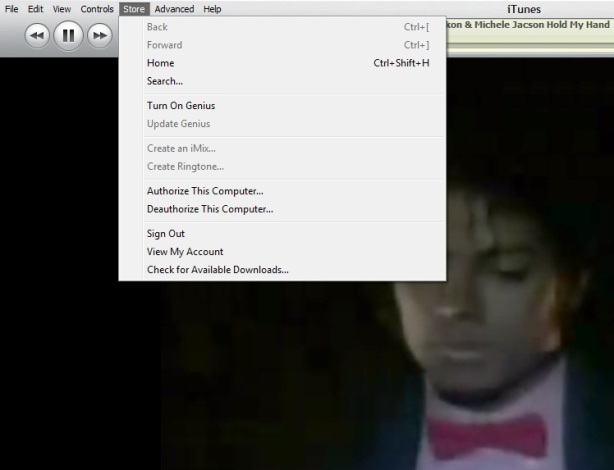
1. Login with the old Account from Menu > Store > Sign in
2. Then Menu > Store > Deauthorize This Computer
3. Then Menu > Store > Sign out
4. Menu > Store > Sign in with your new account
5.Then Menu > Store > Authorize This Computer
On iDevice
1. Go to Setting > Store >
2. Tap on Sign out
3. Go to Setting > General > Reset
4. Reset Local warning, Home screen Layout and Keyboard Dictionary
5. Reboot the iDevice
Last step
1. Connect the iDevice to PC and Sync with the iTunes
Done
Keyboard Shortcut of iTunes

Some of my friend ask me time to time how to use iTunes smartly via keyboard there is the full list of keyboard controls (for Windows). This list covers them all – from [Enter] to play a song, to [Ctrl+Alt+Down], which mutes the volume…
Let me highlight a few in particular: “Snap window to screen size”, “Reshuffle the current playlist” and “Toggle artwork”.
General:
Play the selected song [Enter]
Plays to the next album in a list [Shift][Ctrl][Alt][Right]
Plays the previous album in a list [Shift][Ctrl][Alt][Left]
Create a new Smart Playlist [Shift][+]
Reshuffle the current playlist [Shift][Shuffle Button]
Delete the selected playlist immediately [Ctrl][Delete]
Delete the selected playlist and all the songs listed in it [Shift][Delete]
Check or uncheck all the songs in a list [Ctrl][Click checkbox]
Expand or collapse all the subfolders and lists [Ctrl][Click triangle]
Snap window to screen size [Shift][Double click the title bar]
Refresh the Radio or Party Shuffle list [F5]
Next Music Store Page [Ctrl][]]
Previous Music Store Page [Ctrl][[]
Mini Player [Ctrl][M]
Stream audio from a URL [Ctrl][U]
File Menu:
New Playlist [Ctrl][N]
New Smart Playlist [Ctrl][Alt][N]
New Playlist with selected songs [Ctrl][Shift][N]
Add File [Ctrl][O]
Close Window [Ctrl][W] or [Alt][F4]
Import… [Ctrl][Shift][O]
Get Info [Ctrl][I]
Show File [Ctrl][R]
Show File that is currently playing [Ctrl][L]
Print [Ctrl][P]
Edit Menu:
Undo [Ctrl][Z]
Cut [Ctrl][X]
Copy [Ctrl][C]
Paste [Ctrl][V]
Select All [Ctrl][A]
Unselect All [Ctrl][Shift][A]
Preferences [Ctrl][,]
Controls Menu:
Play / Pause [Spacebar]
Next song [Right]
Previous song [Left]
Next Chapter [Ctrl][Shift][Right]
Previous Chapter [Ctrl][Shift][Left]
Increase volume [Ctrl][Up]
Decrease volume [Ctrl][Down]
Mute [Ctrl][Alt][Down]
Eject Disc [Ctrl][E]
View Menu:
Toggle Browser [Ctrl][B]
Toggle Song Artwork [Ctrl][G]
Toggle MiniStore [Ctrl][Shift][M]
Toggle Visualizer [Ctrl][T]
List View [Ctrl][Alt][3]
Album View [Ctrl][Alt][4]
CoverFlow View [Ctrl][Alt][5]
Video/Viz: Half Size [Ctrl][0]
Video/Viz: Actual Size [Ctrl][1]
Video/Viz: Double Size [Ctrl][2]
Video/Viz: Fit to Screen [Ctrl][3]
Video/Viz: Full Screen [Ctrl][F]
View Options [Ctrl][J] or [Right click on a column heading]
iTunes 9.2 and all abouts

Apple has released iTunes 9.2 for Mac and Windows, which will be required for installing the upcoming iOS 4 update, and syncing iPhone 4. Previously released in beta for the Mac at WWDC 2010, new features include:
iTunes 9.2 comes with several new features and improvements, including:
- Sync with iPhone 4 to enjoy your favorite music, movies, TV shows, books and more on-the-go
- Sync and read books with iPhone or iPod touch with iOS 4 and iBooks 1.1
- Organize and sync PDF documents as books. Read PDFs with iBooks 1.1 on iPad and any iPhone or iPod touch with iOS 4
- Organize your apps on your iOS 4 home screens into folders using iTunes
- Faster back-ups while syncing an iPhone or iPod touch with iOS 4
-
Album artwork improvements make artwork appear more quickly when exploring your library
-
For information on the security content of this update, please visit: http://support.apple.com/kb/HT1222
Jail Breakers :
iPad Jail breakers Code Red
Spirit User Code Red
PwnageTool & redsn0w users Code Green :-)

iFireLight for iPad What is it & giveaway

Who never think of getting a flash light on mobile? YES!! True that every one want to keep it for an emergency iPod/ iPhone user have so many option to chose but for the iPad? Not many.
iFireLight for the iPad brings a little bit of safety and comfort to your digital life style. You always have your new digital friend with you, and it is the perfect size screen for lighting up a room when you need it. Easily change the screen color for setting the mood. Even make the screen flash for getting noticed when you need to be noticed.
Just want to sit around a cozy fire any place any time? iFireLight has you covered there too. At the flick of a switch, transform your iPad into a romantic and comfortable center piece. Guaranteed not to catch the curtains on fire.
Stuck in the dark or on the side of the road? Your friendly iPad is there to save the day. Set the desired
screen color, and turn on either the light to see or flashing light for a becon to be seen.
* this app has the ability for a rapidly flashing light, that may be adverse to some people. Be careful and use responsibly.


Note: this app is working with iPad only not with any iPod or iPhone
Who are interested to get the awesome iPad app may hit the download link
The Grand Giveaway
Great news is we got some promo code for this nice app and we like to share with our readers who have a iPad and promo codes are valid for USA store only.
1. Follow @corebuilder & @vonswankoFSM on twitter
2. Make a comment on the post mentioning your twitter id
3. Make a twit “@corebuilder & @vonswankoFSM I’m a iPad owner want the chance for #iFireLight #giveaway for #iPad”
4. We will DM you the promo code
5. Then show us some love by giving some ranking and your valued comments
May Day! May Day! IPHONE DEV TEAM under attack! 2 Officer down

The main site of the iPhone Dev Team (http://blog.iphone-dev.org) is still up ... Wish the sites will be fixed soon
Thanks to @aditadx for bringing to attention
Steve Jobs shares his thoughts on Flash and Ask to read it

- Apple says Flash isn’t “open”
Apple notes that Adobe’s Flash products are 100% proprietary meaning that they are only available from Adobe, and Adobe has sole authority as to their future enhancement, pricing, etc. - Adobe claims iPhone OS cannot access the “full web”
Apple disagrees. Apple states that almost all this video is also available in a more modern format, H.264, which is viewable on iPhone, iPod touch, and iPad. In addition, Apple supports HTML5, CSS, and JavaScript. And don’t forget the shiny YouTube application. - Reliability, Security, Performance
Symantec recently highlighted Flash for having one of the worst security records in 2009. Flash is the number one reason why Macs crash. Flash does not run well on mobile devices. - Battery life
Flash requires that videos be encoded through software rather than hardware which gives you about half the battery life. - Touch
Flash has many features that do not work well with multi-touch such as rollovers. Developers would need to rewrite their Flash websites. Instead, Apple suggests switching to more modern technologies like HTML5, CSS, and JavaScript. - “The most important reason”
Apple isn’t too fond of having third party development tools. Especially if it’s cross-platform.
Full-Length Letter on APPLE:
The Next iPhone confirmed on June 7
Apple put up details about its Worldwide Developers Conference (WWDC) on its site. Given the recent iPhone 4G leak and Apple’s usual timing when it comes to iPhone announcements, it’s very likely that Apple will officially announce the next version of iPhone at the conference, which is being held from June 7-11 in San Francisco.
Since the leaked prototype that ended up in the hands of tech blog Gizmodo is obviously very real, we don’t expect too many surprises. We expect the iPhone 4G (as it will likely be called) to feature a front camera, an upgraded back camera, improved display, microSIM support and metal details on the case.
 And Steve Jobs Tweeted the announcement of the new iPhone on June 7
Since the leaked prototype that ended up in the hands of tech blog Gizmodo is obviously very real, we don’t expect too many surprises. We expect the iPhone 4G (as it will likely be called) to feature a front camera, an upgraded back camera, improved display, microSIM support and metal details on the case.

Steve Jobs: “Folks Who Want Porn Can Buy An Android Phone”! But we say we have iStreammy & iSpank :D

For those of you who do not know, Steve Jobs responds to a few of the customer e-mails. In one of such responses, Steve Jobs says “Folks who want porn can buy an Android phone.”
The mail was sent to Steve by one Matthew who was concerned about Apple role as Moral Police in keeping porn out of the App Store. He also suggested age restriction and parental control to such apps, instead of banning them from the App Store. The mail also asked clarification on Apple banning cartoonist Mark Fiore’s satire app.
Steve jobs replied with an apology for the Mark Fiore situation. But the real interesting part was when Steve mentioned Android. This is not the first time that Steve has asked users to switch to Android if they wanted porn. At iPhone OS 4 event, Steve said, “You know, there’s a porn store for Android. You can download nothing but porn. You can download porn, your kids can download porn. That’s a place we don’t want to go – so we’re not going to go there.”
via [TechCrunch]
After Israeli Some USA Colleges Rejected Apple's IPad
Apple's iPad has already been rejected by two top universities because of network stability issues, according to the WSJ.
Both George Washington University and Princeton University have rejected use of the device and Cornell University also says it is seeing connectivity problems and is concerned about bandwidth overload.
George Washington said that about half the devices which established a connection to their network were using a leased IP address "well beyond the time they should." Princeton stressed that its problem wasn't a WiFi issue.
Cornell said that the school is seeing networking and connectivity issues and is "working to ensure the iPad does not have devastating consequences to our network."
All the colleges are trying to find fixes for the connectivity, security and network problems but George Washington thinks it could take until next spring until the iPad is fully supported on its network.
Apple spokeswoman Teresa Brewer said she wasn't familiar with the schools' problems, although Princeton has reported its issues to the company.
Read More
Both George Washington University and Princeton University have rejected use of the device and Cornell University also says it is seeing connectivity problems and is concerned about bandwidth overload.
George Washington said that about half the devices which established a connection to their network were using a leased IP address "well beyond the time they should." Princeton stressed that its problem wasn't a WiFi issue.
Cornell said that the school is seeing networking and connectivity issues and is "working to ensure the iPad does not have devastating consequences to our network."
All the colleges are trying to find fixes for the connectivity, security and network problems but George Washington thinks it could take until next spring until the iPad is fully supported on its network.
Apple spokeswoman Teresa Brewer said she wasn't familiar with the schools' problems, although Princeton has reported its issues to the company.
Read More
AMD ! is Apple going to make partner with them for future?

News that Apple executives and their counterparts from chipmaker Advanced Micro Devices have been spotted together has fed speculation that Apple may be moving future Macs away from the Intel chips they've been using since 2006. AppleInsider quotes "people familiar with the matter" as saying that Apple's already worked out an agreement with AMD to use its chips in their labs, an indication that work is already underway to get AMD's desktop and notebook chips in Mac computers.
According to AppleInsider's report, Apple has been frustrated by limited availability of Intel's newest processors, which they suggest may have been a reason why refreshes of products like the Mac Pro and Mac Book Pro have taken so long to get to market. There's also speculation that AMD might be willing to work with Apple on custom chip designs. In addition, AMD now owns graphics chipmaker ATI, which would give Apple an edge on getting improved GPUs into Macs. Both companies are silent on the matter, but witnesses are reporting that AMD top execs have been seen on the free Commuter Coach buses that Apple runs between San Francisco and company headquarters in Cupertino, and have been spotted on the Apple campus coming out of meeting rooms with Apple upper management.
Interestingly, AMD's ties to Apple seem to have a number of tendrils. The Inquirer reports that it was engineers that Apple hired away from AMD last year who developed Apple's in-house graphic switching technology. Bob Drebin and Raja Koduri were top talent AMD got from its ATI acquisition who came to Apple in 2008. Drebin, who had been Chief Technology Officer at ATI, was also instrumental in the development of the GameCube's graphics hardware when he was with ArtX.
The report does not suggest that Apple would move all its lines en masse to new processors. Rather, Apple would become like most other computer manufacturers, choosing from a mix of vendors for its CPUs and graphics chips. Price per GHz is not significantly better with AMD chips, but Apple may well surmise that introducing competition may cause their partners at Intel to come up with sweeter deals
How to Reset an iPad

You can reset an iPad with ease if you have messed it up by changing settings or dumping too much junk which started causing problems. Resetting is easy and it’s the same procedure that you would use in an iPhone. Here’s how it’s done:
Reset all settings in iPad:
You can reset preferences and settings by going to General> Reset> Reset all Settings. This won’t delete your data i.e.; music collection, photos, etc.
Reset dictionary in iPad:
If you want to erase the dictionary words added by you, you can go to General> Reset> Reset Keyboard Dictionary.
Reset Network Settings in iPad:
To reset network settings to factory defaults go to General> Reset> Reset Network Settings.
Erase All Content and Settings in iPad:
To delete all the data in iPad, i.e.; photos, music, contacts, etc go to General> Reset> Erase All Content and Settings.
How To Use iTunes to use Multiple iPhone or iPod
Not many iTunes users know that it is possible to use multiple iTunes libraries on the same computer system. There is virtually no information about running multiple iTunes libraries once iTunes has been started. Before we explain how to setup multiple iTunes libraries we should analyze why someone would want to work with several iTunes libraries instead of just one.
The main reason to use multiple iTunes libraries would be to divide specific data into different libraries. This can be dividing losless and lossy music, libraries for specific occasions, specific music genres or types like bootlegs or live music only.
You might want multiple libraries so that you could, for example, have a library of holiday music that wouldn't appear in your Party Shuffle mix the rest of the year. Or you could use separate libraries to keep your music on your computer and your movies on an external hard disk.
It is actually very easy to create a second iTunes library. All that needs to be done is to press the Shift key (Alt on Macs) before launching iTunes. A small popup window will be displayed asking the user to choose or create a library.

Steps To create or use a different iTunes library: 


Selecting the create a library option will create a new iTunes library that acts independently of all other iTunes libraries. It should also be noted that iTunes will always open the library that has been used the last time iTunes was executed. Switching libraries would again require pressing the Shift key during launch.
The main reason to use multiple iTunes libraries would be to divide specific data into different libraries. This can be dividing losless and lossy music, libraries for specific occasions, specific music genres or types like bootlegs or live music only.
You might want multiple libraries so that you could, for example, have a library of holiday music that wouldn't appear in your Party Shuffle mix the rest of the year. Or you could use separate libraries to keep your music on your computer and your movies on an external hard disk.
It is actually very easy to create a second iTunes library. All that needs to be done is to press the Shift key (Alt on Macs) before launching iTunes. A small popup window will be displayed asking the user to choose or create a library.

Steps To create or use a different iTunes library:
If iTunes is open, quit it.
Hold down the Shift key while you open iTunes (from the Start menu, choose All Programs > iTunes > iTunes).
In the dialog that appears, do one of the following:
■
To create a new library, click Create Library.
■
To choose a different library, click Choose Library.
You can name your iTunes library (the folder containing all of your iTunes content and the iTunes Library.itl file) whatever you like and store it anywhere.
Selecting the create a library option will create a new iTunes library that acts independently of all other iTunes libraries. It should also be noted that iTunes will always open the library that has been used the last time iTunes was executed. Switching libraries would again require pressing the Shift key during launch.
Blackra1n on iPhone OS 4.0 Rockes again!!
We’ve had numerous reports of new hackers working away on the new iPad Firmware, and even some on the new iPhone OS 4.0 firmware. Musclenerd announced his jailbreak in a day and GeoHot has followed suit with a new exploit and a screen shot.

Geohot tweeted an image of iPhone OS 4.0 (notice the Game Center icon) with blackra!n and Cydia installed only a short while ago. While this is great news, it is also going to push back other hackers/jailbreakers in releasing their exploits, simply due to the fact that GeoHot’s exploit is different than theirs and the “spirit” hack.
This is great news for all of us, and I for one cannot wait to get iPhone OS 4.0 installed and Jailbroken!
But for us till now couple of pics and video ...
Geohot tweeted an image of iPhone OS 4.0 (notice the Game Center icon) with blackra!n and Cydia installed only a short while ago. While this is great news, it is also going to push back other hackers/jailbreakers in releasing their exploits, simply due to the fact that GeoHot’s exploit is different than theirs and the “spirit” hack.
This is great news for all of us, and I for one cannot wait to get iPhone OS 4.0 installed and Jailbroken!
But for us till now couple of pics and video ...
Palm for sale!!! Who gonna buy?

But while the handsets have received critical acclaim, sales of the devices have been disappointing, and the value of the company has plunged, with Palm posting 11 straight quarterly losses.
"Palm still has quite a good brand in the US market and some strong technology," Frank He, an analyst with BOC International Holdings told Bloomberg. "You can do something with it. The share have gone down a lot and the company may become attractive to anyone looking for a turnaround play."
Both Palm and Goldman Sachs have declined to comment on the reports.
Palm, which made its name making personal digital assistants in the 1990s, had hoped the launch of the Pre would reinvigorate the company. The device, which used the innovative WebOS operating system to enable users to send emails, surf the internet and use dozens of applications at the same time, was touted as an iPhone killer.
But the critical acclaim did not translate in to solid sales, and Palm is currently ranked sixth in the US smartphone market, behind rivals such as Research in Motion, makers of the BlackBerry, and Apple.
Many of Palm's senior executives are former Apple employees. John Rubinstein, the company's CEO, joined the company after helping to develop the iPod range of music players, and was one of the key figures behind WebOS. But despite some of the Pre's cutting-edge features, sales remained slow, as customers gravitated towards Apple's iPhone and devices running Google's Android operating system.
"Palm's limited scale, distribution and weak global brand outside the United States all point to a takeover as the next chapter in the Palm story," said Geoff Blaber, an analyst with CCS Insight. "The company has developed a highly valuable asset in webOS. The challenge for Palm is finding a buyer prepared to pay a premium for an immature platform when many potential suitors have already invested heavily in Android."
iTunes 9.1 is now available jailbreaker & unlocker please stay away.. it kills blackra1n

iTunes 9.1 is now available and brings some new iPad features ahead of schedule, with the iPad being released this Saturday in the USA.
Quote:
| iTunes 9.1 comes with several new features and improvements, including: • Sync with iPad to enjoy your favorite music, movies, TV shows, books and more on the go • Organize and sync books you've downloaded from iBooks on iPad or added to your iTunes library • Rename, rearrange, or remove Genius Mixes |

Nonetheless, it's exciting to see the iPad making it's way into our latest iTunes update.
We are expecting a iPhone update very soon
For information on the security content of this update, please visit: Apple security updates
For information on the security content of this update, please visit: Apple security updates
Attention to JailBreaker & Unlocker Please don't update now Follow us till it declared as safe


BarMax CA The $1000 application Get hacked and being distributed


BarMax: California Edition. Harvard lawyers teamed with top iPhone developers to produce BarMax, the only complete bar exam prep solution (Essay, MBE, Performance Test, and Flash Cards) available for purchase in the iPhone App Store. Plus it is the only course with 1,371 REAL previous MBE questions, and over 100 REAL previous essay exams.
"Although I've only had the BarMax application for a few weeks, I am already a huge fan. I've had zero problems with the application and it has been very helpful to listen to the lectures." -Craig G, actual BarMax student.
Contact us at info@getbarmax.com for more information, and try BarMax Lite in the App Store for a FREE Trial Version of BarMax to evaluate the course materials. BarMax MPRE is also available to download for free.
Take 50 pounds of books and condense them into the palm of your hand. With BarMax, you squeeze thousands of pages of bar exam course material and over 1,500 real multiple choice and essay practice questions into your iPhone or iPod Touch. In addition, once you purchase the app, we send you a complete Welcome Packet with hundreds of pages of supplemental material, on-screen outlines, practice exams, and suggested as well as optional hard copy printouts.
BarMax's Advisory Board oversees content; Advisory Board Members include:
- Paul Pelosi, Jr. Esq. NASA. JD/MBA Georgetown University.
- Seo Salimi, Esq. Latham & Watkins. JD, University of Southern California.
- Christopher Blazejewski, Esq. Sherin and Lodgen LLP. JD, Harvard University.
- Tej Srimushnam, Esq. Morrison & Foerster. JD, University of Pennsylvania.
- Michael Allen, Esq. President, Lateral Link. JD, Harvard University.
BarMax is a complete solution and the most thorough yet flexible way to study for the bar exam. Listen to audio lectures right on your iPhone wherever you are. Practice MBE questions or review flashcards on the go. With BarMax, your life will no longer revolve around your bar exam prep course. Instead, your bar exam prep will revolve around you.
Don't worry if you don't own an iPhone--we can ship you an iPod Touch as part of your package that will run the app. You will also receive a welcome packet that includes all the materials in Word format so you can print them up and follow along.
If you want to study with your laptop and paper in addition to the iPhone, we have you covered. "On request, BarMax will also send users electronic copies of paperwork." --American Bar Association (ABA) Journal
We offer all of this for one fourth of the price of current packages on the market. We are using the revolutionary technology behind the iPhone to enable bar prep at a much better price, and to teach students in a much better way.
BarMax includes:
- Outlines & audio lectures for all 12 subjects
- Email support (live contact with Harvard-educated lawyers)
- Skeleton outlines for note taking
- 1,371 real practice MBE questions from previous exams categorized by subject
- Over 800 flashcards categorized by subject
- 102 real practice CA essay questions with sample answers
- 18 real practice CA performance tests with sample answers
Plus more…
- Welcome packet with all the materials in MS Word format and hard copy printout option
- Lifetime access to the app and course materials once you purchase
- Great tips and tricks on how to perform on exam day and structure your studying
- Full calendar to make tackling exam prep a breeze—just follow the calendar and you will be prepared
- Review includes: Constitutional Law, Contracts, Crimes, Evidence, Real Property, Torts, Remedies, Professional Responsibility, Civil Procedure, Business Associations (Corporations, Agency & Partnership), Trusts & Wills, and Community Property
Subscribe to:
Posts (Atom)