


Inside
Showing posts with label iTunes. Show all posts
Showing posts with label iTunes. Show all posts
Rearrange your iPhone/iPod touch Apps right in iTunes
Now you can rearrange your iPhone apps and even the entire app page directly in iTunes. Just plug in your iPhone or iPod touch and select it in the Source window. Now click on the Applications tab and drag your Apps around in the order you want. You can also rearrange the pages of apps themselves by dragging them in the right side bar.


How to fix AppStore login on iPhone / iPod / iPad
I think most of you had suffered after changing the account on you iDevice (iPhone/iPod /iPad) old account pop up while updating or downloading any app.
I was very disappointed and restore my Device and set up as new device. Today a Srilankan friend experiencing the same so I dig out the issue and find some interesting thing, actually iTunes stores last authorized account and while sync the iDevice it push the login information to the device may be the one you don't want.
How to fix it ?
Simple
ON PC iTunes

1. Login with the old Account from Menu > Store > Sign in
2. Then Menu > Store > Deauthorize This Computer
3. Then Menu > Store > Sign out
4. Menu > Store > Sign in with your new account
5.Then Menu > Store > Authorize This Computer
On iDevice
1. Go to Setting > Store >
2. Tap on Sign out
3. Go to Setting > General > Reset
4. Reset Local warning, Home screen Layout and Keyboard Dictionary
5. Reboot the iDevice
Last step
1. Connect the iDevice to PC and Sync with the iTunes
Done
I was very disappointed and restore my Device and set up as new device. Today a Srilankan friend experiencing the same so I dig out the issue and find some interesting thing, actually iTunes stores last authorized account and while sync the iDevice it push the login information to the device may be the one you don't want.
How to fix it ?
Simple
ON PC iTunes
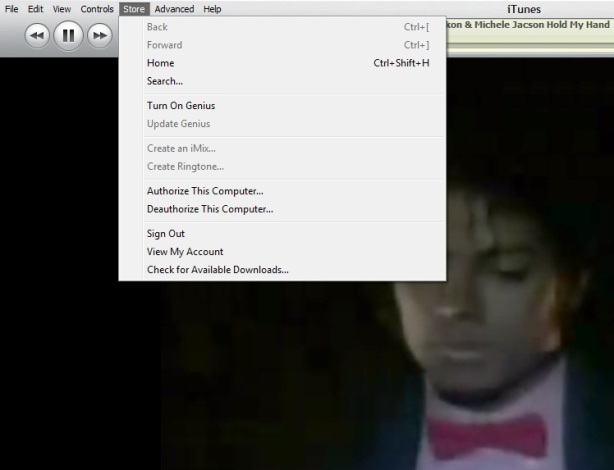
1. Login with the old Account from Menu > Store > Sign in
2. Then Menu > Store > Deauthorize This Computer
3. Then Menu > Store > Sign out
4. Menu > Store > Sign in with your new account
5.Then Menu > Store > Authorize This Computer
On iDevice
1. Go to Setting > Store >
2. Tap on Sign out
3. Go to Setting > General > Reset
4. Reset Local warning, Home screen Layout and Keyboard Dictionary
5. Reboot the iDevice
Last step
1. Connect the iDevice to PC and Sync with the iTunes
Done
Keyboard Shortcut of iTunes

Some of my friend ask me time to time how to use iTunes smartly via keyboard there is the full list of keyboard controls (for Windows). This list covers them all – from [Enter] to play a song, to [Ctrl+Alt+Down], which mutes the volume…
Let me highlight a few in particular: “Snap window to screen size”, “Reshuffle the current playlist” and “Toggle artwork”.
General:
Play the selected song [Enter]
Plays to the next album in a list [Shift][Ctrl][Alt][Right]
Plays the previous album in a list [Shift][Ctrl][Alt][Left]
Create a new Smart Playlist [Shift][+]
Reshuffle the current playlist [Shift][Shuffle Button]
Delete the selected playlist immediately [Ctrl][Delete]
Delete the selected playlist and all the songs listed in it [Shift][Delete]
Check or uncheck all the songs in a list [Ctrl][Click checkbox]
Expand or collapse all the subfolders and lists [Ctrl][Click triangle]
Snap window to screen size [Shift][Double click the title bar]
Refresh the Radio or Party Shuffle list [F5]
Next Music Store Page [Ctrl][]]
Previous Music Store Page [Ctrl][[]
Mini Player [Ctrl][M]
Stream audio from a URL [Ctrl][U]
File Menu:
New Playlist [Ctrl][N]
New Smart Playlist [Ctrl][Alt][N]
New Playlist with selected songs [Ctrl][Shift][N]
Add File [Ctrl][O]
Close Window [Ctrl][W] or [Alt][F4]
Import… [Ctrl][Shift][O]
Get Info [Ctrl][I]
Show File [Ctrl][R]
Show File that is currently playing [Ctrl][L]
Print [Ctrl][P]
Edit Menu:
Undo [Ctrl][Z]
Cut [Ctrl][X]
Copy [Ctrl][C]
Paste [Ctrl][V]
Select All [Ctrl][A]
Unselect All [Ctrl][Shift][A]
Preferences [Ctrl][,]
Controls Menu:
Play / Pause [Spacebar]
Next song [Right]
Previous song [Left]
Next Chapter [Ctrl][Shift][Right]
Previous Chapter [Ctrl][Shift][Left]
Increase volume [Ctrl][Up]
Decrease volume [Ctrl][Down]
Mute [Ctrl][Alt][Down]
Eject Disc [Ctrl][E]
View Menu:
Toggle Browser [Ctrl][B]
Toggle Song Artwork [Ctrl][G]
Toggle MiniStore [Ctrl][Shift][M]
Toggle Visualizer [Ctrl][T]
List View [Ctrl][Alt][3]
Album View [Ctrl][Alt][4]
CoverFlow View [Ctrl][Alt][5]
Video/Viz: Half Size [Ctrl][0]
Video/Viz: Actual Size [Ctrl][1]
Video/Viz: Double Size [Ctrl][2]
Video/Viz: Fit to Screen [Ctrl][3]
Video/Viz: Full Screen [Ctrl][F]
View Options [Ctrl][J] or [Right click on a column heading]
iTunes 9.2 and all abouts

Apple has released iTunes 9.2 for Mac and Windows, which will be required for installing the upcoming iOS 4 update, and syncing iPhone 4. Previously released in beta for the Mac at WWDC 2010, new features include:
iTunes 9.2 comes with several new features and improvements, including:
- Sync with iPhone 4 to enjoy your favorite music, movies, TV shows, books and more on-the-go
- Sync and read books with iPhone or iPod touch with iOS 4 and iBooks 1.1
- Organize and sync PDF documents as books. Read PDFs with iBooks 1.1 on iPad and any iPhone or iPod touch with iOS 4
- Organize your apps on your iOS 4 home screens into folders using iTunes
- Faster back-ups while syncing an iPhone or iPod touch with iOS 4
-
Album artwork improvements make artwork appear more quickly when exploring your library
-
For information on the security content of this update, please visit: http://support.apple.com/kb/HT1222
Jail Breakers :
iPad Jail breakers Code Red
Spirit User Code Red
PwnageTool & redsn0w users Code Green :-)

Running iTunes on Linux

I bought iPhone 3G long back and in order to use the phone I needed to use Apple iTunes. Nomally iTunes and Ubuntu is a no-go, however using the latest wine from the Ubuntu it is possible out of the box – I’ really impressed of the wine project.
What you need
Check that you got the at least the following wine version:
$ dpkg -l | grep wine | awk '{ print $2, " ",$3}'
wine             1.1.29~winehq0~ubuntu~9.04-0ubuntu2
wine-gecko    1.0.0-0ubuntu1
If not, then install wine:$ sudo aptitude install wine wine-geckoThen download iTunes 8.x or Google it :D (important to download version 8.x otherwise it doesn’t work out of the box)
$ wget wget http://appldnld.apple.com.edgesuite.net/content.info.apple.com/iTunes8/061-6717.20090715.XsE4R/iTunesSetup.exeThen just run the install process
$ wine iTunesSetup.exe
And finally start iTunes.
How To Use iTunes to use Multiple iPhone or iPod
Not many iTunes users know that it is possible to use multiple iTunes libraries on the same computer system. There is virtually no information about running multiple iTunes libraries once iTunes has been started. Before we explain how to setup multiple iTunes libraries we should analyze why someone would want to work with several iTunes libraries instead of just one.
The main reason to use multiple iTunes libraries would be to divide specific data into different libraries. This can be dividing losless and lossy music, libraries for specific occasions, specific music genres or types like bootlegs or live music only.
You might want multiple libraries so that you could, for example, have a library of holiday music that wouldn't appear in your Party Shuffle mix the rest of the year. Or you could use separate libraries to keep your music on your computer and your movies on an external hard disk.
It is actually very easy to create a second iTunes library. All that needs to be done is to press the Shift key (Alt on Macs) before launching iTunes. A small popup window will be displayed asking the user to choose or create a library.

Steps To create or use a different iTunes library: 


Selecting the create a library option will create a new iTunes library that acts independently of all other iTunes libraries. It should also be noted that iTunes will always open the library that has been used the last time iTunes was executed. Switching libraries would again require pressing the Shift key during launch.
The main reason to use multiple iTunes libraries would be to divide specific data into different libraries. This can be dividing losless and lossy music, libraries for specific occasions, specific music genres or types like bootlegs or live music only.
You might want multiple libraries so that you could, for example, have a library of holiday music that wouldn't appear in your Party Shuffle mix the rest of the year. Or you could use separate libraries to keep your music on your computer and your movies on an external hard disk.
It is actually very easy to create a second iTunes library. All that needs to be done is to press the Shift key (Alt on Macs) before launching iTunes. A small popup window will be displayed asking the user to choose or create a library.

Steps To create or use a different iTunes library:
If iTunes is open, quit it.
Hold down the Shift key while you open iTunes (from the Start menu, choose All Programs > iTunes > iTunes).
In the dialog that appears, do one of the following:
■
To create a new library, click Create Library.
■
To choose a different library, click Choose Library.
You can name your iTunes library (the folder containing all of your iTunes content and the iTunes Library.itl file) whatever you like and store it anywhere.
Selecting the create a library option will create a new iTunes library that acts independently of all other iTunes libraries. It should also be noted that iTunes will always open the library that has been used the last time iTunes was executed. Switching libraries would again require pressing the Shift key during launch.
iTunes 9.1 is now available and safe for jailbreaker & unlocker
As we had posted earlier the release and the warning now tested the iTunes 9.1 devteam announce it is safe for the jail breaker

Though the blackra1n had an issue but been solved by iH8sn0w

by a quick DLL fix he name the new patch as blackbreeze which can be downloaded from

http://downloads.ih8sn0w.com/blackbreeze.exe
Windows 32Bit + 64Bit are supported.
Install the iTunes 9.1 and run the blackbreeze
iTunes 9.1 is now available jailbreaker & unlocker please stay away.. it kills blackra1n

iTunes 9.1 is now available and brings some new iPad features ahead of schedule, with the iPad being released this Saturday in the USA.
Quote:
| iTunes 9.1 comes with several new features and improvements, including: • Sync with iPad to enjoy your favorite music, movies, TV shows, books and more on the go • Organize and sync books you've downloaded from iBooks on iPad or added to your iTunes library • Rename, rearrange, or remove Genius Mixes |

Nonetheless, it's exciting to see the iPad making it's way into our latest iTunes update.
We are expecting a iPhone update very soon
For information on the security content of this update, please visit: Apple security updates
For information on the security content of this update, please visit: Apple security updates
Attention to JailBreaker & Unlocker Please don't update now Follow us till it declared as safe


OFFICIAL PLAYBOY application!!! on AppStore?


Get exclusive content and a glimpse of January/February double issue and get to vote on the Playmate of the year 2009! of Playboy wherever and whenever you want!
Get your hands on all the good stuff electronically, including the cover, the Playmate's intro text, data sheet and a behind the scenes video, plus preview pictures and the following ICONIC MONTHLY FEATURES:
ICONIC MONTHLY FEATURES
Playboy Interview — Candid long-form conversation with the world's most insightful minds
Playboy Advisor — Advice about everything from sex to stereos and cars to cuisine
20 Questions — A selection from the quick-hitting Q&A session with today's top celebrities
Party Jokes — Classic gags that are sure to make you the center of attention
Celebrities Hangin' With Hef — Famous folks partying and posing with the man himself
Fashion — Pictures of today's hottest looks with tips on how to make them work for you
EXCLUSIVE CONTENT
Playmate Video — The new Centerfold comes to life in a sexy preview clip that's unavailable anywhere else!
Free Wallpapers — Add some Playboy personality to your iPhone with free Rabbit Head wallpaper and downloadable photographs of the Playmate, designed and available exclusively for this app!
If you want to be dialed into what's new from the world's top entertainment and lifestyle magazine for men (and what man wouldn't?) Playboy is the app you need!
Monthly editions are available for purchase through the “Archive” section within the application, including previous months.
*This app does not contain any fully nude content.
What's new in Version 1.0.22
More explicit images and articles for the Jan Feb 2010 issue.
WOW feeling hot in the cold days :D
iPhone OS 4.0 Firmware licked information


That’s right, y’all. We’re back at it, and this time we’ve received some exclusive iPhone OS 4.0 details from one of our trusty Apple connects.
Here are some iPhone OS 4.0 features, according to our guy:
- There will be multi-touch gestures OS-wide. (Would make sense for that as the rumored OS for the iTablet is close if not the same as the iPhone)
- “A few new ways” to run applications in the background — multitasking.
- Many graphical and UI changes to make navigating through the OS easier and more efficient. We haven’t had this broken down, but we can only hope for improved notifications, a refreshed home screen, etc.
- The update will supposedly be available for only the iPhone 3G and 3GS, but will “put them ahead in the smartphone market because it will make them more like full-fledged computers” more than any other phone to date. Everyone is “really excited.”
- The last piece of information is the most vague, but apparently there will be some brand new syncing ability for the contacts and calendar applications.
Thanks, Lindsey & BGR!
*****BGR also confirmed that, Apple Tablet will be called as iTablet not iSlate
To know more & update
Read our blog Every day Bookmark or Make it your home page http://corebuilder.blogspot.com/
&
follow us http://twitter.com/corebuilder
Powerful Camera with 10x Zoom & more


 Zoom in/out with your iPhone Camera! One of iPhone's most requested feature.
With Camera Zoom, you can now zoom in and out in real-time when taking pictures, by just simply moving the slider.
Anti-shake stabilization helps eliminate those blurry photos.
A timer lets you setup timed group photos.
Tap to Focus now works for iPhone 3Gs.
Faster shot taking with iPhone OS 3.1. Now ready to snap the next shot quickly.
Review your last photos quickly with the review button.
PS: You can take several standard pictures and they will be saved in the background. You don’t have to wait for next shot until the previous one is saved. The number of photos being saved is stated above the tabs. And you can even take some quick shots and set the timer or time-lapse right after that – saving queue will manage all of them easily.
FEATURES:
√ Anti-shake (optional)
√ 10 seconds timer (optional)
√ Up to 10x digital zoom
√ Tap to focus and auto-focus for 3GS
√ Auto-adjusts photo to best quality
√ Camera roll preview
√ Tap preview image to email
√ Moving the slider to zoom in/out
√ Hide/Show the slider (optional)
√ 320x480 Standard Size(To save you memory)
With the best features you want, Start using this camera app today and you will quickly be replacing the default camera application.
Languages English
Requirements Compatible with iPhone.
Requires iPhone OS 3.0 or later
Requires iPhone OS 3.0 or later
Qik VideoCamera - 15 FPS, Zoom+Effects! for 3G & 2G Wow !!

Add a Video Recorder to your iPhone with Qik VideoCamera!
• Realtime Effects & Zoom (3G & 2G only), Up to 15 FPS
• Brightness control, Audio boost, Landscape mode, Email sharing, and more!
Exclusive realtime effects allow you to see the effect live, while shooting!
• Black & white
• Black & white with Red - bright red and yellow objects keep their color
• Mirror horizontal and vertical - image is reflected, carnival-style
• Color game (aka "Avatar mode") - red and blue are reversed
Note: only one color effect, zoom, or brightness can be applied at the same time, and some FPS reduction will occur (10-20%)
More reasons Qik VideoCamera is one of the best-loved apps in the app store:
• 12+ FPS at max resolution with good lighting
• access all your videos from your PC/Mac on local network (see the Gallery in List View)
• No recording limit at any resolution
• Instant saving at any resolution, just shoot and go (or shoot again!)
• Export video to Camera Roll and and then to iPhoto
2 quality modes supported:
• 400x304, 12+ FPS - 8MB/min file size
• 200x152, 15 FPS - 3.5MB/min file size
::Update for Facebook sharing coming next week!::
Coming soon:
• Effects for 3GS
• Share to Facebook, YouTube, Twitter, Brightcove and Qik.com
• Share by SMS
• Geo location
Tips:
• High FPS is only achievable under good lighting conditions - this is a limitation of 2G & 3G iPhones.
• If your iPhone has been running for a long time, and FPS seems low, it might need a restart; they do suffer from slow-downs over time.
• To export a video to the Camera Roll, tap the bottom right button to view your videos. Then select the video, press "Export" and wait till you see success.
• if new video does not show up in iPhoto, unplug your iPhone and plug it back.
• Special effects use processing power, so FPS will be reduced somewhat (10-20%)
• Recorded videos are currently best played in QiuckTime on any platform (Mac/PC)
Download Qik VideoCamera and start recording fun, high quality videos with your iPhone now!
The Qik Free and Open Source Software Notice http://qik.com/info/opensource is incorporated herein by reference.
• Realtime Effects & Zoom (3G & 2G only), Up to 15 FPS
• Brightness control, Audio boost, Landscape mode, Email sharing, and more!
Exclusive realtime effects allow you to see the effect live, while shooting!
• Black & white
• Black & white with Red - bright red and yellow objects keep their color
• Mirror horizontal and vertical - image is reflected, carnival-style
• Color game (aka "Avatar mode") - red and blue are reversed
Note: only one color effect, zoom, or brightness can be applied at the same time, and some FPS reduction will occur (10-20%)
More reasons Qik VideoCamera is one of the best-loved apps in the app store:
• 12+ FPS at max resolution with good lighting
• access all your videos from your PC/Mac on local network (see the Gallery in List View)
• No recording limit at any resolution
• Instant saving at any resolution, just shoot and go (or shoot again!)
• Export video to Camera Roll and and then to iPhoto
2 quality modes supported:
• 400x304, 12+ FPS - 8MB/min file size
• 200x152, 15 FPS - 3.5MB/min file size
::Update for Facebook sharing coming next week!::
Coming soon:
• Effects for 3GS
• Share to Facebook, YouTube, Twitter, Brightcove and Qik.com
• Share by SMS
• Geo location
Tips:
• High FPS is only achievable under good lighting conditions - this is a limitation of 2G & 3G iPhones.
• If your iPhone has been running for a long time, and FPS seems low, it might need a restart; they do suffer from slow-downs over time.
• To export a video to the Camera Roll, tap the bottom right button to view your videos. Then select the video, press "Export" and wait till you see success.
• if new video does not show up in iPhoto, unplug your iPhone and plug it back.
• Special effects use processing power, so FPS will be reduced somewhat (10-20%)
• Recorded videos are currently best played in QiuckTime on any platform (Mac/PC)
Download Qik VideoCamera and start recording fun, high quality videos with your iPhone now!
The Qik Free and Open Source Software Notice http://qik.com/info/opensource is incorporated herein by reference.
New in this version • Amazing real-time Video Effects on iPhone 3G / 2G!
• Up to 15 fps, Zoom, Landscape, plus major video and audio quality improvements
• Audio Boost and Brightness controls
• B&W (w/Red filter), Fun-house Mirror, Color change filter for iPhone 3G/2G
• User can now choose from different video qualities on 2G/3G
• Local Web access for easier file download
• E-mail sharing
• UI improvements
• Application start time reduced, plus other fixes
• Up to 15 fps, Zoom, Landscape, plus major video and audio quality improvements
• Audio Boost and Brightness controls
• B&W (w/Red filter), Fun-house Mirror, Color change filter for iPhone 3G/2G
• User can now choose from different video qualities on 2G/3G
• Local Web access for easier file download
• E-mail sharing
• UI improvements
• Application start time reduced, plus other fixes
Languages English
Requirements Compatible with iPhone.
Requires iPhone OS 3.1 or later.
Requires iPhone OS 3.1 or later.
iKamasutra: The iPod / iPhone application for any couple that wants to get inspired

The app with over 100 positions and shake to show random position!
iKamasutra is the application for any couple that wants to get inspired. It will get the two of you motivated, and help you connect in new exciting ways!
iKamasutra is the application for any couple that wants to get inspired. It will get the two of you motivated, and help you connect in new exciting ways!

This application is for adult only but the art of making love is been elaborated & illustrated in decent way. Actually no porno graphic content can be found so it's soft core and available in APP Store & the cost is only $2.99.

Features:
- Over 100 describing illustrations.
- Mail positions
- Fun and motivating descriptions of each position.
- Gives motivating feedback on your progress.
Easy to use:
- Star your favorite ones.
- Shake to show a new random position.
- Swipe with your finger to show next or previous position.
New in this version Improved illustrations
Mail position functionality
Minor interface tweaks
Lower shake sensitivity
Mail position functionality
Minor interface tweaks
Lower shake sensitivity
Languages English
Requirements Compatible with iPhone and iPod touch.
Requires iPhone OS 3.0 or later.
Requires iPhone OS 3.0 or later.
After the jailbreak!!!
Good Day i&IPeople!
You all are quite familiar with the jail break and unlock now I am goanna mention few thing I like to do after jail break. Not mandatory but I like to install few services and fixes that I like you may like it too.
NB. This Post will update regularly and how to do it will be post on separately so Don’t forget to keep ur eye on it or can follow blog…
1. Update the Cydia (prefer complete update)
2. Install APT 7
3. Unlock the iPhone (Blackra1n by GeoHot is the 1 now my fav) [Link 4 how2]
4. Disable The unnecessary demons [Link 4 how2]
5. Install OpenSSH [Link 4 how2]
6. Change the Default SSH password for root & mobile [Link 4 how2]
7. Command line Text editor Nano [Link 4 how2]
8. Adding Favorite Repo all atones [Link 4 how2]
9. PushFix [Link 4 how2]
10. Disable the annoying msg “Call forward been activated” via ForwardMsgFix [Link 4 how2]
11. Battery % (ilike asBattery on 3G) [Link 4 how2]
12. Address Book ABFix for indexing Address book
13. afc2add To enable access via USB for few service and iH8Snow’s Cydia Fix and few other
14. Number Format Fix via CalleriD & Format fix [Link 4 how2]
15. Video Camera (as I have 3G I like 3Gs Video recorder & Cycoder) [Link 4 how2]
16. Improved Camera 4/5 MPX cam & Other exiting cams [Link 4 how2]
17. Count the SMS Character & to prevent the SMS send by mistake I like SMS Helper [Link 4 how2]
18. For Testing some Software I Fake my Phone so Use UDIDFaker :) to fake apple APP
19. Use to Voice chat with friends from my EDGE apple don’t allow so 3G Unrestictor is my survival [Link 4 how2]
20. Enabling SMS delivery report [Link 4 how2]
21. CyDelete To delete the Cydia APP from SpringBoard [Link 4 how2]
22. Memory Optimization [Link 4 how2]
23. Install MC the midnight commender [Link 4 how2]
24. Ensure Privacy by Blocking unwanted call / sms / MMS [Link 4 how2]
25. Call / SMS Log manager Via Mobile Log [Link 4 how2]
26. To backup my contact to/from SIM, I do Use SIMmanager [Link 4 how2]
27. I like to delete some call record from the caller list So use Recent/CallLog Delet [Link 4 how2]
28. I like to shout about my Place so I like to put my location where I am So I go by Longitude [Link 4 how2]
29. Restore the iDevice via iTunes
30. Restore the Saved Address Book, SMS, Mail, Notes via SSH [Link 4 how2]
31. Then again give a update to Cydia by apt-get update & apt-get upgrade
32. Enable MMS [Link 4 how2]
33. …..
You may also like to do all the Cydia install work all together might follow the Link :) [Link 4 how2]
Who is not getting confident might Call us, we can help them to do it right. Follow us on twitter or if you know the number Call For Help..
Warning some of the APP is commercial and not free for use & [Link 4 how2] is for how to do it not all are active now keep a eye on it..
I like to mention I am not a mobile music listener I had other device for that so don’t install media related things but you may ask for that if u like to have .. Make a comment I will surely reply ASAP
Luminr - make them all glow, can you? an iPhone / iPod game by Mukto Software of Bangladesh


Mukto Software Ltd. is a new start-up in Dhaka, Bangladesh. It's funded by a group of youngsters. It focuses on developing application for smart phones (android, blackberry and iPhone) and web as well. While the major cash flow comes from outsourcing projects mostly from USA and UK, Mukto Software has started releasing application on its own banner.
An interesting fact worth motioning about Mukto is, it has four ACM ICPC World Finalists in the development team! WOW!!
I think face book use might play the mindjolt game on face Book that is a creation of Mukto Software Ltd. Might like to recall that the game so here you can find
Recently (January 7, 2010) they had released a game for iPhone & iPod name luminr, which can be run on OS version 2.0 onwards. It's the first game released by Mukto in the app store and they are quite ambitious and planning to release nine more games this year.
No surprise, cause I know what is ACM ICPC is. They all good programmer.. I was attached with the DHAKA ACM ICPC 2007.. No doubt four ACM ICPC World Finalists brain & some IT guru total 14 member team will rock it..
Here it goes the challenge
Make them all glow, can you ?
How to?
Tap on orbs arranged in a grid to make them all glow. Tapping on an orb changes its state from unlit to lit or lit to unlit along with the neighboring orbs.
Turn on all the orbs to pass a level with as few moves & as fast as you can.
Features:
* There are 9 levels, each with more orbs than the previous one.
* Two difficulty modes.
-- In the easy mode, all orbs are unlit in the beginning.
-- In the hard mode, some orbs are already lit to make your life harder.
* Place your name in the global leaderboard and brag to your friends about your achievement through Facebook & Twitter.
Screen Shot


Download link Link: AppStore Alternative link
Don’t have a iPhone/IPod? No worry gamer Play on web
If you like can take a look for detail about the maker of the Game
If you like can take a look for detail about the maker of the Game
Your comment is desired
Subscribe to:
Posts (Atom)