
Geo hot will rock again with a new exploit called pwned4life

Inside
Showing posts with label iPad. Show all posts
Showing posts with label iPad. Show all posts


Rearrange your iPhone/iPod touch Apps right in iTunes
Now you can rearrange your iPhone apps and even the entire app page directly in iTunes. Just plug in your iPhone or iPod touch and select it in the Source window. Now click on the Applications tab and drag your Apps around in the order you want. You can also rearrange the pages of apps themselves by dragging them in the right side bar.


How to fix AppStore login on iPhone / iPod / iPad
I think most of you had suffered after changing the account on you iDevice (iPhone/iPod /iPad) old account pop up while updating or downloading any app.
I was very disappointed and restore my Device and set up as new device. Today a Srilankan friend experiencing the same so I dig out the issue and find some interesting thing, actually iTunes stores last authorized account and while sync the iDevice it push the login information to the device may be the one you don't want.
How to fix it ?
Simple
ON PC iTunes

1. Login with the old Account from Menu > Store > Sign in
2. Then Menu > Store > Deauthorize This Computer
3. Then Menu > Store > Sign out
4. Menu > Store > Sign in with your new account
5.Then Menu > Store > Authorize This Computer
On iDevice
1. Go to Setting > Store >
2. Tap on Sign out
3. Go to Setting > General > Reset
4. Reset Local warning, Home screen Layout and Keyboard Dictionary
5. Reboot the iDevice
Last step
1. Connect the iDevice to PC and Sync with the iTunes
Done
I was very disappointed and restore my Device and set up as new device. Today a Srilankan friend experiencing the same so I dig out the issue and find some interesting thing, actually iTunes stores last authorized account and while sync the iDevice it push the login information to the device may be the one you don't want.
How to fix it ?
Simple
ON PC iTunes
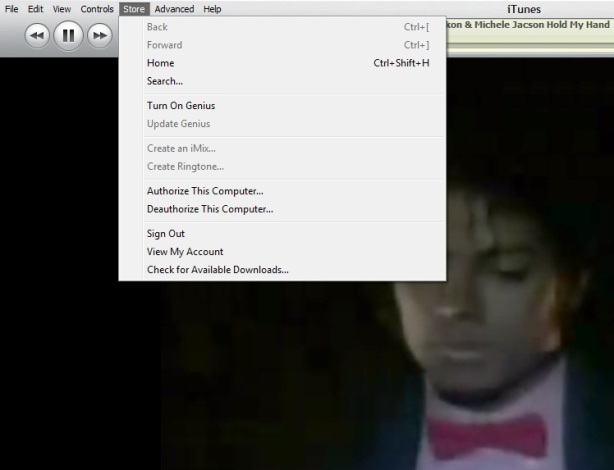
1. Login with the old Account from Menu > Store > Sign in
2. Then Menu > Store > Deauthorize This Computer
3. Then Menu > Store > Sign out
4. Menu > Store > Sign in with your new account
5.Then Menu > Store > Authorize This Computer
On iDevice
1. Go to Setting > Store >
2. Tap on Sign out
3. Go to Setting > General > Reset
4. Reset Local warning, Home screen Layout and Keyboard Dictionary
5. Reboot the iDevice
Last step
1. Connect the iDevice to PC and Sync with the iTunes
Done
Keyboard Shortcut of iTunes

Some of my friend ask me time to time how to use iTunes smartly via keyboard there is the full list of keyboard controls (for Windows). This list covers them all – from [Enter] to play a song, to [Ctrl+Alt+Down], which mutes the volume…
Let me highlight a few in particular: “Snap window to screen size”, “Reshuffle the current playlist” and “Toggle artwork”.
General:
Play the selected song [Enter]
Plays to the next album in a list [Shift][Ctrl][Alt][Right]
Plays the previous album in a list [Shift][Ctrl][Alt][Left]
Create a new Smart Playlist [Shift][+]
Reshuffle the current playlist [Shift][Shuffle Button]
Delete the selected playlist immediately [Ctrl][Delete]
Delete the selected playlist and all the songs listed in it [Shift][Delete]
Check or uncheck all the songs in a list [Ctrl][Click checkbox]
Expand or collapse all the subfolders and lists [Ctrl][Click triangle]
Snap window to screen size [Shift][Double click the title bar]
Refresh the Radio or Party Shuffle list [F5]
Next Music Store Page [Ctrl][]]
Previous Music Store Page [Ctrl][[]
Mini Player [Ctrl][M]
Stream audio from a URL [Ctrl][U]
File Menu:
New Playlist [Ctrl][N]
New Smart Playlist [Ctrl][Alt][N]
New Playlist with selected songs [Ctrl][Shift][N]
Add File [Ctrl][O]
Close Window [Ctrl][W] or [Alt][F4]
Import… [Ctrl][Shift][O]
Get Info [Ctrl][I]
Show File [Ctrl][R]
Show File that is currently playing [Ctrl][L]
Print [Ctrl][P]
Edit Menu:
Undo [Ctrl][Z]
Cut [Ctrl][X]
Copy [Ctrl][C]
Paste [Ctrl][V]
Select All [Ctrl][A]
Unselect All [Ctrl][Shift][A]
Preferences [Ctrl][,]
Controls Menu:
Play / Pause [Spacebar]
Next song [Right]
Previous song [Left]
Next Chapter [Ctrl][Shift][Right]
Previous Chapter [Ctrl][Shift][Left]
Increase volume [Ctrl][Up]
Decrease volume [Ctrl][Down]
Mute [Ctrl][Alt][Down]
Eject Disc [Ctrl][E]
View Menu:
Toggle Browser [Ctrl][B]
Toggle Song Artwork [Ctrl][G]
Toggle MiniStore [Ctrl][Shift][M]
Toggle Visualizer [Ctrl][T]
List View [Ctrl][Alt][3]
Album View [Ctrl][Alt][4]
CoverFlow View [Ctrl][Alt][5]
Video/Viz: Half Size [Ctrl][0]
Video/Viz: Actual Size [Ctrl][1]
Video/Viz: Double Size [Ctrl][2]
Video/Viz: Fit to Screen [Ctrl][3]
Video/Viz: Full Screen [Ctrl][F]
View Options [Ctrl][J] or [Right click on a column heading]
iTunes 9.2 and all abouts

Apple has released iTunes 9.2 for Mac and Windows, which will be required for installing the upcoming iOS 4 update, and syncing iPhone 4. Previously released in beta for the Mac at WWDC 2010, new features include:
iTunes 9.2 comes with several new features and improvements, including:
- Sync with iPhone 4 to enjoy your favorite music, movies, TV shows, books and more on-the-go
- Sync and read books with iPhone or iPod touch with iOS 4 and iBooks 1.1
- Organize and sync PDF documents as books. Read PDFs with iBooks 1.1 on iPad and any iPhone or iPod touch with iOS 4
- Organize your apps on your iOS 4 home screens into folders using iTunes
- Faster back-ups while syncing an iPhone or iPod touch with iOS 4
-
Album artwork improvements make artwork appear more quickly when exploring your library
-
For information on the security content of this update, please visit: http://support.apple.com/kb/HT1222
Jail Breakers :
iPad Jail breakers Code Red
Spirit User Code Red
PwnageTool & redsn0w users Code Green :-)

iFireLight for iPad What is it & giveaway

Who never think of getting a flash light on mobile? YES!! True that every one want to keep it for an emergency iPod/ iPhone user have so many option to chose but for the iPad? Not many.
iFireLight for the iPad brings a little bit of safety and comfort to your digital life style. You always have your new digital friend with you, and it is the perfect size screen for lighting up a room when you need it. Easily change the screen color for setting the mood. Even make the screen flash for getting noticed when you need to be noticed.
Just want to sit around a cozy fire any place any time? iFireLight has you covered there too. At the flick of a switch, transform your iPad into a romantic and comfortable center piece. Guaranteed not to catch the curtains on fire.
Stuck in the dark or on the side of the road? Your friendly iPad is there to save the day. Set the desired
screen color, and turn on either the light to see or flashing light for a becon to be seen.
* this app has the ability for a rapidly flashing light, that may be adverse to some people. Be careful and use responsibly.


Note: this app is working with iPad only not with any iPod or iPhone
Who are interested to get the awesome iPad app may hit the download link
The Grand Giveaway
Great news is we got some promo code for this nice app and we like to share with our readers who have a iPad and promo codes are valid for USA store only.
1. Follow @corebuilder & @vonswankoFSM on twitter
2. Make a comment on the post mentioning your twitter id
3. Make a twit “@corebuilder & @vonswankoFSM I’m a iPad owner want the chance for #iFireLight #giveaway for #iPad”
4. We will DM you the promo code
5. Then show us some love by giving some ranking and your valued comments
A Masterpiece Collection for the reader of iPad/iPhone/iPod

"A luxurious reading experience." - MacWorld
Beautifully typeset using techniques used for quality printed books, this collection includes unabridged versions of some of the world's most loved novels, plays and short stories. Pages can be 'turned', their edges following your finger, mimicking real books.
• 3D animation lets you ‘turn’ pages, mimicking real books.
• Each title displayed on a custom-designed book spine
• Lovingly typeset using techniques for quality printed books
• Choice of three text sizes (via your iPhone’s Settings App)
This app is powered by Gizreader, created by and for lovers of books. See a video demo on the GizReader website. (www.gizreader.com)
The depth of each richly designed spine tells you whether a book is short, long or in-between.
Skim down the pile of books. Tap to choose. A highlight reminds you which title you were last reading.
Lose yourself almost instantly in the story. GizReader is quick. Its type is crisp and clear, beautifully set for reading pleasure. Each book’s formatting is checked and polished, compared where necessary against multiple sources.
Pages turn realistically, their edges following your finger, with a satisfying flip sound. (Unless you turn the sound off.) Alternatively, you can tap or swipe to turn pages instantly.
When you return to a book, GizReader remembers your place, even if you have resized the text. (Choose from three text sizes in your iPhone’s Settings App.) You can also see from the progress bar where you are in the story.
The app includes unabridged versions of some of the world’s most loved masterpieces. The collection grows over time, via free updates.
The titles are:
Novels:
• The Adventures of Huckleberry Finn by Mark Twain
• The Adventures of Tom Sawyer by Mark Twain
• Around the World in 80 Days by Jules Verne
• The Call of the Wild by Jack London
• The Count of Monte Cristo by Alexandre Dumas
• David Copperfield by Charles Dickens
• Emma by Jane Austen
• Frankenstein by Mary Shelley
• Gulliver’s Travels by Jonathan Swift
• The Hound of the Baskervilles by Arthur Conan Doyle
• The Invisible Man by H. G. Wells
• Jane Eyre by Charlotte Brontë
• King Solomon's Mines by H. Rider Haggar
• Little Women by Louisa May Alcott
• The Lost World by Arthur Conan Doyle
• The Man in the Iron Mask by Alexandre Dumas
• The Mysterious Affair at Styles by Agatha Christie
• North and South by Elizabeth Gaskell
• Oliver Twist by Charles Dickens
• Pride and Prejudice by Jane Austen
• The Prisoner of Zenda by Anthony Hope
• The Red Badge of Courage by Stephen Crane
• The Return of Tarzan by Edgar Rice Burroughs
• Sense and Sensibility by Jane Austen
• The Strange Case of Dr. Jekyll and Mr. Hyde by Robert Louis Stevenson
• A Tale of Two Cities by Charles Dickens
• Tarzan of the Apes by Edgar Rice Burroughs
• The Time Machine by H.G. Wells
• Treasure Island by Robert Louis Stevenson
• Wuthering Heights by Emily Bronte
Plays:
• The Importance of Being Earnest by Oscar Wilde
• Romeo and Juliet by William Shakespeare
Short story collections (each contains a series of short stories):
• The Adventures of Sherlock Holmes by Arthur Conan Doyle
• The Memoirs of Sherlock Holmes by Sir Arthur Conan Doyle
• The Return of Sherlock Holmes by Sir Arthur Conan Doyle
• The Curious Case of Benjamin Button, and Other Stories by F. Scott Fitzgerald
• The Garden Party and Other Stories by Katherine Mansfield
• The Jungle Book by Rudyard Kipling
Beautifully typeset using techniques used for quality printed books, this collection includes unabridged versions of some of the world's most loved novels, plays and short stories. Pages can be 'turned', their edges following your finger, mimicking real books.
• 3D animation lets you ‘turn’ pages, mimicking real books.
• Each title displayed on a custom-designed book spine
• Lovingly typeset using techniques for quality printed books
• Choice of three text sizes (via your iPhone’s Settings App)
This app is powered by Gizreader, created by and for lovers of books. See a video demo on the GizReader website. (www.gizreader.com)
The depth of each richly designed spine tells you whether a book is short, long or in-between.
Skim down the pile of books. Tap to choose. A highlight reminds you which title you were last reading.
Lose yourself almost instantly in the story. GizReader is quick. Its type is crisp and clear, beautifully set for reading pleasure. Each book’s formatting is checked and polished, compared where necessary against multiple sources.
Pages turn realistically, their edges following your finger, with a satisfying flip sound. (Unless you turn the sound off.) Alternatively, you can tap or swipe to turn pages instantly.
When you return to a book, GizReader remembers your place, even if you have resized the text. (Choose from three text sizes in your iPhone’s Settings App.) You can also see from the progress bar where you are in the story.
The app includes unabridged versions of some of the world’s most loved masterpieces. The collection grows over time, via free updates.
The titles are:
Novels:
• The Adventures of Huckleberry Finn by Mark Twain
• The Adventures of Tom Sawyer by Mark Twain
• Around the World in 80 Days by Jules Verne
• The Call of the Wild by Jack London
• The Count of Monte Cristo by Alexandre Dumas
• David Copperfield by Charles Dickens
• Emma by Jane Austen
• Frankenstein by Mary Shelley
• Gulliver’s Travels by Jonathan Swift
• The Hound of the Baskervilles by Arthur Conan Doyle
• The Invisible Man by H. G. Wells
• Jane Eyre by Charlotte Brontë
• King Solomon's Mines by H. Rider Haggar
• Little Women by Louisa May Alcott
• The Lost World by Arthur Conan Doyle
• The Man in the Iron Mask by Alexandre Dumas
• The Mysterious Affair at Styles by Agatha Christie
• North and South by Elizabeth Gaskell
• Oliver Twist by Charles Dickens
• Pride and Prejudice by Jane Austen
• The Prisoner of Zenda by Anthony Hope
• The Red Badge of Courage by Stephen Crane
• The Return of Tarzan by Edgar Rice Burroughs
• Sense and Sensibility by Jane Austen
• The Strange Case of Dr. Jekyll and Mr. Hyde by Robert Louis Stevenson
• A Tale of Two Cities by Charles Dickens
• Tarzan of the Apes by Edgar Rice Burroughs
• The Time Machine by H.G. Wells
• Treasure Island by Robert Louis Stevenson
• Wuthering Heights by Emily Bronte
Plays:
• The Importance of Being Earnest by Oscar Wilde
• Romeo and Juliet by William Shakespeare
Short story collections (each contains a series of short stories):
• The Adventures of Sherlock Holmes by Arthur Conan Doyle
• The Memoirs of Sherlock Holmes by Sir Arthur Conan Doyle
• The Return of Sherlock Holmes by Sir Arthur Conan Doyle
• The Curious Case of Benjamin Button, and Other Stories by F. Scott Fitzgerald
• The Garden Party and Other Stories by Katherine Mansfield
• The Jungle Book by Rudyard Kipling
New in Version 1.0.10 added a new book:
• The Return of Sherlock Holmes by Sir Arthur Conan Doyle
Check on APPSTORE
Have you ever worried about your iPhone/iPod Touch Battery?

Get in to the detailed features:-
SuperCharge (Exclusive)
Your Device is not full charge even if it says 100%.. iBattery Manager overcomes this limitation and help your device charge upto its full potential. Thus overall increasing battery charge by upto 5%
Battery Management(Exclusive)
Helps you manage your iPhone/iPod touch battery in most efficient way. If you want to listen music for 2 hours. Press the music button, slide it to 2 hours, now you can see how much battery will be left after you listen music for 2 hours. Great use when you are generally out.
Battery Timings
Tells you current battery percentage and remaining time of talk 2G, talk3G, standby, video, audio, internet 3g, internet wifi, game, game 3D.
Health/Maintenance
It increase battery life of your device by helping you Full Charge Cycle once in a month. Records your last full charge cycle and reminds you, next scheduled Full Charge Cycle date. So you needn't remember about it. Recommended by Apple at www.apple.com/battries
Dock mode(Exclusive)
If you have an iPhone dock, put your iPhone there while charging, selected the dock mode, now you can see nice LCD display of current time, current battery and remaining time to charge from a far distance, no need to go near your iPhone/iPod Touch to see your current battery charging status. (does not require Dock to work this feature)
Calibration
Battery health calibration to determine the capacity of battery. ( automatic & manual )
Alert on Full Charge
You will be notified with alert sound when your battery get full charged. There are 6 different alert sound to choose from. It also supports alert repetition so that you never miss the alert.
Remaining time to Recharge
Tells you remaining time to recharge when connected to power cable/usb cable.
Tips & Tricks:- Apply these latest Tips & Tricks to maximize your battery life
and more....
iBattery Manager supports the following device model
- iPhone 2G
- iPhone 3G
- iPhone 3GS
- iPod 1st Gen
- iPod 2nd Gen
- iPod 3rd Gen
They had recently update to Version 2.0
Version 2.0 comes with the following new features
--------------------------------------------------
+ Complete rewrite of code
+ Battery life for Game(normal) and Game 3D is included
+ Added Battery Maintenance
+ Added dock mode
+ Added Calibration of battery (Manual and Automatic) feature
+ Added 6 different sounds to choose from for alert on full recharge
+ Added alert sound repetition interval so that you never miss the alert sound
+ Added alert sound repetition ON/OFF setting
+ Added FAQ
+ Added Bug report and Feature request inside the app
+ Added Share with mail and write a review
+ Added About page
Can check screen shot & buy from AppStore for $0.99
--------------------------------------------------
+ Complete rewrite of code
+ Battery life for Game(normal) and Game 3D is included
+ Added Battery Maintenance
+ Added dock mode
+ Added Calibration of battery (Manual and Automatic) feature
+ Added 6 different sounds to choose from for alert on full recharge
+ Added alert sound repetition interval so that you never miss the alert sound
+ Added alert sound repetition ON/OFF setting
+ Added FAQ
+ Added Bug report and Feature request inside the app
+ Added Share with mail and write a review
+ Added About page
Can check screen shot & buy from AppStore for $0.99
Spirit is out for BUT with lots of bug an your dead iphone will not bring to life


Nothing to write about it massy release with so many limitation locked devices cant be jailbreak ed so why it is useful LOL and people gave donation for this?
If you give a try http://spiritjb.com/
How to make your own iPad micro SIM
The iPad is almost in the every where, but the micro-SIM is not.
Despite the 3G version of the iPad being sold unlocked, it requires a whole new type of SIM card, or does it? That's right, we've been trimming away the mystery of the new micro-SIM.
At first glance, the electronic contact area is no different to that of a conventional SIM, you know, the type that's small enough to fit into a tiny phone never mind the hulking iPad.
As it turns out traditional SIMs measure 15 x 25mm and have that angled corner. The new micro-SIM is officially 12 x 15mm. That's effectively the size of just the normal SIM contact area.
Apple was just wanting to be clever or it just wanted everyone to be forced to buy new SIMs, either way it's a touch annoying, but with our mighty scissors we can cut them down to size and so can you. SIMples.
How to do it:
Future Publishing Limited provides the information for this project in good faith and makes no representations as to its completeness or accuracy. Individuals carrying out the instructions in this project do so at their own risk.
1. Here's a traditional SIM and its measurements, the only working area is the metal contacts.

2. This is the same SIM with the micro-SIM specifications overlaid. You can use this to trim yours down to size.

3. Here we are cutting our SIM down to size...

4. ...and now it's ready to activate in our shiny new iPad.

However, AT&T's version of the micro-SIM appears to be around 13.5 x 16.5mm - enough to give the original contact area 1.1m clearance along the bottom and left edge and 1.7mm along the top and right area - so it may be worth holding off on the scissors until we get our hands on an iPad and check the correct dimensions.
There are even tools that cut a micro sim from a sim.
See the picture closely the at&t SIMs

The chip looks identical.

Collected from techradar & macrumor
Despite the 3G version of the iPad being sold unlocked, it requires a whole new type of SIM card, or does it? That's right, we've been trimming away the mystery of the new micro-SIM.
At first glance, the electronic contact area is no different to that of a conventional SIM, you know, the type that's small enough to fit into a tiny phone never mind the hulking iPad.
As it turns out traditional SIMs measure 15 x 25mm and have that angled corner. The new micro-SIM is officially 12 x 15mm. That's effectively the size of just the normal SIM contact area.
Apple was just wanting to be clever or it just wanted everyone to be forced to buy new SIMs, either way it's a touch annoying, but with our mighty scissors we can cut them down to size and so can you. SIMples.
How to do it:
Future Publishing Limited provides the information for this project in good faith and makes no representations as to its completeness or accuracy. Individuals carrying out the instructions in this project do so at their own risk.
1. Here's a traditional SIM and its measurements, the only working area is the metal contacts.
2. This is the same SIM with the micro-SIM specifications overlaid. You can use this to trim yours down to size.
3. Here we are cutting our SIM down to size...
4. ...and now it's ready to activate in our shiny new iPad.
However, AT&T's version of the micro-SIM appears to be around 13.5 x 16.5mm - enough to give the original contact area 1.1m clearance along the bottom and left edge and 1.7mm along the top and right area - so it may be worth holding off on the scissors until we get our hands on an iPad and check the correct dimensions.
There are even tools that cut a micro sim from a sim.
See the picture closely the at&t SIMs
The chip looks identical.
Collected from techradar & macrumor
10 Things Netbooks Still do Better than an iPad
While the iPad might win out on some particular functions--video playback quality, in particular, the truth is there are a great many things Netbooks can do that an iPad just can't. Right now, at least. And while that may not make a Netbook better than a laptop, in some instances a Netbook certainly seems better than an iPad.
1. Video chat.
Most Netbooks, even low-end ones, now have Webcams enabling basic video chat over Skype or any other program. The iPad, however, does not. We wish the iPad had a camera and iChat, especially since it would make the tablet a unique communications device to rival the iPhone. Perhaps cost was a factor, even though most Netbooks manage the feat in a package under $500.
2. Run Flash.
While Steve Jobs called the iPad "the best Web experience you've ever had," there is a big missing piece right now, and that's the whole Web. Browser-based apps and Flash-driven content are huge elements of cloud computing and of many Web sites, and right now it's not even clear whether the iPad can even run Hulu or Netflix. Atom Netbooks can be slow and stuttery when playing Web video, but at least they can.
3. Programming.
Most people aren't programmers, or anything close to it, but most Netbooks do run on a full Windows 7 OS that can be used for programming or modification. For the friendly hackers out there, that's a deal-breaker on the iPad.
4. Upload photos from a camera.
No USB ports on the iPad mean no connecting cameras or other peripherals, which can be a drag if the iPad is meant as a portable computing replacement for bloggers. Netbooks have at least 2 USB ports standard. We should use iPad photo transfer to upload photos, but when we're on the go we prefer a direct connection.
5. Store more than 64GB of data.
We expected a little more memory on the iPad. Even the most basic Netbook has a 160GB hard drive. Cloud storage can assist with data, but it's still no replacement for onboard capacity.
6. Play Facebook games.
Without the aforementioned Flash, browser games aren't really possible on the iPad. Those looking to play Farmville will have to wait for the App or just flock to a Netbook.
7. Swapping batteries.
Sure, the iPad is slim, attractive and very showy. But its battery is fixed, while a Netbook can not only swap its battery, but upgrade from a three- to a six-cell or more.
8. Install CD media
With the addition of a simple USB DVD/CD-ROM drive, disc-based software can be installed on a Netbook even without an optical drive built in. Netbooks can also install files off USB drives, or via any other input method. The iPad wasn't designed with this flexibility in mind, but it's still nice to be able to do.
9. Type on your lap.
Yes, the iPad has a virtual keyboard, and even a cool keyboard dock that turns the tablet into a quasi-desktop device. But the dock can't be used for lap typing, and the Apple demos didn't make iPad typing seem as comfortable as pounding away on an old-fashioned hinged Netbook. For long-term writing on the go, a physical Netbook keyboard with an attached angled screen still wins.
10. Upgrade.
Netbooks can upgrade their RAM--albeit slightly--and with a little effort, that hard drive can be swapped, too. The iPad is a fixed entity, so there's no going back once you've picked 16, 32, or 64GB.
1. Video chat.
Most Netbooks, even low-end ones, now have Webcams enabling basic video chat over Skype or any other program. The iPad, however, does not. We wish the iPad had a camera and iChat, especially since it would make the tablet a unique communications device to rival the iPhone. Perhaps cost was a factor, even though most Netbooks manage the feat in a package under $500.
2. Run Flash.
While Steve Jobs called the iPad "the best Web experience you've ever had," there is a big missing piece right now, and that's the whole Web. Browser-based apps and Flash-driven content are huge elements of cloud computing and of many Web sites, and right now it's not even clear whether the iPad can even run Hulu or Netflix. Atom Netbooks can be slow and stuttery when playing Web video, but at least they can.
3. Programming.
Most people aren't programmers, or anything close to it, but most Netbooks do run on a full Windows 7 OS that can be used for programming or modification. For the friendly hackers out there, that's a deal-breaker on the iPad.
4. Upload photos from a camera.
No USB ports on the iPad mean no connecting cameras or other peripherals, which can be a drag if the iPad is meant as a portable computing replacement for bloggers. Netbooks have at least 2 USB ports standard. We should use iPad photo transfer to upload photos, but when we're on the go we prefer a direct connection.
5. Store more than 64GB of data.
We expected a little more memory on the iPad. Even the most basic Netbook has a 160GB hard drive. Cloud storage can assist with data, but it's still no replacement for onboard capacity.
6. Play Facebook games.
Without the aforementioned Flash, browser games aren't really possible on the iPad. Those looking to play Farmville will have to wait for the App or just flock to a Netbook.
7. Swapping batteries.
Sure, the iPad is slim, attractive and very showy. But its battery is fixed, while a Netbook can not only swap its battery, but upgrade from a three- to a six-cell or more.
8. Install CD media
With the addition of a simple USB DVD/CD-ROM drive, disc-based software can be installed on a Netbook even without an optical drive built in. Netbooks can also install files off USB drives, or via any other input method. The iPad wasn't designed with this flexibility in mind, but it's still nice to be able to do.
9. Type on your lap.
Yes, the iPad has a virtual keyboard, and even a cool keyboard dock that turns the tablet into a quasi-desktop device. But the dock can't be used for lap typing, and the Apple demos didn't make iPad typing seem as comfortable as pounding away on an old-fashioned hinged Netbook. For long-term writing on the go, a physical Netbook keyboard with an attached angled screen still wins.
10. Upgrade.
Netbooks can upgrade their RAM--albeit slightly--and with a little effort, that hard drive can be swapped, too. The iPad is a fixed entity, so there's no going back once you've picked 16, 32, or 64GB.
After Israeli Some USA Colleges Rejected Apple's IPad
Apple's iPad has already been rejected by two top universities because of network stability issues, according to the WSJ.
Both George Washington University and Princeton University have rejected use of the device and Cornell University also says it is seeing connectivity problems and is concerned about bandwidth overload.
George Washington said that about half the devices which established a connection to their network were using a leased IP address "well beyond the time they should." Princeton stressed that its problem wasn't a WiFi issue.
Cornell said that the school is seeing networking and connectivity issues and is "working to ensure the iPad does not have devastating consequences to our network."
All the colleges are trying to find fixes for the connectivity, security and network problems but George Washington thinks it could take until next spring until the iPad is fully supported on its network.
Apple spokeswoman Teresa Brewer said she wasn't familiar with the schools' problems, although Princeton has reported its issues to the company.
Read More
Both George Washington University and Princeton University have rejected use of the device and Cornell University also says it is seeing connectivity problems and is concerned about bandwidth overload.
George Washington said that about half the devices which established a connection to their network were using a leased IP address "well beyond the time they should." Princeton stressed that its problem wasn't a WiFi issue.
Cornell said that the school is seeing networking and connectivity issues and is "working to ensure the iPad does not have devastating consequences to our network."
All the colleges are trying to find fixes for the connectivity, security and network problems but George Washington thinks it could take until next spring until the iPad is fully supported on its network.
Apple spokeswoman Teresa Brewer said she wasn't familiar with the schools' problems, although Princeton has reported its issues to the company.
Read More
Israel Bans iPad

While iPad shortages are causing delayed shipments on international orders elsewhere, Israel is yet to get the iPad too - but by choice. And the nation is effectively threatening anyone who attempts to purchase or obtain a US version of the device. What's more, an Israeli who does so will have their tablet confiscated. You see, the Communications Ministry in Israel has blocked the import of iPads to Israel. So adamant is the government regarding this policy that if anyone attempts to enter the country through customs with an iPad, officers have been granted authority to confiscate any and all Apple tablets. Even worse, iPad owners will be slapped with a fine in order to cover the cost of storing the device until the present ban is lifted. While several media outlets have slanted coverage to suggest that Israel has banned the use of iPads for some unspecified reason, Israel has admitted to holding off on the iPad's arrival until the device has been thoroughly tested and inspected by the government. Apple's Israel distributor is apparently yet to provide Israel with enough details as to how the device works from the inside and out. Until then, there will be no such thing as an iPad permitted within Israeli borders. According to one Israeli government official who spoke with Haaretz: Quote:
News Via MIMI |
Location:Dhaka,Bangladesh
How to Reset an iPad

You can reset an iPad with ease if you have messed it up by changing settings or dumping too much junk which started causing problems. Resetting is easy and it’s the same procedure that you would use in an iPhone. Here’s how it’s done:
Reset all settings in iPad:
You can reset preferences and settings by going to General> Reset> Reset all Settings. This won’t delete your data i.e.; music collection, photos, etc.
Reset dictionary in iPad:
If you want to erase the dictionary words added by you, you can go to General> Reset> Reset Keyboard Dictionary.
Reset Network Settings in iPad:
To reset network settings to factory defaults go to General> Reset> Reset Network Settings.
Erase All Content and Settings in iPad:
To delete all the data in iPad, i.e.; photos, music, contacts, etc go to General> Reset> Erase All Content and Settings.
iPad been Jailbreaked in 24 hour it reached to customer

Apple has released the long waited iPad yesterday already 70000 copy been sold out.

Devteam (MuscleNerd) has announce that iPad jail broke is done by comex.. and publish the picture of the jailbroken device though the official jail break will come at a latter time as apple probaly gonna release a firmware update soon. So cross finger for the new release of the Apple & Jailbreaker
BarMax CA The $1000 application Get hacked and being distributed


BarMax: California Edition. Harvard lawyers teamed with top iPhone developers to produce BarMax, the only complete bar exam prep solution (Essay, MBE, Performance Test, and Flash Cards) available for purchase in the iPhone App Store. Plus it is the only course with 1,371 REAL previous MBE questions, and over 100 REAL previous essay exams.
"Although I've only had the BarMax application for a few weeks, I am already a huge fan. I've had zero problems with the application and it has been very helpful to listen to the lectures." -Craig G, actual BarMax student.
Contact us at info@getbarmax.com for more information, and try BarMax Lite in the App Store for a FREE Trial Version of BarMax to evaluate the course materials. BarMax MPRE is also available to download for free.
Take 50 pounds of books and condense them into the palm of your hand. With BarMax, you squeeze thousands of pages of bar exam course material and over 1,500 real multiple choice and essay practice questions into your iPhone or iPod Touch. In addition, once you purchase the app, we send you a complete Welcome Packet with hundreds of pages of supplemental material, on-screen outlines, practice exams, and suggested as well as optional hard copy printouts.
BarMax's Advisory Board oversees content; Advisory Board Members include:
- Paul Pelosi, Jr. Esq. NASA. JD/MBA Georgetown University.
- Seo Salimi, Esq. Latham & Watkins. JD, University of Southern California.
- Christopher Blazejewski, Esq. Sherin and Lodgen LLP. JD, Harvard University.
- Tej Srimushnam, Esq. Morrison & Foerster. JD, University of Pennsylvania.
- Michael Allen, Esq. President, Lateral Link. JD, Harvard University.
BarMax is a complete solution and the most thorough yet flexible way to study for the bar exam. Listen to audio lectures right on your iPhone wherever you are. Practice MBE questions or review flashcards on the go. With BarMax, your life will no longer revolve around your bar exam prep course. Instead, your bar exam prep will revolve around you.
Don't worry if you don't own an iPhone--we can ship you an iPod Touch as part of your package that will run the app. You will also receive a welcome packet that includes all the materials in Word format so you can print them up and follow along.
If you want to study with your laptop and paper in addition to the iPhone, we have you covered. "On request, BarMax will also send users electronic copies of paperwork." --American Bar Association (ABA) Journal
We offer all of this for one fourth of the price of current packages on the market. We are using the revolutionary technology behind the iPhone to enable bar prep at a much better price, and to teach students in a much better way.
BarMax includes:
- Outlines & audio lectures for all 12 subjects
- Email support (live contact with Harvard-educated lawyers)
- Skeleton outlines for note taking
- 1,371 real practice MBE questions from previous exams categorized by subject
- Over 800 flashcards categorized by subject
- 102 real practice CA essay questions with sample answers
- 18 real practice CA performance tests with sample answers
Plus more…
- Welcome packet with all the materials in MS Word format and hard copy printout option
- Lifetime access to the app and course materials once you purchase
- Great tips and tricks on how to perform on exam day and structure your studying
- Full calendar to make tackling exam prep a breeze—just follow the calendar and you will be prepared
- Review includes: Constitutional Law, Contracts, Crimes, Evidence, Real Property, Torts, Remedies, Professional Responsibility, Civil Procedure, Business Associations (Corporations, Agency & Partnership), Trusts & Wills, and Community Property
Dev Team releases Jailbreaking tool 3.1.5
 The Dev Team has just released an update to PwnageTool. The newest version is 3.1.5 and it will work on Apple’s latest firmware update 3.1.3 however, for the moment this PwnageTool (3.1.5) is only available for the Mac OS X.
PwnageTool 3.1.5 will allow you to create custom firmware so you will still be able to Jailbreak your iPhones while enjoying the newest 3.1.3 update.
If you plan on using the newest PwnageTool to jailbreak your 3.1.3 updated iPhone, I reccomend make sure to visit the Dev Team official site for more details before trying it out.
Note: Till today neither of the Jail breaking is supporting blacksn0w
MyWeather Mobile With Push


View on iTunes
Category: WeatherMyWeather Mobile is a feature rich weather application with severe weather push notifications, animated looping radar and satellite, NWS alert map, 36-hour temperature, precipitation and wind speed/direction graphs (USA only), 7-day forecasts, over 10,000 U.S. cities and now thousands of international cities. You can also rotate the phone horizontally to view FULL-SCREEN radar animation and 36 hour trend graphs (USA only).
What's new in Version 2.0
• Push Notifications for Severe Weather Alerts
• Alert Map with all active National Weather Service watches, warnings and advisories
• Auto Refresh Button –manually or automatically every 10 minutes.
• New MyWeather product icon
• Fixed Radar map Auto-Center
• Fixed “i” button - easier to open
• Data Display – Numerous improvements have been made to our data display.
• Updated International cities – We updated our city list for Argentina and Israeli cities
• Alert Map with all active National Weather Service watches, warnings and advisories
• Auto Refresh Button –manually or automatically every 10 minutes.
• New MyWeather product icon
• Fixed Radar map Auto-Center
• Fixed “i” button - easier to open
• Data Display – Numerous improvements have been made to our data display.
• Updated International cities – We updated our city list for Argentina and Israeli cities
MyWeather Mobile - iTunes Top 100 Paid Applications of 2008 NOW WITH PUSH ALERTS!
FEATURES
* Push Severe Weather Alerts – Users can now receive 50 NWS weather alerts pushed to your iPhone or iPod/iTouch (for USA only)! Please see our YouTube video at http://www.youtube.co/watch?v=qI_tBs49D98
* Alert Map – Users can see all active National Weather Service alerts for watches, warnings and advisories.
* Pins on Alert Map– Touch the red push-pin to view the NWS alert for that location.
* Auto Refresh Button – Users can now either manually refresh the data or let the app do it for them automatically every 10 minutes.
* New MyWeather Icon – MyWeather has updated our product icon!
* Fixed Radar map Auto-Center – The Radar and Satellite maps will now auto-center to your highlighted city when in the vertical position.
* Fixed “i” button – We updated the “i” button so it is easier to touch and open.
* Data Display – Numerous improvements have been made to our data display to reflect our commitment to accuracy and user feedback.
FEATURES
* Push Severe Weather Alerts – Users can now receive 50 NWS weather alerts pushed to your iPhone or iPod/iTouch (for USA only)! Please see our YouTube video at http://www.youtube.co/watch?v=qI_tBs49D98
* Alert Map – Users can see all active National Weather Service alerts for watches, warnings and advisories.
* Pins on Alert Map– Touch the red push-pin to view the NWS alert for that location.
* Auto Refresh Button – Users can now either manually refresh the data or let the app do it for them automatically every 10 minutes.
* New MyWeather Icon – MyWeather has updated our product icon!
* Fixed Radar map Auto-Center – The Radar and Satellite maps will now auto-center to your highlighted city when in the vertical position.
* Fixed “i” button – We updated the “i” button so it is easier to touch and open.
* Data Display – Numerous improvements have been made to our data display to reflect our commitment to accuracy and user feedback.
OFFICIAL PLAYBOY application!!! on AppStore?


Get exclusive content and a glimpse of January/February double issue and get to vote on the Playmate of the year 2009! of Playboy wherever and whenever you want!
Get your hands on all the good stuff electronically, including the cover, the Playmate's intro text, data sheet and a behind the scenes video, plus preview pictures and the following ICONIC MONTHLY FEATURES:
ICONIC MONTHLY FEATURES
Playboy Interview — Candid long-form conversation with the world's most insightful minds
Playboy Advisor — Advice about everything from sex to stereos and cars to cuisine
20 Questions — A selection from the quick-hitting Q&A session with today's top celebrities
Party Jokes — Classic gags that are sure to make you the center of attention
Celebrities Hangin' With Hef — Famous folks partying and posing with the man himself
Fashion — Pictures of today's hottest looks with tips on how to make them work for you
EXCLUSIVE CONTENT
Playmate Video — The new Centerfold comes to life in a sexy preview clip that's unavailable anywhere else!
Free Wallpapers — Add some Playboy personality to your iPhone with free Rabbit Head wallpaper and downloadable photographs of the Playmate, designed and available exclusively for this app!
If you want to be dialed into what's new from the world's top entertainment and lifestyle magazine for men (and what man wouldn't?) Playboy is the app you need!
Monthly editions are available for purchase through the “Archive” section within the application, including previous months.
*This app does not contain any fully nude content.
What's new in Version 1.0.22
More explicit images and articles for the Jan Feb 2010 issue.
WOW feeling hot in the cold days :D
Apple's new iPad is good but not as we expected!

It has a virtual keyboard and can be viewed in landscape or portrait mode. It has a built-in photo viewer, calendar, address book, maps, YouTube, and QuickTime movies and TV shows. You can browse the New York Times and check out photos, zoom in and zoom out.
You can use it to view Adobe PDFs. The keypad looks like it is quite easy for typing, since the keys are large and the keyboard view takes up about half of the screen size.
iPad syncs just like an iPhone or iPod & the Keyboard dock for the iPad - so you can use like a desktop PC.
iPad compatible with all Apps, Apps can run in iPhone scaled or pixel doubled mode to make them fit to the screen.
iWork is coming to iPad! This takes the device into a completely different realm - starting to look a bit brighter for the iPad.
What is in it ?
Processor: 1Ghz Apple A4 chip
Storage: 16, 32 or 64 GB solid state storage
WiFi: 802.11n,
Weight: 1.5 pounds
Thickness: 0.5 inch
Display: 9.7" inches diagonal screen size
Run time: 10hrs battery
iPad price starts at $499 for the 16GB version, $599 for 32GB and $699 for 64GB
iPad 3G models will cost an extra $130 on top of each price - there are six models in total -
WIFI models available worldwide in 60 days and 3G versions 30 days after that.
iPad 3G models will be carrier unlocked.
Thats all for now ! keep your eye on http://www.apple.com/ipad/
for official video http://www.youtube.com/apple
Subscribe to:
Posts (Atom)